Chapter 5: Loops and Repetition Structures
Table of contents (21)
- Core Concepts Part I
- 5.1 Repeating the Same Steps: The for Loop
- 5.2 Repeating Across an Integer Sequence: range()
- 5.3 Accumulation and Counting in Loops
- 5.4 Execute While a Condition Holds: The while Loop
- 5.5 Changing Loop Flow: break and continue
- 5.6 Organizing Loops in Functions
- Core Concepts Part I Exercises
- Core Concepts Part II
- 5.7 Grouping Data in Containers: Three Basic List Operations
- 5.8 Processing List Elements with Loops
- 5.9 Repeating for Each Item: Nested Loops
- 5.10 Retrieving Both Index and Value: enumerate()
- 5.11 When a Loop is Not Interrupted by break: The else Clause
- 5.12 Continuous Input: Sentinel Values and Interactive Loops
- Core Concepts Part II Exercises
- Chapter Summary
- Supplementary Notes (Tips)
- Tip 1: Do Not Modify Loop Variables Inside a for Loop Body
- Tip 2: Floating-Point Errors and Financial Boundary Checks
- Tip 3: When to Write a Loop vs. When to Call sum()
Navigation: Previous: Chapter 4 - if Statements and Branching Structures
Language: English | 中文版
In university administration and business data analysis, we constantly run into two kinds of repetitive work.
The first is repeating the same operation across many independent items. Suppose Southwestern University of Finance and Economics (SWUFE) needs to send an autumn sports meet opening notice to more than 20,000 enrolled students. The rule is identical for every recipient: read the student's name and ID, plug them into a standard message template, and send the notice. Notifying the second student does not depend on the first; the system simply carries out the same independent step more than 20,000 times.
The second is building up a running total step by step. Suppose the academic registry calculates a student's Grade Point Average (GPA) from a transcript that lists several courses, each with its credits and grade points:
To compute this ratio, each course requires two additions: we add \text{Course Credits} \times \text{Course Grade Points} to the numerator (total grade points), and we add \text{Course Credits} to the denominator (total credits). When processing the second course, the system adds those amounts onto the subtotals from the first course. Each step updates the running total from the step before it.
If we write only top-to-bottom sequential code, both tasks quickly hit a wall:
- Code length grows with data size: In strictly sequential code, every action needs its own line. Sending notices to 20,000 students would require 20,000 lines of code. If the wording of the notice changes, someone has to edit all 20,000 lines by hand.
- Fixed code cannot adapt to changing data counts: One student might take 5 courses this semester and 8 next semester. A script with a fixed number of lines cannot automatically adjust to transcripts of different lengths.
To solve both problems, we use a loop structure. The core idea of a loop is to separate the changing data from the fixed processing rule: we write the code for a single step once, and let the computer repeat that step for every item or until a stopping condition is met.
- For batch tasks (such as sending mass notices): Write the statement that notifies one student, and let the loop repeat it across the entire roster. Whether there are 3 students or 20,000, the code stays two or three lines long.
- For running totals (such as calculating GPA): Write the rule that adds one course to the running totals, and let the loop apply that rule to each course on the transcript.
Python provides two loop statements for these two situations:
- The
forloop: Useforwhen you know the sequence or number of items in advance—such as stepping through a roster to send notices or reading through a transcript to sum credits. - The
whileloop: Usewhilewhen you do not know the number of repetitions beforehand and want to keep repeating as long as a condition holds—such as adding monthly savings until an account balance reaches a target.
In Chapter 4, branching structures (if / elif / else) let our programs choose which path to take. In this chapter, loop structures (for and while) let our programs control how many times a set of steps runs. Together, branching and loops can express almost any business rule or computational workflow.
This chapter is organized in two parts:
- Core Concepts Part I covers the
forloop withrange(), accumulators and counters, condition-driven repetition with thewhileloop, altering loop flow withbreakandcontinue, and packaging loops inside functions. - Core Concepts Part II introduces lists for storing business records, iterating over lists, nested loops for two-dimensional grid analysis, pairing sequence numbers with items via
enumerate(), the loopelseclause, and interactive data entry using sentinel values.
Core Concepts Part I
5.1 Repeating the Same Steps: The for Loop
5.1.1 From Repetitive Code to Repeated Execution
Let us start with a small version of the notification problem: sending a sports meet notice to three students with IDs 1, 2, and 3. Without a loop, we would write three separate print() statements:
print("Sending sports meet notice to student 1")
print("Sending sports meet notice to student 2")
print("Sending sports meet notice to student 3")
Output:
Sending sports meet notice to student 1
Sending sports meet notice to student 2
Sending sports meet notice to student 3
Look closely at those three lines: the action and wording are identical, and only the student ID (1, 2, 3) changes from one line to the next.
Whenever the action stays the same and only the value changes, we can separate the changing value from the fixed action. We introduce a loop variable student_id that takes the values 1, 2, and 3 one after another, and run the print() statement once for each value:
# For each student_id from 1 up to (but not including) 4:
#     Send the sports meet notice to student_id
# Once all notices are sent, print the completion message
for student_id in range(1, 4):
    print(f"Sending sports meet notice to student {student_id}")

print("All notices sent.")
Output:
Sending sports meet notice to student 1
Sending sports meet notice to student 2
Sending sports meet notice to student 3
All notices sent.
Here, range(1, 4) produces a sequence of consecutive integers starting at 1 and stopping just before 4—namely 1, 2, and 3. Because range() follows the "include start, exclude stop" rule, 4 is not included (we examine range() bounds and step sizes in Section 5.2).
When Python runs for student_id in range(1, 4):, it works like an assembly line:
- It takes the next integer from
range(1, 4)and assigns it to the loop variablestudent_id. - It runs the indented block of code below the header (the loop body).
- As soon as the loop body finishes, Python automatically goes back to
range(1, 4), assigns the next integer tostudent_id, and runs the loop body again—no manual counter update needed.
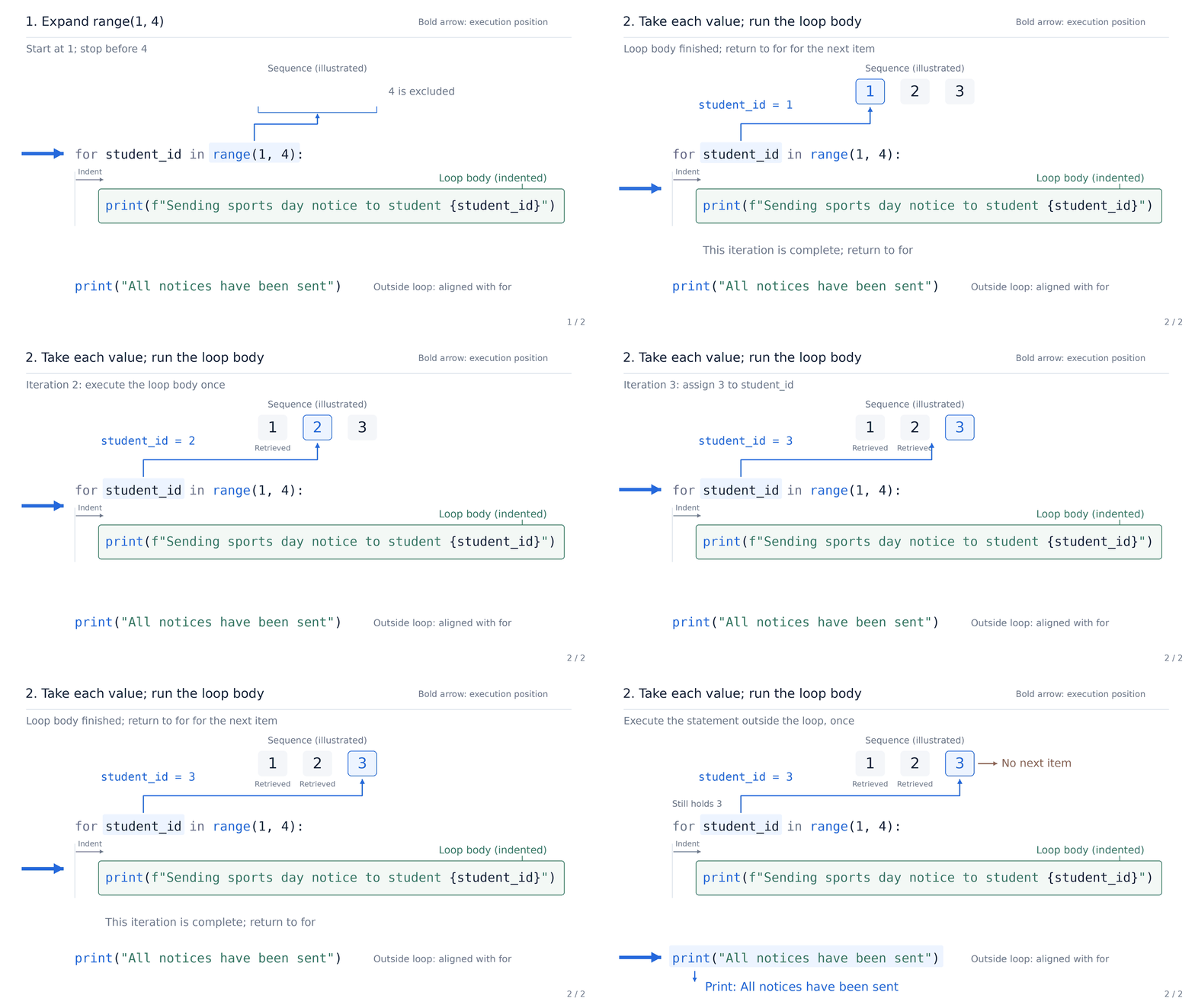
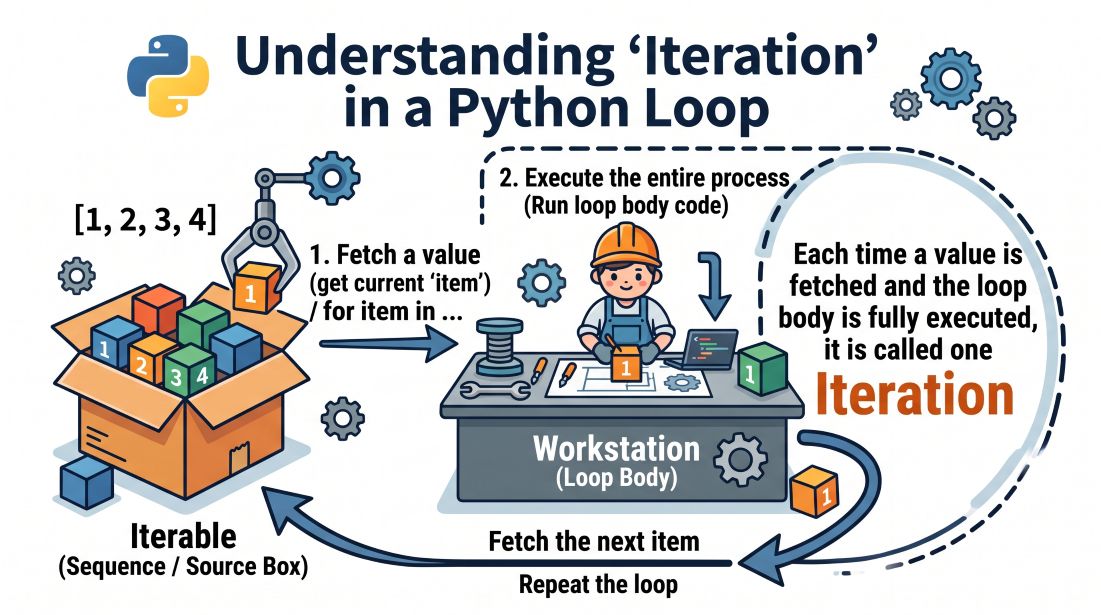
Each complete pass through the loop body for one item in the sequence is called an iteration. Because range(1, 4) contains 3 integers, this loop runs 3 iterations. Once all three numbers have been processed, the loop ends automatically, and Python moves on to the first unindented line below the loop: print("All notices sent."). If we change range(1, 4) to range(7, 10), student_id takes 7, 8, and 9 in turn.
Tip (Loop Variable Naming):
student_idis a variable name you choose, not a Python keyword. If you rename it in theforheader, update its name inside the loop body to match. Pick clear nouns that describe what each item represents (such asstudent_id,month, orprice) so the loop reads naturally.
5.1.2 The Basic Structure of a for Loop
A for loop paired with range() has the following structure:
for loop_variable in range(start, stop):
    loop_body_statement_1
    loop_body_statement_2
    ...

statement_executed_after_loop_ends
Here, range(start, stop) supplies an ordered sequence of integers, and loop_variable receives the current integer at the start of each iteration.
The keywords for and in work as a pair, and the colon : at the end of the header introduces the indented loop body. Every statement indented by 4 spaces beneath for belongs to the loop body and repeats on each iteration. As soon as a statement returns to the same indentation level as for, it sits outside the loop and runs only once, after the entire loop has finished.
In-Class Exercise: Change range(1, 4) to range(1, 5) and then to range(7, 10). Write down on paper which student IDs will print and how many lines of output you expect, then run the code to check.
5.2 Repeating Across an Integer Sequence: range()
5.2.1 Start, Stop, and the Half-Open Interval Principle
In Section 5.1, range(1, 4) gave us 1, 2, and 3. What if we want the integers from 1 through 5? We set the stop value to 6—one past the last number we want:
for number in range(1, 6):
    print(number)
Output:
1
2
3
4
5
The call range(1, 6) generates integers starting at 1 and stopping just before 6. In mathematics, this is the half-open interval [\text{start}, \text{stop}): include the start, exclude the stop.
Why does Python exclude the stop value instead of including it? Two practical benefits show up right away:
- The number of items is simply \text{stop} - \text{start}: You never have to add 1 to find the length. For example,
range(1, 6)has 6 - 1 = 5 numbers; looping over 12 months withrange(1, 13)runs 13 - 1 = 12 times; looping from1through n withrange(1, n + 1)runs (n + 1) - 1 = n times. - Adjacent ranges join cleanly without overlap: If you split a workload into two consecutive batches—
range(1, 5)andrange(5, 9)—the first batch ends at4and the second starts at5. The boundary value5is neither counted twice nor left out.
Whenever you step forward by 1 and want your loop to include the upper bound n, set the stop argument to n + 1.
Problem: Write a function
print_triangle(n: int) -> Nonethat prints a right-angled triangle of asterisks (*) with n rows.When n = 4, the output should be:
text* ** *** ****Analysis: Row 1 has 1 asterisk, row 2 has 2 asterisks, and in general row i has i asterisks. That means our row index i needs to run through 1, 2, \dots, n. Because
range()excludes its stop value, we writerange(1, n + 1)so that row n is included:pythondef print_triangle(n: int) -> None: for i in range(1, n + 1): print("*" * i) # Function call print_triangle(4)
5.2.2 Start, Stop, and Step
We can call range() with one, two, or three integer arguments:
| Syntax Form | Rule | Example | Generated Sequence |
|---|---|---|---|
range(stop) |
Stop only: starts at 0 by default, steps by +1 |
range(4) |
0, 1, 2, 3 |
range(start, stop) |
Start and stop: steps by +1 by default, excludes stop |
range(1, 4) |
1, 2, 3 |
range(start, stop, step) |
Start, stop, and step: adds step each time, excludes stop |
range(1, 7, 2) |
1, 3, 5 |
When called with a single argument range(stop), Python starts at 0 and produces stop integers (0 through stop - 1).
When called with three arguments, the third argument is the step size—the amount added to move from one number to the next. A positive step counts upward; a negative step counts downward. For instance, to print a 3-day countdown to the sports meet, we start at 3, stop before 0, and step by -1:
for remaining_days in range(3, 0, -1):
    print(f"Days until opening: {remaining_days}")
Output:
Days until opening: 3
Days until opening: 2
Days until opening: 1
Starting at 3 and adding -1 each time produces 3, 2, and 1, stopping right before 0.
Tip (Argument Constraints for range): All arguments to
range()must be integers. Passing a float (such asrange(1, 4, 0.5)) raises aTypeError. Passing a step size of0raises aValueErrorbecause a step of zero would never move toward the stop bound.
5.2.3 Boundaries and Empty Sequences
A for loop body runs only if range() produces at least one integer. What happens if start already sits at or beyond stop, or if step points away from stop? Then range() produces an empty sequence, and the loop body runs 0 times:
| Expression | Generated Integers | Loop Body Iterations | Reason |
|---|---|---|---|
range(1, 4) |
1, 2, 3 |
3 | start < stop; stepping by +1 moves from 1 toward 4 |
range(4) |
0, 1, 2, 3 |
4 | Starts at 0 by default and steps by +1, producing 4 integers |
range(3, 0, -1) |
3, 2, 1 |
3 | start > stop; stepping by -1 moves from 3 down toward 0 |
range(3, 3) |
(none) | 0 | start == stop; excluding 3 leaves no integers in [3, 3) |
range(3, 0) |
(none) | 0 | Default step is +1; stepping upward from 3 moves away from 0 at once |
In short: with a positive step, numbers are generated only while < stop; with a negative step, numbers are generated only while > stop. When range() is empty, Python does not raise an error—it simply skips the loop body and continues with the code below the loop.
In-Class Exercise: Use range() to print the month numbers for the first half of the year (1 through 6), and then write a second loop to print only the even months (2, 4, and 6). Write down your range() arguments on paper first, then run the code to verify that Month 6 is included in both outputs.
5.3 Accumulation and Counting in Loops
5.3.1 Summing from 1 to N: The Accumulator
Writing 1 + 2 + 3 + 4 + 5 by hand works for five numbers, but not for summing the integers from 1 to 100 or totaling thousands of sales records.
How do we build a sum inside a for loop? Notice that the loop variable number is overwritten by the next integer on every iteration, so number alone cannot remember earlier values. To keep a running sum across iterations, we define a separate variable total = 0 before the loop starts, and add each new number into total inside the loop body. A variable that builds up a cumulative result across loop iterations is called an accumulator.
n = 5
total = 0  # Initialize accumulator: total starts at 0 before summing begins

# For each integer from 1 to n:
#     Add number to total
for number in range(1, n + 1):
    total = total + number

# Loop finished; resume main flow
print(f"Sum of integers from 1 to {n}: {total}")
Output:
Sum of integers from 1 to 5: 15
Because we want to include n in the sum, we write range(1, n + 1).
Inside the loop, the assignment total = total + number works in two steps: first evaluate the right-hand side total + number using the current value of total, and then store that new sum back into total on the left-hand side. In accounting terms, this is simply \text{Ending Balance} = \text{Beginning Balance} + \text{Current Transaction}:
| Stage | Current number |
total Before Addition |
Formula and Assignment | total After Addition |
|---|---|---|---|---|
| Init | — | — | Initial ledger set to 0 | 0 |
| Iteration 1 | 1 | 0 | 0 + 1 |
1 |
| Iteration 2 | 2 | 1 | 1 + 2 |
3 |
| Iteration 3 | 3 | 3 | 3 + 3 |
6 |
| Iteration 4 | 4 | 6 | 6 + 4 |
10 |
| Iteration 5 | 5 | 10 | 10 + 5 |
15 |
At the end of each iteration, total holds the sum of all integers from 1 up to the current number. After the fifth iteration completes, total holds 15.
Tip (Augmented Assignment): Python provides a shorthand for updating a variable in place:
total = total + numbercan be written astotal += number. Likewise, adding 1 to a counter is usually written ascount += 1.
5.3.2 Where to Initialize and Where to Output
What happens if we accidentally place total = 0 inside the loop body? Then every iteration resets total back to 0 right before adding number, wiping out everything accumulated in earlier iterations:
# Erroneous example: resetting the accumulator inside the loop discards previous progress
n = 5

for number in range(1, n + 1):
    total = 0  # Bug: total resets to 0 on every iteration
    total = total + number

print(f"Incorrect total: {total}")
Output:
Incorrect total: 5
Because Python raises no syntax error here, this is a classic logic bug: the final output simply reflects the last iteration (0 + 5 = 5). Always initialize accumulators before the loop header.
Similarly, where you indent print() controls what kind of report your program produces:
- Indented inside the loop body:
print()runs on every iteration, showing the running subtotal after each step (like a detailed transaction log). - Unindented after the loop body:
print()runs once after all iterations finish, reporting only the final sum (like a period-end summary).
5.3.3 Combining Loops and Conditional Statements
So far, our loop has added every number in the sequence. In practice, we often want to inspect a sequence of records and count only those that pass a specific test.
Problem: Inspect the integers from 1 through 10, print each number that is divisible by 3, and count how many such numbers exist.
In Python, the modulo operator % gives the remainder after integer division, so number is divisible by 3 whenever number % 3 == 0. By nesting an if statement inside the for loop, we print and count number only when that condition holds:
n = 10
count = 0  # Initialize match counter to 0

# For each number from 1 to n:
#     If number is divisible by 3:
#         Print number and increment counter
for number in range(1, n + 1):
    if number % 3 == 0:
        print(number)
        count = count + 1  # Or count += 1

print(f"Numbers divisible by 3: {count}")
Output:
3
6
9
Numbers divisible by 3: 3
Here, the for loop steps through all 10 integers (1 to 10), while the inner if statement acts as a filter. The indented print(number) and count = count + 1 statements run only when number is 3, 6, or 9.
Pay close attention to the indentation of count = count + 1:
- Indented inside the
ifblock (8 spaces): Incrementscountonly whennumber % 3 == 0holds, counting matching items (3). - Aligned with
ifinside theforblock (4 spaces): Incrementscounton every iteration regardless of divisibility, counting all items inspected (10).
5.3.4 Application: Accumulating Monthly Spending Increases
Let us put sequence generation, formula calculation, and accumulation together in a departmental budgeting problem. Suppose a department plans a 3-month quarterly budget: Month 1 spending is 1200 yuan, and planned spending rises by 100 yuan each month after that (1200, 1300, and 1400 yuan).
How does planned spending depend on the month number month? Month 1 adds 0 \times 100 to the 1200-yuan base, Month 2 adds 1 \times 100, and Month 3 adds 2 \times 100. In general, for any month month:
Inside the loop, we compute monthly_cost from this formula, add it to total_cost, and print the monthly line item:
month_count = 3
total_cost = 0

for month in range(1, month_count + 1):
    monthly_cost = 1200 + (month - 1) * 100
    total_cost = total_cost + monthly_cost
    print(f"Month {month}: planned spending {monthly_cost} yuan")

print(f"Total planned spending: {total_cost} yuan")

if month_count > 0:
    average_cost = total_cost / month_count
    print(f"Average monthly spending: {average_cost:.2f} yuan")
else:
    print("No budget months; cannot calculate average spending")
Output:
Month 1: planned spending 1200 yuan
Month 2: planned spending 1300 yuan
Month 3: planned spending 1400 yuan
Total planned spending: 3900 yuan
Average monthly spending: 1300.00 yuan
Let us trace how the variables work together across the three parts of the script:
- Before the loop: We set
month_count = 3and initialize the accumulatortotal_cost = 0. - Inside the loop: On each iteration,
monthly_costcomputes that single month's budget (1200, then 1300, then 1400), whiletotal_costaccumulates the running sum (1200, then 2500, then 3900). Notice the distinct roles of these two variables:monthly_costis overwritten each month, whereastotal_costcarries the cumulative sum forward across months. - After the loop: We print
total_cost(3900 yuan) and checkif month_count > 0:before dividingtotal_cost / month_count. Ifmonth_countwere0,range(1, 1)would be empty, the loop would run 0 times, and theif month_count > 0:guard would prevent aZeroDivisionError.
In-Class Exercise: Test the summation script from Section 5.3.1 with n = 1, 10, 0, and test the divisibility counter from Section 5.3.3 with n = 2, 3, 12. Write down the expected output on paper first, then run your code to check the boundary cases.
Extended Approach: Storing in a List Before Aggregating
In the script above, each month's monthly_cost is overwritten on the next iteration. What if a later part of our program still needs the individual monthly figures after the loop ends? Then we split the work into two stages: first collect each month's figure in a list, and then loop over the list to compute the total.
A list is Python's standard container for an ordered sequence of values:
- Syntax: A list writes its items inside square brackets
[], separated by commas (such as[1200, 1300, 1400]). - Appending: We start with an empty list
monthly_costs = []and callmonthly_costs.append(cost)on each iteration to add the new month's cost to the end of the list (we cover lists systematically in Section 5.7).
month_count = 3
monthly_costs = []  # Empty list to store monthly costs

# Stage 1: Compute monthly budget and store in list
for month in range(1, month_count + 1):
    cost = 1200 + (month - 1) * 100
    monthly_costs.append(cost)
    print(f"Month {month}: planned spending {cost} yuan")

# Stage 2: Iterate directly over list elements to sum
total_cost = 0
for cost in monthly_costs:
    total_cost += cost

print(f"Total planned spending: {total_cost} yuan")

if month_count > 0:
    average_cost = total_cost / month_count
    print(f"Average monthly spending: {average_cost:.2f} yuan")
else:
    print("No budget months; cannot calculate average spending")
The output is identical to the single-loop version, but monthly_costs now retains [1200, 1300, 1400] in memory for any follow-up analysis. Notice how Stage 2 writes for cost in monthly_costs: to step directly through the stored numbers without needing range(). Separating data collection from summary calculation is a clean, reusable pattern that we will use throughout Part II.
5.4 Execute While a Condition Holds: The while Loop
5.4.1 When Repetition Count is Unknown: The while Loop
A for loop works well whenever you know the sequence or the exact number of iterations before the loop starts. In many financial and business problems, however, you do not know in advance how many steps a process will take.
Suppose a startup team is saving toward a 2500-yuan reserve target. Why can't we easily write this with for month in range(...)? Because we do not know what stop value to pass to range(). Pick a stop value that is too small, and the loop quits before the reserve reaches 2500 yuan; pick one that is too large, and the loop keeps running unneeded months after the target is met. Here, when to stop depends on the running balance, not on a preset number of months. Whenever the number of repetitions is unknown beforehand and depends on a condition that changes during execution, we use a while loop.
Problem: A startup project begins with 1000 yuan in seed capital. At the end of each month, the team adds 600 yuan (assuming zero expenses and zero interest). How many full months will it take for the reserve to reach or exceed 2500 yuan?
Let us trace the balance by hand first: Month 1 ends with 1600 yuan, Month 2 ends with 2200 yuan, and Month 3 ends with 2800 yuan—which reaches and passes 2500 yuan. Stated as a loop rule: as long as the reserve is strictly below 2500 yuan, add another month of funding; as soon as the reserve reaches 2500 yuan or more, stop.
reserve = 1000
target = 2500
monthly_addition = 600
months = 0  # Initialize month counter to 0

# While reserve is strictly less than target:
#     Add one month of funding and increment months counter
while reserve < target:
    reserve += monthly_addition
    months = months + 1
    print(f"End of month {months}: balance {reserve:.2f} yuan")

print(f"Target reached in {months} months")
Output:
End of month 1: balance 1600.00 yuan
End of month 2: balance 2200.00 yuan
End of month 3: balance 2800.00 yuan
Target reached in 3 months
The header while reserve < target: tells Python: as long as reserve < target evaluates to True, run the indented loop body. Each pass through the body adds 600 to reserve and adds 1 to months. Once the body finishes, Python jumps back to the while header and tests reserve < target again against the updated balance.
5.4.2 Testing Conditions Before Running the Loop Body
A while loop has the following general structure:
initialize_state_variables

while condition_expression:
    statements_to_repeat_while_true
    update_state_toward_termination

statements_executed_after_loop_ends
Here, condition_expression is a boolean expression that evaluates to True or False. The table below traces every condition check and state update in the startup funding script:
| Check Number | reserve at Check |
Condition reserve < 2500 |
Enter Loop Body? | Balance and Months After Iteration |
|---|---|---|---|---|
| Check 1 | 1000 yuan | True |
Yes | 1600 yuan, 1 month |
| Check 2 | 1600 yuan | True |
Yes | 2200 yuan, 2 months |
| Check 3 | 2200 yuan | True |
Yes | 2800 yuan, 3 months |
| Check 4 | 2800 yuan | False |
No | Remains 2800 yuan, 3 months; exits |
Notice two important facts from this trace:
- Python checks the condition before every iteration: Even before the very first pass, Python tests
reserve < 2500. If the startup began withreserve = 3000, Check 1 would immediately evaluate toFalse, the loop body would run0times, and the script would report0 months. - The condition is checked one more time than the body runs: Here the loop body runs 3 times, but
reserve < 2500is tested 4 times. Whenreservereaches2800inside the third iteration, the loop does not stop mid-body; it finishes printing Month 3, returns to thewhileheader for Check 4, sees2800 < 2500isFalse, and exits cleanly.
5.4.3 Advancing the Loop and Preventing Infinite Loops
Every working while loop relies on three coordinated parts: initialize the state variables before the loop, test the continuation condition in the while header, and update the state inside the loop body so it moves closer to stopping.
In our funding example, reserve starts at 1000, grows by 600 on each iteration, and continues while reserve < 2500. Because reserve increases by a positive amount each month, it is guaranteed to cross 2500 after a finite number of steps, turning reserve < 2500 to False.
If any part of that update chain is broken, the condition never becomes False:
| Common Bug | Balance Behavior | Runtime Consequence |
|---|---|---|
Omitting reserve += monthly_addition |
Stays frozen at 1000 yuan | Condition 1000 < 2500 stays True forever |
Setting monthly_addition = 0 |
Adds 0 each round; balance unchanged | Reserve stays at 1000 yuan and never reaches 2500 yuan |
| Accidentally using negative addition | Balance shrinks each month | Reserve moves further below 2500; condition stays True |
Writing continuation as reserve != target |
Balance jumps from 2200 to 2800 yuan | Balance steps right past 2500; reserve != 2500 stays True forever |
A loop whose continuation condition never becomes False is called an infinite loop. If your program hangs or prints lines endlessly, click the Stop button in your IDE or press Ctrl + C in the terminal to interrupt it, then check how your state variable changes inside the loop body.
Look closely at the fourth row of the table: writing while reserve != target: instead of while reserve < target:. Because reserve jumps in steps of 600 yuan—from 1600 to 2200 to 2800—it never lands on 2500 exactly. Testing reserve != 2500 misses the crossing and keeps adding money forever. Whenever a loop steps toward a threshold, test the inequality (reserve < target), not exact inequality (reserve != target).
Tip (Currency Units and Floating-Point Precision): To keep the focus on loop mechanics, these examples use integer yuan. In financial software, you should also avoid testing exact equality on
floatvalues because of binary rounding; see Tip 2 in the Supplementary Notes.
5.4.4 Choosing Between for and while Loops
Since both for and while repeat a block of code, how should you choose between them when designing a program? Ask one question: Do you know the sequence or the number of repetitions before the loop begins?
| Typical Business Task | Recommended Loop | Selection Rationale |
|---|---|---|
| Sum integers from 1 to N | for with range() |
Start and stop bounds are known; direct sequence traversal is cleanest |
| Process 12 monthly budget rows in order | for with range() |
Fixed at 12 iterations; sequence moves by month index |
| Add monthly funds until target is reached | while |
Iteration count is unknown beforehand; depends on running balance |
| Scan cashier barcode inputs until checkout | while |
Item count is unknown beforehand; ends on specific checkout command |
Of course, any for loop over a known range can be rewritten as a while loop. For example, here is how we sum the integers from 1 to n using while:
n = 5
total = 0
number = 1

while number <= n:
    total += number
    number += 1

print(f"Sum of integers from 1 to {n}: {total}")
Output:
Sum of integers from 1 to 5: 15
Comparing this while version with for number in range(1, n + 1): shows why for is cleaner when the range is known. The for loop advances number automatically, whereas the while loop requires you to write three separate lines of bookkeeping by hand:
| Stage | Code | Purpose |
|---|---|---|
| Initialize | number = 1 |
Set the starting integer before the loop |
| Test bound | number <= n |
Keep looping while number is at most n (so n itself is included) |
| Step increment | number += 1 |
Advance number by 1 at the end of each iteration |
If you forget the line number += 1 at the bottom of the while body, number stays stuck at 1 and the program enters an infinite loop. Whenever the sequence or iteration count is known in advance, use a for loop: it keeps all range bookkeeping in the header and cannot forget to advance the loop variable.
In-Class Exercise: Test the startup funding script from Section 5.4.1 with target set to 2200, 2500, and 1000 yuan. Work out the number of months on paper first, then run the script to verify. Notice how these three cases test hitting the target exactly, stepping past the target, and starting at the target.
5.5 Changing Loop Flow: break and continue
5.5.1 Exiting Early After Finding a Target: break
Up to now, every loop has run until its sequence was exhausted or its while header condition turned False. When searching for a target value, however, we often want to stop the loop the moment we find the first match—without wasting time checking the remaining candidates.
Python's break statement does exactly that: it exits the current loop immediately. As soon as Python executes break, it skips the rest of the loop body, leaves the loop altogether, and continues at the first unindented statement below the loop.
Problem (Target Profit Planning): A product sells for 50 yuan per unit, has a variable cost of 30 yuan per unit, and carries 1000 yuan in fixed costs. Assuming every unit produced is sold, find the smallest integer sales volume between 1 and 200 units that earns a profit of at least 1000 yuan.
From cost-volume-profit (CVP) analysis, profit is:
Because each additional unit sold adds 50 - 30 = 20 yuan to profit, profit rises steadily with sales volume. If we test candidate quantities in ascending order (1, 2, 3, ...), the first quantity that achieves \text{profit} \ge 1000 is guaranteed to be the minimum qualifying volume. Once we find it, we print the answer and exit the loop with break:
unit_price = 50
unit_cost = 30
fixed_cost = 1000
target_profit = 1000
found = False  # Initialize flag variable: False indicates target not yet found

# For each candidate quantity from 1 to 200:
#     Calculate profit
#     If profit meets or exceeds target_profit:
#         Record match, print result, and break out of loop immediately
for quantity in range(1, 201):
    profit = (unit_price - unit_cost) * quantity - fixed_cost
    if profit >= target_profit:
        found = True
        print(f"First qualifying sales volume: {quantity} units")
        print(f"Corresponding profit: {profit} yuan")
        break

if not found:
    print("No qualifying sales volume found between 1 and 200 units")

print("Search finished")
Output:
First qualifying sales volume: 100 units
Corresponding profit: 1000 yuan
Search finished
Let us trace what happens: for quantities 1 through 99, profit remains below 1000 yuan (at 99 units, profit is (50 - 30) \times 99 - 1000 = 980 yuan). On iteration 100, profit reaches 1000 yuan. The if profit >= target_profit: check succeeds, sets found = True, prints the result, and runs break—skipping quantities 101 through 200 completely.
Why do we need the boolean variable found? Once execution reaches the lines below the loop, the program needs to know how the loop ended: did it exit early via break because a solution was found, or did it test all 200 quantities without ever reaching target_profit? A boolean variable that remembers whether an event occurred during a loop is called a flag variable: we set found = False before the loop, flip it to True inside the if branch when a match appears, and check if not found: after the loop to print a notice when no candidate qualified (try setting target_profit = 5000 to see this branch run).
5.5.2 Skipping the Current Iteration: continue
Sometimes we do not want to stop the entire loop when we hit a special record; we just want to skip the rest of the current iteration and move straight on to the next item. That is the job of the continue statement: when Python executes continue, it skips the remaining lines in the loop body for the current iteration and jumps directly to the next iteration.
Problem: A trade fair runs for 7 days (Days 1 through 7), but the venue closes on Day 3 for scheduled maintenance. Each open day costs 80 yuan in venue maintenance fees, while closed days cost nothing. Print each open day, and report the total number of open days and the total maintenance fee.
closed_day = 3
daily_cost = 80
open_days = 0
total_cost = 0

# For each day from 1 to 7:
#     If day is the closed day, skip the rest of this iteration
#     Otherwise, increment open days, add maintenance fee, and print open notice
for day in range(1, 8):
    if day == closed_day:
        continue

    open_days += 1
    total_cost += daily_cost
    print(f"Day {day}: venue open")

print(f"Open days: {open_days}")
print(f"Total maintenance fee: {total_cost} yuan")
Output:
Day 1: venue open
Day 2: venue open
Day 4: venue open
Day 5: venue open
Day 6: venue open
Day 7: venue open
Open days: 6
Total maintenance fee: 480 yuan
When day is 3, day == closed_day is True. Python executes continue, which skips open_days += 1, total_cost += daily_cost, and print(...) for Day 3, and moves straight on to Day 4.
Contrast continue with break here: if we accidentally wrote break instead of continue on Day 3, the loop would stop altogether on Day 3 and never process Days 4 through 7.
Could we have written this without continue by placing the three update lines inside if day != closed_day:? Yes. Using if day == closed_day: continue at the top of the loop is known as a guard clause: it filters out exceptions right away so the normal business logic below stays flat without an extra level of indentation.
5.5.3 Differences in continue Behavior Between for and while Loops
When you use continue, keep in mind an important difference between for and while loops:
- In a
forloop,continuejumps back to theforheader, which automatically fetches the next item fromrange()or the list. - In a
whileloop,continuejumps back to thewhileheader to re-test the condition—it does not automatically increment your counter. If your counter update (record_no += 1) sits at the bottom of the loop body belowcontinue, thencontinuewill skip the counter update too, leaving the counter stuck at the same value forever!
For example, if we inspect records 1 through 4 with a while loop and want to skip record 2, we must update record_no before the continue check:
record_no = 0

while record_no < 4:
    record_no += 1  # Increment first so continue does not trap the counter
    if record_no == 2:
        continue
    print(f"Checking record {record_no}")
Output:
Checking record 1
Checking record 3
Checking record 4
What would happen if we started at record_no = 1 and put record_no += 1 at the very bottom of the while body? Iteration 1 would print record 1 and increment record_no to 2. On iteration 2, if record_no == 2: would run continue, jumping back to while record_no < 4: before reaching record_no += 1. Now record_no is still 2, so the next iteration hits continue again, trapping the program in an infinite loop. This is another reason why for loops are much less error-prone whenever you are stepping through a known sequence.
5.5.4 Distinguishing continue, break, and return
Let us put continue and break side by side with the return statement from Chapter 2 to see how their stopping scopes differ:
| Statement | What It Stops | Where Execution Goes Next | Typical Business Use Case |
|---|---|---|---|
continue |
Current iteration only | Jumps to the loop header to start the next iteration | Skip a closed day, a missing value, or an invalid input |
break |
Innermost enclosing loop | Jumps to the first statement below that loop | Found the first qualifying item; stop searching the rest |
return |
Entire enclosing function | Exits the function and hands the return value back | Function has its final answer; return it to the caller |
Remember their syntax rules: break and continue can appear only inside a loop (for or while), whereas return can appear only inside a function (def). When a loop sits inside a function, break leaves the loop but keeps running the rest of the function; return exits both the loop and the function immediately, no matter how many loops are nested around it.
In-Class Exercise: In the trade fair script from Section 5.5.2, change closed_day to 1 and then to 7. For each value, write down on paper what the script outputs with continue versus with break, then run the code to verify.
5.6 Organizing Loops in Functions
5.6.1 Parameterizing Computation Bounds
In Section 5.3.1, our script summed the integers from 1 to 5 by setting n = 5 at the top of the file. If we want to sum from 1 to 5, then from 1 to 100, and then from 1 to 0, we do not want to copy and paste the loop three times. Instead, we package the loop inside a function sum_integers(n: int) -> int and pass the upper bound n as a parameter:
def sum_integers(n: int) -> int:
    """Return the sum of integers from 1 to n, where n is a non-negative integer."""
    total = 0
    for number in range(1, n + 1):
        total += number
    return total


print(sum_integers(5))
print(sum_integers(100))
print(sum_integers(0))
Output:
15
5050
0
Each call to sum_integers(n) creates a fresh local variable total = 0, runs the loop for that specific argument n, and returns the final total. Because total is local to each call, calling sum_integers(100) after sum_integers(5) starts cleanly at 0 rather than adding onto 15. And when n = 0, range(1, 1) is empty, the loop body runs 0 times, and the function immediately returns the initial value total = 0.
Tip (Summation Formulas vs. Loops): Of course, the sum 1 + 2 + \dots + n can be computed in one step with Gauss's formula
n * (n + 1) // 2. We write the loop out here to show the standard three-step function template that works for any series or dataset: initialize the accumulator \rightarrow update it inside the loop \rightarrow return the final result after the loop.
5.6.2 Returning Totals Only After Loop Completion
Look at the indentation of return total in sum_integers(): it sits at 4 spaces, aligned with for—outside the loop body. That alignment guarantees that the function waits until all iterations finish before returning total.
What happens if you accidentally indent return total inside the loop body (at 8 spaces)?
# Erroneous example: placing return inside the loop exits during iteration 1
def incorrect_sum(n: int) -> int:
    total = 0
    for number in range(1, n + 1):
        total += number
        return total  # Bug: returns immediately after adding 1 in iteration 1


print(incorrect_sum(5))
print(incorrect_sum(0))
Output:
1
None
Because return terminates the entire function immediately:
- When we call
incorrect_sum(5), iteration 1 setsnumber = 1, adds1tototal, and hitsreturn totalon the very next line—exiting the function right away with1and never reaching2, 3, 4, 5. - Even worse, when we call
incorrect_sum(0),range(1, 1)is empty, so the loop body never runs at all! Execution skips the loop, reaches the end of the function without hitting anyreturnstatement, and returnsNoneby default.
Keep this simple rule in mind whenever a function contains a loop:
- When computing a total, average, or count across all items: Place
returnoutside the loop (aligned withfororwhile) so every item is processed first. - When searching for the first item that matches a condition: Place
returninside theifbranch in the loop to return the match as soon as it is found—and still place a fallbackreturnoutside the loop in case no item matches (as we will do in Part II, Exercise 2).
5.6.3 Updating State in Sequence: The Fibonacci Sequence
An accumulator (total) or counter (count) only needs to remember one number from the previous step. Some problems, however, require remembering two previous numbers at each step.
A classic example is the Fibonacci sequence: Term 0 is 0, Term 1 is 1, and every term from Term 2 onward is the sum of the two terms immediately before it:
Index: 0  1  2  3  4  5  6   7
Value: 0  1  1  2  3  5  8  13
Notice that to compute Term 6 (8), we only need Term 4 (3) and Term 5 (5); we no longer need Terms 0 through 3. That means we do not have to store the entire sequence in memory. Instead, we can keep two state variables that act like a two-slot sliding window, shifting one step to the right on each iteration so they always hold the latest two adjacent terms.
Let previous hold the earlier term in the window (starting at Term 0: 0) and current hold the later term (starting at Term 1: 1). To slide the window one step to the right:
- First compute the sum of the two current window values:
next_value = previous + current. - Shift the window right by setting
previous = currentandcurrent = next_value:
def fibonacci(n: int) -> int:
    """Return the n-th Fibonacci number, where n >= 0 and Term 0 is 0."""
    previous = 0
    current = 1

    # Shift state n times:
    #     Calculate next_value, then shift previous and current one step to the right
    for step in range(n):
        next_value = previous + current
        previous = current
        current = next_value

    return previous


print(fibonacci(0))
print(fibonacci(1))
print(fibonacci(2))
print(fibonacci(7))
Output:
0
1
1
13
Why does fibonacci(n) return previous at the end rather than current? Let us trace what previous and current hold after each shift:
| Completed Shifts | Value of previous |
Value of current |
Corresponding Sequence Terms |
|---|---|---|---|
| 0 (start) | 0 | 1 | Term 0, Term 1 |
| 1 | 1 | 1 | Term 1, Term 2 |
| 2 | 1 | 2 | Term 2, Term 3 |
| 3 | 2 | 3 | Term 3, Term 4 |
| 4 | 3 | 5 | Term 4, Term 5 |
| 5 | 5 | 8 | Term 5, Term 6 |
Before the loop runs (0 shifts), previous holds Term 0 (0). Each iteration shifts both variables forward by one term index. After n shifts, previous holds Term n and current holds Term n + 1. Returning previous therefore gives Term n for every n \ge 0—including the boundary case n = 0, where range(0) runs 0 shifts and the function immediately returns previous = 0.
Pay special attention to the order of the three assignments inside the loop: we save previous + current in the temporary variable next_value before we overwrite previous = current. If you leave out next_value and write previous = current first, you destroy the old value of previous before adding it (you will diagnose and fix this exact bug in Exercise 4 below).
In-Class Exercise: Extend the trace table above through Shift 6 and Shift 8 by hand. Then call fibonacci(6) and fibonacci(8) to verify your answers, and check what current holds at the end of each call.
Core Concepts Part I Exercises
These four exercises bring together arithmetic formulas, if branches, functions, and for / while loops (without lists). Before writing code for each problem, ask yourself three questions: What state variables do I need to initialize before the loop? How should each iteration update them? What condition stops the loop?
Exercise 1: Sum of Odd Integers from 1 to N
Write a function sum_odd_numbers(n: int) -> int that takes a non-negative integer n and returns the sum of all odd integers from 1 through n (including n if n is odd; returning 0 when n = 0).
Hint: You can either step through odd integers directly with range(1, n + 1, 2) or check if number % 2 != 0: inside range(1, n + 1).
Input n |
Expected Return | Calculation Detail |
|---|---|---|
| 0 | 0 | No odd numbers in range; returns 0 |
| 1 | 1 | Single odd number: 1 |
| 6 | 9 | Summing odds: 1 + 3 + 5 = 9 |
| 7 | 16 | Includes bound: 1 + 3 + 5 + 7 = 16 |
Exercise 2: Minimum Months to Reach Investment Target
Write a function months_to_target(initial: int, monthly: int, target: int) -> int that takes an initial balance initial, a fixed month-end contribution monthly, and a target balance target, and returns the minimum number of full months needed for the balance to reach or exceed target. All three inputs are in integer yuan (initial >= 0, monthly > 0, target >= 0, assuming zero interest and zero withdrawals).
Use a while loop. Make sure that if initial already meets or exceeds target at the start, the function returns 0.
| Initial Capital (yuan) | Monthly Addition (yuan) | Target Amount (yuan) | Expected Months | Scenario Description |
|---|---|---|---|---|
| 1000 | 600 | 2200 | 2 | Reaches exactly 2200 at end of Month 2 |
| 1000 | 600 | 2500 | 3 | Reaches 2800 at end of Month 3 (passes) |
| 2500 | 600 | 2500 | 0 | Initial funds meet target; zero wait |
| 3000 | 600 | 2500 | 0 | Initial funds exceed target; return 0 |
Exercise 3: Purchasing Under Dual Budget and Inventory Constraints
A department buys identical office supplies one unit at a time. The unit price unit_price is a positive integer (in yuan), while supplier inventory stock (in units) and total budget budget (in yuan) are non-negative integers. Each unit purchased deducts unit_price from the remaining budget. Purchasing stops as soon as the remaining budget cannot cover another unit or supplier inventory runs out.
Write a function count_affordable_items(stock: int, unit_price: int, budget: int) -> int that returns the maximum number of units the department can buy. Combine a for loop over range(stock), a counter variable, and break: on each attempt, check whether the remaining budget is less than unit_price; if so, break immediately; otherwise deduct unit_price and increment the counter.
| Supplier Stock (units) | Unit Price (yuan) | Total Budget (yuan) | Expected Purchase Count | Boundary Check Focus |
|---|---|---|---|---|
| 10 | 80 | 250 | 3 | Buying 3 leaves 10 yuan; cannot buy fourth unit |
| 10 | 80 | 240 | 3 | Buying 3 exhausts budget exactly (0 yuan left) |
| 2 | 80 | 250 | 2 | Budget allows more, but supplier stock is only 2 units |
| 10 | 80 | 0 | 0 | Zero budget allows zero purchases |
| 0 | 80 | 250 | 0 | Zero stock allows zero purchases |
Exercise 4: Debugging State Updates in Fibonacci Recurrence
The function below tries to compute the n-th Fibonacci number (where Term 0 is 0 and Term 1 is 1) without using a temporary variable:
def incorrect_fibonacci(n: int) -> int:
    """Buggy implementation: overwrites previous state prematurely."""
    previous = 0
    current = 1

    for step in range(n):
        previous = current
        current = previous + current

    return previous


print(incorrect_fibonacci(3))
Running this code prints:
4
The first four Fibonacci terms (Terms 0, 1, 2, 3) are 0, 1, 1, 2, so Term 3 should be 2, not 4.
Before running the code, trace the two assignments inside the loop by hand and fill in the table below (recording the values of previous and current at the end of each iteration):
| Completed Iteration | Value of previous |
Value of current |
|---|---|---|
| 0 (start) | 0 | 1 |
| 1 | To fill | To fill |
| 2 | To fill | To fill |
| 3 | To fill | To fill |
Once you see where the numbers go wrong, fix the function using a temporary variable and test it on all five cases below. Also explain: why does testing only n = 1 fail to catch this bug?
Input n |
Expected Return | Focus |
|---|---|---|
| 0 | 0 | 0 iterations; checks initial boundary |
| 1 | 1 | 1 iteration (buggy code coincidentally returns 1 here too) |
| 2 | 1 | 2 iterations; checks if Term 1 propagates correctly |
| 3 | 2 | Exposes the variable overwriting bug |
| 6 | 8 | Multiple iterations; checks recurrence stability |
Reference Solutions and Implementation Guides
Exercise 1: Sum of Odd Integers from 1 to N
def sum_odd_numbers(n: int) -> int:
    """Return the sum of odd integers from 1 to n, where n is a non-negative integer."""
    total = 0
    for number in range(1, n + 1, 2):
        total += number
    return total


print(sum_odd_numbers(0))
print(sum_odd_numbers(1))
print(sum_odd_numbers(6))
print(sum_odd_numbers(7))
Output:
0
1
9
16
Implementation Guide: Using range(1, n + 1, 2) steps by 2 (1, 3, 5, ...), so the loop visits only odd integers without needing an if check inside the body. Setting the stop value to n + 1 guarantees that n is included whenever n itself is odd. Looping over range(1, n + 1) with if number % 2 != 0: works equally well.
Exercise 2: Minimum Months to Reach Investment Target
def months_to_target(initial: int, monthly: int, target: int) -> int:
    """Simulate monthly savings in integer yuan; initial and target are non-negative, monthly is positive."""
    reserve = initial
    months = 0

    while reserve < target:
        reserve += monthly
        months += 1

    return months


print(months_to_target(1000, 600, 2200))
print(months_to_target(1000, 600, 2500))
print(months_to_target(2500, 600, 2500))
print(months_to_target(3000, 600, 2500))
Output:
2
3
0
0
Implementation Guide: We start months = 0 before the loop. When initial is already at least target (as in the last two test cases), reserve < target is False on the very first check, so the loop body never runs and the function returns 0. Otherwise, each iteration adds monthly to reserve and increments months by 1 until reserve >= target.
Exercise 3: Purchasing Under Dual Budget and Inventory Constraints
def count_affordable_items(stock: int, unit_price: int, budget: int) -> int:
    """Return the number of items purchased; stock and budget are non-negative, unit_price is positive."""
    remaining = budget
    item_count = 0

    for attempt in range(stock):
        if remaining < unit_price:
            break
        remaining -= unit_price
        item_count += 1

    return item_count


print(count_affordable_items(10, 80, 250))
print(count_affordable_items(10, 80, 240))
print(count_affordable_items(2, 80, 250))
print(count_affordable_items(10, 80, 0))
print(count_affordable_items(0, 80, 250))
Output:
3
3
2
0
0
Implementation Guide: The two constraints are handled by two different parts of the loop: for attempt in range(stock): ensures we never buy more than the stock available, while if remaining < unit_price: break stops purchasing as soon as the remaining budget cannot pay for the next unit. When stock = 0, range(0) is empty and the function returns 0 immediately.
Exercise 4: Debugging State Updates in Fibonacci Recurrence
Tracing the buggy code gives:
| Completed Iteration | Value of previous |
Value of current |
Error Root Cause |
|---|---|---|---|
| 0 (start) | 0 | 1 | Initial state correct |
| 1 | 1 | 2 | previous = current sets 1; then current = 1 + 1 sets 2 |
| 2 | 2 | 4 | previous = current sets 2; then current = 2 + 2 sets 4 |
| 3 | 4 | 8 | previous = current sets 4; then current = 4 + 4 sets 8 |
What went wrong? In iteration 1, the statement previous = current overwrites the original 0 in previous with 1. When the next line runs current = previous + current, instead of adding the old previous (0) to current (1), it adds the newly overwritten previous (1) to current (1), getting 1 + 1 = 2. Every iteration after that simply doubles current (2 \to 4 \to 8).
Why did testing n = 1 miss this bug? Because after 1 iteration, previous was set to current's initial value (1), which happens to match Term 1 (1) by coincidence; the corrupted value 2 was sitting in current, waiting to be copied into previous on iteration 2.
Corrected code:
def fibonacci(n: int) -> int:
    """Return the n-th Fibonacci number, where n >= 0 and Term 0 is 0."""
    previous = 0
    current = 1

    for step in range(n):
        next_value = previous + current
        previous = current
        current = next_value

    return previous


print(fibonacci(0))
print(fibonacci(1))
print(fibonacci(2))
print(fibonacci(3))
print(fibonacci(6))
Output:
0
1
1
2
8
Implementation Guide: Whenever you update two variables that depend on each other's old values, save the result of the calculation in a temporary variable (next_value) before overwriting either variable. And when testing a loop function, always test at least three cases: 0 iterations, 1 iteration, and multiple iterations (n \ge 2).
Core Concepts Part II
In Core Concepts Part I, every sequence we looped over was either generated by range() or computed from a formula. In real business operations, however, records rarely follow a neat arithmetic formula: customer order amounts (85.0, 99.0, 120.0 yuan) and daily store revenues (1200.0, 0.0, 1500.0 yuan) arrive as irregular numbers.
To process real datasets with loops, Core Concepts Part II introduces Python's primary sequence container—the list—and builds up four practical patterns step by step:
| Learning Tier | Sections | Core Focus and Business Applications |
|---|---|---|
| 1. List basics and traversal | 5.7, 5.8 | Store transactions in lists; iterate with for to filter, sum, and format records |
| 2. Multi-scenario evaluation | 5.9 | Use nested loops to evaluate price \times quantity grids and project profits |
| 3. Traversal helper tools | 5.10, 5.11 | Pair sequence numbers with values via enumerate(); handle search completions with loop else |
| 4. Interactive continuous input | 5.12 | Use while True with sentinel values to record keyboard entries and aggregate results |
Make sure you are comfortable with list operations and list traversal in Sections 5.7 and 5.8 before moving on to Sections 5.9 through 5.12.
5.7 Grouping Data in Containers: Three Basic List Operations
Suppose we have three customer orders of 85.0, 99.0, and 120.0 yuan. Because the gaps between these amounts are uneven (+14.0, then +21.0), range() cannot generate them. Nor do we want to create separate variables order_1, order_2, order_3, ..., order_1000 by hand, because separate variables cannot be stepped through automatically by a for loop.
Instead, we group these related numbers into a single ordered container called a list. This section covers the three list operations you will use most often with loops: creating a list, appending a new item to the end, and reading an item by its position.
5.7.1 Defining Lists: Storing a Collection of Items in Square Brackets
order_amounts = [85.0, 99.0, 120.0]

print(order_amounts)
print(f"Number of orders: {len(order_amounts)}")
Output:
[85.0, 99.0, 120.0]
Number of orders: 3
Writing comma-separated values inside square brackets [] creates a list. Each item stored inside the list is called an element, and the built-in function len(order_amounts) returns how many elements the list currently holds (3).
A list keeps its elements in the exact order you placed them and allows duplicate values. When you do not know the elements in advance, you can start with an empty list order_amounts = [] (whose length len(order_amounts) is 0) and add items as they arrive.
5.7.2 Appending Elements: .append()
When a checkout terminal records expenses one by one, each new expense is added to the end of an existing list using the .append() method:
expenses = []
expenses.append(25.0)
expenses.append(68.5)

print(expenses)
print(f"Recorded expenses: {len(expenses)}")
Output:
[25.0, 68.5]
Recorded expenses: 2
Here expenses starts empty ([]). Calling expenses.append(25.0) places 25.0 at the end of the list ([25.0]), and calling expenses.append(68.5) places 68.5 right after it ([25.0, 68.5]), bringing len(expenses) to 2.
Tip (Do Not Assign the Return Value of append): The
.append()method modifies the list in place and returnsNone. Always callexpenses.append(25.0)on its own line. Never writeexpenses = expenses.append(25.0)—doing so overwrites your list variableexpenseswithNone!
5.7.3 Accessing Elements by Position: Zero-Based Indexing
To read a single element from a list, write the list name followed by the element's position number in square brackets []. This position number is called an index.
In Python, list indices start at 0, not 1.
Why start at 0? Because an index measures how many steps you move forward (the offset) from the first element. The first element sits right at the front of the list, so its offset is 0; the second element is 1 step from the front (index 1); and the third element is 2 steps from the front (index 2):
| Everyday Description | Python Index | Access Expression | Retrieved Amount |
|---|---|---|---|
| 1st order | 0 | order_amounts[0] |
85.0 yuan |
| 2nd order | 1 | order_amounts[1] |
99.0 yuan |
| 3rd order | 2 | order_amounts[2] |
120.0 yuan |
order_amounts = [85.0, 99.0, 120.0]

print(f"First order amount: {order_amounts[0]:.2f} yuan")
print(f"Third order amount: {order_amounts[2]:.2f} yuan")
Output:
First order amount: 85.00 yuan
Third order amount: 120.00 yuan
In general, a list of length n has valid non-negative indices from 0 through n - 1. For our 3-element list order_amounts, the valid indices are 0, 1, and 2. Asking for order_amounts[3] raises an IndexError: list index out of range because there is no fourth element; likewise, indexing into an empty list (empty_list[0]) always raises an IndexError.
In-Class Exercise: Create a list containing two expense numbers, then call .append() to add a third. Print the list's length and its third element, confirming that the third element sits at index 2.
5.8 Processing List Elements with Loops
5.8.1 Accessing Elements Directly
To step through every element of a list with a for loop, simply place the list after in:
expenses = [25.0, 68.5, 16.5]

# For each expense in the expenses list:
#     Print expense formatted to 2 decimal places
for expense in expenses:
    print(f"Expense: {expense:.2f} yuan")

print("All expenses displayed.")
Output:
Expense: 25.00 yuan
Expense: 68.50 yuan
Expense: 16.50 yuan
All expenses displayed.
Notice the naming convention: the plural noun expenses names the entire list, while the singular noun expense names the loop variable that holds one item at a time. On Iteration 1, expense is 25.0; on Iteration 2, 68.5; and on Iteration 3, 16.5. In other words, for expense in expenses: hands expense each element's value directly, without needing range() or [i] indexing.
Stepping through every element of a collection in order is called traversal. Whenever you only need the values themselves, for item in items: is the cleanest way to traverse a list in Python. If the list is empty ([]), the loop body simply runs 0 times.
More generally, any for loop in Python follows the same pattern:
for loop_variable in iterable:
    process_current_element
An iterable is any object that can hand back its elements one at a time in a for ... in loop. Both range() objects and lists are iterables, as are strings and dictionaries (which we will meet in later chapters).
5.8.2 Sales Summary: Accumulation, Filtering, and Valid Records
Now let us combine list traversal, continue, an accumulator, and a counter to clean and summarize a store's daily sales records.
Suppose a retail store logs 4 days of sales in sales_records = [1200.0, -1.0, 0.0, 1500.0]. Normal daily sales are non-negative (\ge 0.0), whereas a missing daily report is marked with -1.0. We want to compute total sales and average daily sales across the valid reported days:
sales_records = [1200.0, -1.0, 0.0, 1500.0]
total_sales = 0.0
valid_count = 0  # Counter for valid reported days

# For each daily sales record in sales_records:
#     If sales is the missing marker -1.0, skip this iteration
#     Otherwise, add sales to total_sales and increment valid_count
for sales in sales_records:
    if sales == -1.0:
        continue
    total_sales += sales
    valid_count += 1

print(f"Reported days: {valid_count}")
print(f"Total reported sales: {total_sales:.2f} yuan")

if valid_count > 0:
    average_sales = total_sales / valid_count
    print(f"Average reported daily sales: {average_sales:.2f} yuan")
else:
    print("No valid records; cannot calculate average")
Output:
Reported days: 3
Total reported sales: 2700.00 yuan
Average reported daily sales: 900.00 yuan
Pay close attention to two data-cleaning rules in this calculation:
- Missing data (
-1.0) is not the same as zero sales (0.0): On Day 2,-1.0means the store failed to submit a report, soif sales == -1.0: continueskips that entry completely. On Day 3,0.0means the store was open and reported zero revenue; that is a genuine operating day and must incrementvalid_countby 1 (if you skipped0.0, the average across the remaining two days would be overstated as 2700.0 / 2 = 1350.00 yuan instead of 900.00 yuan). - Divide by
valid_count, notlen(sales_records): Althoughlen(sales_records)is4, only3days were actually reported. Dividingtotal_salesbyvalid_count(2700.0 / 3 = 900.00 yuan) gives the true daily average across reported days, and checkingif valid_count > 0:first prevents division by zero if all entries are-1.0.
5.8.3 Order Calculation: Calling Single-Order Functions in a Loop
In Chapter 4, we wrote a function to compute the payable amount for one order. Once our orders are stored in a list, we can call that single-order function inside a for loop to bill an entire batch of orders.
Problem: An e-commerce store offers free shipping on orders of 99.0 yuan or more, and charges a 6.0-yuan shipping fee on smaller orders. Given a list of order amounts, compute the total payable amount across the entire batch.
def calculate_payment(order_amount: float) -> float:
    """Calculate payment including shipping for a single order amount."""
    if order_amount >= 99.0:
        shipping_fee = 0.0
    else:
        shipping_fee = 6.0
    return order_amount + shipping_fee


def calculate_batch_payment(order_amounts: list) -> float:
    """Calculate total payment across a list of orders; return 0.0 for empty batches."""
    total_payment = 0.0
    for amount in order_amounts:
        payment = calculate_payment(amount)
        total_payment += payment
    return total_payment


print(f"Batch total payment: {calculate_batch_payment([85.0, 99.0, 120.0]):.2f} yuan")
print(f"Empty batch total payment: {calculate_batch_payment([]):.2f} yuan")
Output:
Batch total payment: 310.00 yuan
Empty batch total payment: 0.00 yuan
For the three orders [85.0, 99.0, 120.0], calculate_payment() returns 91.0 (85.0 + 6.0), 99.0, and 120.0 yuan, which calculate_batch_payment() sums to 310.00 yuan.
Splitting the task across these two functions illustrates separation of concerns:
calculate_payment()focuses on the business rule for a single order (how shipping is charged).calculate_batch_payment()focuses on looping over the list and summing the results.
If the store later changes its free-shipping threshold from 99.0 yuan to 129.0 yuan, you only need to update calculate_payment(); the batch loop in calculate_batch_payment() stays untouched.
In-Class Exercise: Append a fourth order of 98.0 yuan to the list [85.0, 99.0, 120.0], work out the new batch total by hand, and run the code to verify. Also trace step by step why calculate_batch_payment([]) returns 0.0.
5.9 Repeating for Each Item: Nested Loops
5.9.1 Evaluating Combinations of Prices and Quantities
In managerial decision-making, we often want to see how two variables interact across a grid of scenarios. Suppose we are pricing a product with a unit variable cost of 30.0 yuan and fixed costs of 1000.0 yuan:
We want to evaluate profit across two candidate unit prices (50.0 and 60.0 yuan) and two projected sales quantities (100 and 200 units).
How do we test all 2 \times 2 = 4 combinations systematically? First we hold the price at 50.0 yuan and loop through both quantities (100 and 200); then we advance the price to 60.0 yuan and loop through both quantities (100 and 200) again. Placing one loop inside another like this is called a nested loop:
prices = [50.0, 60.0]
quantities = [100, 200]
unit_cost = 30.0
fixed_cost = 1000.0

# For each unit price in candidate prices:
#     For each sales quantity in candidate quantities:
#         Calculate and print profit for the (price, quantity) combination
for price in prices:
    for quantity in quantities:
        profit = (price - unit_cost) * quantity - fixed_cost
        print(f"Price: {price:.2f} yuan, Quantity: {quantity} units, Profit: {profit:.2f} yuan")
Output:
Price: 50.00 yuan, Quantity: 100 units, Profit: 1000.00 yuan
Price: 50.00 yuan, Quantity: 200 units, Profit: 3000.00 yuan
Price: 60.00 yuan, Quantity: 100 units, Profit: 2000.00 yuan
Price: 60.00 yuan, Quantity: 200 units, Profit: 5000.00 yuan
A nested loop works like the hour and minute hands of a clock: each time the outer loop advances by one step, the inner loop runs through a complete cycle from start to finish:
- The outer loop sets
price = 50.0. - While
pricestays at50.0, the inner loop runs forquantity = 100(profit1000.00) and thenquantity = 200(profit3000.00), completing its first full pass. - The outer loop advances to
price = 60.0. - The inner loop starts fresh from the beginning of
quantities, running forquantity = 100(profit2000.00) andquantity = 200(profit5000.00).
| Step | Outer price |
Inner quantity |
Resulting profit |
|---|---|---|---|
| 1 | 50.0 yuan | 100 units | 1000.00 yuan |
| 2 | 50.0 yuan | 200 units | 3000.00 yuan |
| 3 | 60.0 yuan | 100 units | 2000.00 yuan |
| 4 | 60.0 yuan | 200 units | 5000.00 yuan |
In mathematics, pairing every item of prices with every item of quantities forms their Cartesian product. If prices has m elements and quantities has n elements, the inner loop body runs m \times n times in total (here 2 \times 2 = 4 times; for 10 prices and 12 quantities, the exact same four lines of code evaluate all 10 \times 12 = 120 scenarios).
5.9.2 break Only Exits the Innermost Loop
Now suppose our question changes slightly: for each candidate price in [50.0, 60.0], we want to find only the first sales quantity in [100, 200, 300] that achieves a profit of at least 2500.0 yuan, and then move right on to the next price.
To stop checking larger quantities once a price hits target_profit, we place break inside the inner loop:
prices = [50.0, 60.0]
quantities = [100, 200, 300]  # Candidate quantities in ascending order
unit_cost = 30.0
fixed_cost = 1000.0
target_profit = 2500.0

for price in prices:
    for quantity in quantities:
        profit = (price - unit_cost) * quantity - fixed_cost
        if profit >= target_profit:
            print(f"Price {price:.2f} yuan: first qualifying volume is {quantity} units")
            break
Output:
Price 50.00 yuan: first qualifying volume is 200 units
Price 60.00 yuan: first qualifying volume is 200 units
Look at the second line of output: even though break ran when price was 50.0 yuan, the program still moved on to test price = 60.0 yuan! That illustrates the scoping rule for break in nested loops: break exits only the innermost loop that directly contains it; the outer loop continues to its next iteration as usual.
When price = 50.0, the inner loop tests 100 units (profit 1000.0, below 2500.0) and then 200 units (profit 3000.0, which meets 2500.0). Running break terminates the inner quantity loop—skipping 300 units for 50.0 yuan—and hands control back to the outer loop, which advances price to 60.0 yuan and starts the inner quantity loop over from 100 units.
In-Class Exercise: Change target_profit to 3500.0 yuan. Work out on paper which quantity qualifies first for 50.0 yuan and for 60.0 yuan, then run the script to check.
5.10 Retrieving Both Index and Value: enumerate()
In Section 5.8.1, for amount in order_amounts: gave us each order amount directly, without its position number. When printing an invoice or audit ledger, however, we often want to display both a 1-based sequence number (Order #1, Order #2, ...) and the order amount on the same line.
Instead of initializing a separate counter order_no = 1 before the loop and incrementing order_no += 1 inside the body, we can wrap the list in Python's built-in enumerate() function, which hands back a (number, element) pair on each iteration:
order_amounts = [85.0, 99.0, 120.0]

for order_no, amount in enumerate(order_amounts, start=1):
    print(f"Order #{order_no}: {amount:.2f} yuan")
Output:
Order #1: 85.00 yuan
Order #2: 99.00 yuan
Order #3: 120.00 yuan
On each iteration, enumerate(order_amounts, start=1) produces a pair (current_number, current_element). Writing two variable names order_no, amount separated by a comma between for and in splits that pair into order_no and amount automatically—a syntax known as unpacking:
| Iteration | Paired Data from enumerate() |
Assigned to order_no |
Assigned to amount |
|---|---|---|---|
| Round 1 | (1, 85.0) |
1 | 85.0 yuan |
| Round 2 | (2, 99.0) |
2 | 99.0 yuan |
| Round 3 | (3, 120.0) |
3 | 120.0 yuan |
Here start=1 tells enumerate() to begin numbering at 1 instead of the default 0. Keep in mind that start=1 only changes the label number assigned to order_no; it still starts at the very first element of the list (85.0) and never skips any elements.
In practice, follow this simple rule of thumb: if you only need the elements, write for item in items:; if you need both a sequence number and the element, write for i, item in enumerate(items, start=1):.
5.11 When a Loop is Not Interrupted by break: The else Clause
5.11.1 Using Loop else to Express "Search Completed Without Finding a Match"
Recall Section 5.5.1, where we searched for a qualifying sales quantity and used a boolean flag variable found = False so we could print a notice after the loop if no match was found. Because "search a sequence and do something if no break occurred" is such a common pattern, Python allows you to attach an else clause directly to a for or while loop (aligned vertically with for or while).
How does a loop else clause work? The else block runs if and only if the loop finishes normally without hitting break; if the loop exits early via break, the else block is skipped.
Suppose a bank credit audit inspects a customer's loan history in overdue_days. If any loan has days > 0, the script prints an overdue alert and exits the loop immediately with break; if all loans have 0 overdue days, the script reports "No overdue records found":
overdue_days = [0, 0, 0]

for days in overdue_days:
    if days > 0:
        print(f"Overdue record found: {days} days overdue")
        break
else:
    print("No overdue records found")

print("Audit finished")
Output:
No overdue records found
Audit finished
Look closely at the indentation: else: sits at the exact same column as for, not indented under if. Because every item in [0, 0, 0] is 0, if days > 0: is never True, so break never runs. Once the for loop finishes checking all three items normally, Python enters the else: block and prints "No overdue records found".
Compare what happens across three different input lists:
Input overdue_days |
How the Loop Ends | Execute Loop else? |
|---|---|---|
[0, 0, 0] (all clean) |
Checks all 3 items; no break hit |
Yes |
[0, 12, 0] (overdue exists) |
Hits break on second item (12) |
No |
[] (empty list) |
0 iterations; no break hit |
Yes |
5.11.2 Do Not Confuse Loop else with "Loop Did Not Run"
Many beginners look at for ... else and guess that else runs when the loop body does not run. Row 1 of the table above shows why that guess is wrong: for [0, 0, 0], the loop body runs 3 times, and the else block still runs afterward!
The easiest way to remember loop else is to read else: mentally as no_break:
- Did the loop hit
break? \rightarrow Yes: exit the loop and skipelse:. - Did the loop finish without hitting
break? (whether it checked all items, usedcontinue, or ran 0 times on an empty list) \rightarrow Nobreakoccurred: runelse:.
Tip (Code Style Preference): Because loop
elsedoes not exist in C, Java, or JavaScript, some engineering teams prefer writing an explicit flag variable (found = False) or placing the search inside a function that exits early withreturn(as you will do in Part II, Exercise 2). Any of the three styles is fine when writing your own code, but you should be able to readfor ... elsewhenever you encounter it in Python codebases.
5.12 Continuous Input: Sentinel Values and Interactive Loops
In Section 5.8.2, the store's daily sales were already sitting in a predefined list sales_records = [1200.0, -1.0, 0.0, 1500.0]. At a real point-of-sale terminal, however, a cashier types in sales figures one by one at the keyboard, and the program does not know in advance how many entries will be typed.
To handle interactive data entry cleanly, we split the program into two stages:
- Stage 1 (Interactive Entry): Run a
whileloop that prompts the operator for numbers one by one and appends each valid number to a listsales_records. - Stage 2 (Summary Aggregation): Once entry is finished and the
whileloop ends, run aforloop oversales_recordsto compute the total and count.
Why not just add the numbers on the fly inside Stage 1 without a list? Because storing the validated entries in sales_records preserves the individual daily records in memory so Stage 2 (or later audit steps) can inspect, sum, or average them cleanly.
In Stage 1, how does the operator tell the program "I am done entering data"? We pick a special number that could never occur as a real daily sales figure to act as the stop signal. A special value used only to signal the end of input is called a sentinel value.
Because real daily sales are always non-negative (\ge 0.0), we choose -1 as our sentinel value: typing -1 stops the input loop; typing any other negative number prints an error prompt and asks again; typing any non-negative number appends it to sales_records.
Tip (Input Type Assumptions): The script below uses
float(input(...))to convert the typed string into afloat, assuming the operator types valid digits. We will learn how to catch non-numeric text (such as"abc") gracefully withtry ... exceptin Chapter 8.
sales_records = []

# Continuously receive keyboard input:
#     If sentinel -1.0 is entered, break immediately
#     If any other negative value is entered, prompt re-entry and skip
#     If a valid non-negative number is entered, append to sales_records
while True:
    amount = float(input("Enter daily sales (-1 to stop): "))

    if amount == -1.0:
        break
    if amount < 0.0:
        print("Amount cannot be negative; please re-enter")
        continue

    sales_records.append(amount)

total_sales = 0.0
for amount in sales_records:
    total_sales += amount
record_count = len(sales_records)

print(f"Reported days: {record_count}")
print(f"Total reported sales: {total_sales:.2f} yuan")
If the operator types 120, -2, 0, 80, and -1 in order, the terminal session looks like this:
Enter daily sales (-1 to stop): 120
Enter daily sales (-1 to stop): -2
Amount cannot be negative; please re-enter
Enter daily sales (-1 to stop): 0
Enter daily sales (-1 to stop): 80
Enter daily sales (-1 to stop): -1
Reported days: 3
Total reported sales: 200.00 yuan
Notice how four details work together in Stage 1:
while True:paired withbreak: Because we need to readamount = float(input(...))before we can test whetheramount == -1.0, writingwhile True:starts an open-ended loop and letsif amount == -1.0: breakstop the loop right after the input is read.- Test the sentinel
-1.0before testing< 0.0: Because-1.0is itself a negative number,if amount == -1.0:must come first. If you putif amount < 0.0:first, typing-1would be caught as an invalid negative number, print the error message, and hitcontinue—making it impossible to exit the loop! - Neither
-1.0nor invalid negatives entersales_records: Bothbreak(for-1.0) andcontinue(for other negative numbers like-2) jump out before reachingsales_records.append(amount). Only valid sales figures (120.0,0.0,80.0) are appended to the list. - Why
len(sales_records)works directly here: Compare this with Section 5.8.2, where-1.0was stored insidesales_recordsas a missing-data marker and we had to maintain a separate countervalid_count. Here,-1.0is intercepted at the keyboard and never enterssales_records, solen(sales_records)(3) is already the exact count of valid reported days.
Core Concepts Part II Exercises
Exercise 1: All Qualifying Price-Quantity Combinations
Using the cost parameters from Section 5.9 (unit_cost = 30.0 yuan, fixed_cost = 1000.0 yuan), evaluate candidate prices prices = [50.0, 60.0] and candidate quantities quantities = [100, 200, 300] against a target profit of 3000.0 yuan.
Write a two-level nested loop (prices on the outer loop, quantities on the inner loop) that prints every (price, quantity) combination earning a profit of at least 3000.0 yuan, and then prints the total count of qualifying plans at the end.
Hint: Because management wants all qualifying combinations listed (all 4 of them), do not use break when a match is found. Also check where you initialize your plan counter so it does not reset between prices.
Exercise 2: Locate First Over-Threshold Order
During an internal audit, you need to scan a list of order amounts in sequence and find the first order that strictly exceeds (>) an audit threshold. Write a function find_first_large_order(order_amounts: list, threshold: float) -> int that takes a list of non-negative order amounts order_amounts and a non-negative threshold, and returns the 1-based order number of the first order with amount > threshold. If no order strictly exceeds threshold (or if order_amounts is empty), return 0.
Use enumerate(order_amounts, start=1). Think about why you can place return order_no directly inside the if branch in the loop without needing break or a flag variable.
Order List order_amounts |
Threshold threshold |
Expected Order Number | Scenario Description |
|---|---|---|---|
[500.0, 1000.0, 1200.0, 1500.0] |
1000.0 | 3 | Order 2 equals threshold (not over); Order 3 is first over |
[1200.0, 500.0] |
1000.0 | 1 | Order 1 exceeds threshold immediately; returns 1 |
[500.0, 1000.0] |
1000.0 | 0 | No order strictly exceeds threshold; returns 0 |
[] |
1000.0 | 0 | Empty list; loop does not run; returns 0 |
Exercise 3: Interactive Daily Sales Entry and Safe Average
Extend the two-stage interactive sales script from Section 5.12 so that Stage 2 also computes and prints the average daily sales across reported days (assuming valid numeric strings entered in yuan).
Keep the Stage 1 input rules identical: -1 ends input; any other negative number prints "Amount cannot be negative; please re-enter" and skips to the next prompt; non-negative numbers (>= 0.0) are appended to sales_records. At the end of Stage 2:
- If at least one valid day was recorded (for example,
120, -2, 0, 80, -1), compute and print the average daily sales formatted to 2 decimal places. - If the operator types
-1right away without recording any valid days (0reported days), do not divide by zero; instead print"No valid records; cannot calculate average".
| Input Sequence via Keyboard | Reported Days | Total Sales | Expected Output or Notice |
|---|---|---|---|
120, -2, 0, 80, -1 |
3 days | 200.00 yuan | 66.67 yuan |
0, -1 |
1 day | 0.00 yuan | 0.00 yuan |
-1 |
0 days | 0.00 yuan | No valid records; cannot calculate average |
Reference Solutions and Implementation Guides
Exercise 1: All Qualifying Price-Quantity Combinations
prices = [50.0, 60.0]
quantities = [100, 200, 300]
unit_cost = 30.0
fixed_cost = 1000.0
target_profit = 3000.0
plan_count = 0

for price in prices:
    for quantity in quantities:
        profit = (price - unit_cost) * quantity - fixed_cost
        if profit >= target_profit:
            plan_count += 1
            print(f"Price: {price:.2f} yuan, Quantity: {quantity} units, Profit: {profit:.2f} yuan")

print(f"Qualifying plans: {plan_count}")
Output:
Price: 50.00 yuan, Quantity: 200 units, Profit: 3000.00 yuan
Price: 50.00 yuan, Quantity: 300 units, Profit: 5000.00 yuan
Price: 60.00 yuan, Quantity: 200 units, Profit: 5000.00 yuan
Price: 60.00 yuan, Quantity: 300 units, Profit: 8000.00 yuan
Qualifying plans: 4
Implementation Guide: Make sure plan_count = 0 is initialized before the outer for price in prices: loop. If you accidentally place plan_count = 0 between the outer header and the inner header, plan_count resets to 0 on every new price and ends up counting only the qualifying plans for the last price (60.0 yuan, reporting 2 instead of 4).
Exercise 2: Locate First Over-Threshold Order
def find_first_large_order(order_amounts: list, threshold: float) -> int:
    """Return 1-based order number of the first order exceeding threshold; return 0 if none found."""
    for order_no, amount in enumerate(order_amounts, start=1):
        if amount > threshold:
            return order_no
    return 0


print(find_first_large_order([500.0, 1000.0, 1200.0, 1500.0], 1000.0))
print(find_first_large_order([1200.0, 500.0], 1000.0))
print(find_first_large_order([500.0, 1000.0], 1000.0))
print(find_first_large_order([], 1000.0))
Output:
3
1
0
0
Implementation Guide: Because we inspect orders in ascending order (start=1), the first time amount > threshold holds is guaranteed to be the first over-threshold order. Executing return order_no inside the if branch immediately exits both the loop and the function, handing back order_no without needing break or a flag variable. If the loop finishes all items without ever triggering return order_no (or if order_amounts is empty), execution reaches the final line return 0.
Exercise 3: Interactive Daily Sales Entry and Safe Average
sales_records = []

while True:
    amount = float(input("Enter daily sales (-1 to stop): "))

    if amount == -1.0:
        break
    if amount < 0.0:
        print("Amount cannot be negative; please re-enter")
        continue

    sales_records.append(amount)

total_sales = 0.0
for amount in sales_records:
    total_sales += amount
record_count = len(sales_records)

print(f"Reported days: {record_count}")
print(f"Total reported sales: {total_sales:.2f} yuan")

if record_count > 0:
    average_sales = total_sales / record_count
    print(f"Average reported daily sales: {average_sales:.2f} yuan")
else:
    print("No valid records; cannot calculate average")
For inputs 120, -2, 0, 80, and -1:
Reported days: 3
Total reported sales: 200.00 yuan
Average reported daily sales: 66.67 yuan
Implementation Guide: Because Stage 1 filters out both the sentinel -1.0 and invalid negative numbers before .append(), sales_records contains only valid reported days. In Stage 2, record_count = len(sales_records) gives the exact number of valid days, and if record_count > 0: protects the division total_sales / record_count when the operator exits immediately on the first prompt.
Chapter Summary
Across every business problem in this chapter, writing a loop follows the same three-step rhythm: initialize state variables before the loop, update those variables on each iteration inside the loop, and print or return the final result after the loop ends.
The table below summarizes all core loop and list patterns from this chapter:
| Business Need or Scenario | Recommended Syntax | Key Principle and Error Prevention |
|---|---|---|
| Create empty list and append records | items = [] then items.append(x) |
.append() mutates in place; never write items = items.append(x) |
| Access element by offset index | items[0], items[1] |
Index is offset distance; zero-based; guard against index out of range |
| Traverse every item in a list | for item in items: |
Variable receives elements directly; no manual indexing required |
| Iterate over fixed integer range | for i in range(start, stop, step): |
Half-open [start, stop); to include integer n, write stop as n + 1 |
| Continue until condition is met | while condition: |
Loop body must update state variables toward termination condition |
| Accumulate sums or count occurrences | Initialize to 0 before; update inside |
Never initialize inside the loop body, or state resets to 0 each cycle |
| Process only matching records | Nest if statements inside loop body |
Pay attention to indentation: only indented statements are conditionally run |
| Skip special records and continue | Use continue inside loop body |
Skips remainder of current iteration; in while, do not skip step increments |
| Terminate loop on early match | Use break inside loop body |
Exits innermost enclosing loop immediately; outer loops continue running |
| Return early from inside function | Use return inside function loop |
Exits entire function immediately; place after loop for aggregate summaries |
| Retrieve both index and value | for no, item in enumerate(items, start=1): |
Unpack paired tuples; avoids maintaining manual counter variables |
| Evaluate price \times quantity grid | Two-level nested loops | Inner loop completes full cycle for each outer step; total runs equal product |
Whenever you test a loop you have written, check these five boundary cases:
- Empty inputs (an empty list
[],month_count = 0, or typing the sentinel-1right away): Does the loop skip its body cleanly, and does your code guard against dividing by zero or indexing into an empty list? - Single-item inputs (n = 1 or a 1-element list): Does the loop run once and return the right value?
- Exact boundary values (an order amount of exactly
99.0yuan, or a profit that equalstarget_profitexactly): Did you choose<vs.<=(and>vs.>=) accurately, and doesrange()include the upper bound you intended? - Zero matches (a target profit no candidate quantity can reach, or a list where no item passes the filter): Does your flag variable, loop
elseclause, or fallbackreturnhandle the "not found" case properly? - Already-satisfied starting state (initial reserve already meets or exceeds
targetin awhileloop): Does thewhilecondition evaluate toFalseon Check 1 and return0months without running the body?
Supplementary Notes (Tips)
Tip 1: Do Not Modify Loop Variables Inside a for Loop Body
In a Python for loop, the interpreter automatically fetches the next element from the iterable at the top of each iteration and assigns it to the loop variable. Even if you reassign the loop variable inside the loop body (for example, writing number = 999), the very next iteration will overwrite number with the next item from the sequence anyway. Never modify a for loop variable inside the loop body to try to jump ahead or change the step size. If you need a different step size, pass step to range(start, stop, step); if you need to skip certain items, use continue.
Also remember that in Python, for, while, and if blocks do not create their own separate variable scope. If a loop runs at least one iteration, the loop variable stays defined after the loop ends, holding whatever value it had on the last iteration; if the loop runs 0 iterations (for example, over an empty list []), the loop variable is never created at all. For that reason, always initialize variables that you plan to read after the loop (total, count, found) before the loop starts rather than relying on the loop variable after the loop.
Finally, keep all list traversals (for item in items:) read-only with respect to the list's structure: do not insert or delete elements from items while iterating over it directly, because shifting elements in memory mid-traversal causes the loop to skip adjacent items. We will cover safe ways to build filtered lists in the list chapter.
Tip 2: Floating-Point Errors and Financial Boundary Checks
To keep our early examples simple, several scripts in this chapter stored currency amounts as standard floating-point numbers (float). Under the hood, computers store float values in base-2 (binary) scientific notation following the IEEE 754 standard. Just as \frac{1}{3} = 0.3333\dots cannot be written as a finite decimal in base 10, the decimal fractions 0.1 and 0.2 are infinite repeating fractions in base 2. Because the computer has to round them to a fixed number of binary digits, 0.1 + 0.2 evaluates to 0.30000000000000004 rather than 0.3, and adding float values repeatedly inside a loop can accumulate tiny rounding discrepancies.
When working with monetary amounts or decimals in loops, follow two practical rules:
- Never use exact floating-point equality (
==or!=) as awhileloop stopping condition. Ifxstarts at0.0and adds0.1on each step,while x != 1.0:will run forever because after 10 additionsxis0.9999999999999999, which is not equal to1.0, and then steps right past1.0to1.0999999999999999. Always use inequality bounds such aswhile x < 1.0:(or integer counters). - In real accounting and financial software, do not store money as raw
floatvalues. Instead, store amounts as integer cents (int, where1200yuan is120000fen/cents) or use Python's standard-librarydecimal.Decimaltype, which performs exact base-10 arithmetic.
Keep in mind too that formatting a number with print(f"{average_cost:.2f}") only rounds the displayed text to 2 decimal places; it does not change the underlying number stored in average_cost.
Tip 3: When to Write a Loop vs. When to Call sum()
If you already have a clean list of numbers such as daily_sales = [1200.0, 1500.0, 1300.0] and simply want their total, Python's built-in sum() function computes the answer in a single line:
daily_sales = [1200.0, 1500.0, 1300.0]
total_sales = sum(daily_sales)
print(f"Total sales: {total_sales:.2f} yuan")
Output:
Total sales: 4000.00 yuan
If sum(daily_sales) is so short, why did we spend this chapter learning how to write accumulator loops by hand?
Because sum() only knows how to add every element of an existing collection unconditionally. As soon as your business rule requires something more—skipping -1.0 missing-data markers while counting valid days (Section 5.8.2), computing per-order shipping fees before adding each order to the batch total (Section 5.8.3), or stopping early with break the moment a purchase would exceed the remaining budget (Part I, Exercise 3)—sum() alone cannot express the rule. Writing an explicit loop gives you full control over what happens on each step. In everyday Python coding, use sum() whenever you are adding a clean sequence as-is, and write a loop whenever you need to filter, count, transform, or stop early.
Navigation: Previous: Chapter 4 - if Statements and Branching Structures