Chapter 1: Variables, Basic Data Types, and Operators
Table of contents (18)
- Part 1: Core Concepts
- 1.1 Program Files and Workspaces: From .py Files to VS Code Projects
- 1.2 Variables and Assignment
- 1.3 Numeric Types: Integers and Floating-Point Numbers
- 1.4 The String Type: Textual Data
- 1.5 The Boolean Type and Conditional Logic
- 1.6 Type Inspection and Type Conversion
- Core Exercises
- Part 2: Advanced Topics
- 1.7 The Null Value: None
- 1.8 Floating-Point Representation Error
- 1.9 Truth Value Testing and Truthiness
- 1.10 Multiline Strings, Escape Characters, and Raw Strings
- 1.11 Keywords and Built-in Identifiers
- 1.12 Splitting and Joining Strings: A First Look at Lists
- 1.13 Zero-Padding Format Specifiers
- Advanced Exercises
- References
Language / 语言: English | 中文版 Chapter Navigation: Previous Chapter: Chapter 0 Environment Setup and Development Tools | Next Chapter: Chapter 2 Functions
In business data processing and numerical analysis, different values represent different things: inventory counts and order volumes are integers; prices and interest rates are decimals; customer names and invoice numbers are text; and discount eligibility is a simple yes-or-no state (True or False).
Computers classify and store these values using data types. This chapter shows how to create, save, and run Python script files, introduces three foundational data types—numbers, text, and Booleans—and covers variable assignment along with arithmetic and logical operators.
Part 1: Core Concepts
1.1 Program Files and Workspaces: From .py Files to VS Code Projects
1.1.1 Why Use .py Files: Code Persistence and Reuse
An interactive prompt works well for quick one-line tests, but everything vanishes the moment the terminal closes. Real data processing requires running, testing, and sharing code repeatedly. That is why we write our programs into script files.
- Python Source Files (
.py): Python programs are saved as plain-text files with a.pyextension (such aschapter_01.py), commonly called scripts. When you run a script, the Python interpreter reads and executes its instructions sequentially from top to bottom. - Two Fundamental Syntax Elements:
- Comments: Any text following a hash symbol (
#). The interpreter ignores comments entirely. We use them to explain program intent, logic, and business context to human readers. - The Output Function (
print): Unlike an interactive prompt, a script does not display expression results automatically. You must callprint(...)to write output explicitly to the terminal.
- Comments: Any text following a hash symbol (
1.1.2 Set Up the learn_python Project Workspace in VS Code
In software engineering and data analytics, the standard practice is to create a dedicated workspace for the entire project, keeping all source code and data files organized under a single root directory.
Follow these steps to set up the learn_python project workspace in VS Code:
- Create the Project Root Folder:
- Open your operating system's file manager (File Explorer on Windows, Finder on macOS).
- Choose a permanent directory on your drive. Use a path made entirely of English letters, numbers, and underscores—avoid spaces and non-ASCII characters—to prevent path-encoding issues (for example,
D:\learn_pythonor a dedicated folder under your user home directory). - Create a new folder at that location named
learn_python.
- Open the Project Folder in VS Code:
- Launch Visual Studio Code.
- On the top menu bar, select File -> Open Folder... (shortcut:
Ctrl + K Ctrl + Oon Windows/Linux,Cmd + Oon macOS). - In the file dialog, select the newly created
learn_pythonfolder and click Select Folder. - If prompted with the security dialog "Do you trust the authors of the files in this folder?", check "Trust the authors of all files in the parent folder" and click Yes, I trust the authors.
- Look at the Explorer panel on the left side of VS Code. The top header displays
learn_python. This confirms that VS Code has opened the folder as the active project root.
- Verify the Python Interpreter:
- When a
.pyfile is open in the workspace, check the status bar in the bottom-right corner of VS Code to confirm that it shows the Python interpreter configured in Chapter 0 (for example,Python 3.12.* ('base': conda)). - If the status bar displays "Select Interpreter", press
Ctrl + Shift + P(Cmd + Shift + Pon macOS) to open the Command Palette, enterPython: Select Interpreter, and select your configured Conda or Python environment from the list.
- When a
1.1.3 Create and Run chapter_01.py
With the workspace established, we create the first chapter's code file, chapter_01.py:
-
Create the Script File:
- Hover over the
learn_pythonheader at the top of the VS Code Explorer panel. - Click the New File icon (a file symbol with a plus sign).
- Enter
chapter_01.pyand press Enter. - An empty editor tab for
chapter_01.pyopens in the main window.
- Hover over the
-
Write the Initial Test Program: Enter the following code into the editor. Use header comments to record the course name and task, then call
print(...)to display a system status message:python# chapter_01.py # Course: Computer Programming in Python # Task: Verify project setup and print system status print("===== E-Commerce Accounting System =====") print("Project Workspace: learn_python") print("System Status: Running Normally")Code Explanation:
- Header Comments (lines 1–3): Lines beginning with
#are comments. Comments are written for human readers; the Python interpreter ignores them during execution. Here they record the filename, course, and purpose of the script. - Output Statements (lines 5–7):
print(...)is Python's built-in output function. It displays the text inside parentheses to the terminal. Paired double quotation marks""delimit string text (the quotes themselves are not printed). Each call toprint()automatically appends a newline character.
- Header Comments (lines 1–3): Lines beginning with
-
Save the File: Press
Ctrl + S(Cmd + Son macOS). The dot indicator on the editor tab disappears, confirming that the file is saved to disk. Get into the habit of saving before every run; the interpreter executes only what is saved on disk, not unsaved editor buffers. -
Run the Script and View Terminal Output: VS Code provides two convenient ways to run a Python script:
- Method 1 (Run Button): Click the triangular Play button in the upper-right corner of the editor ("Run Python File in Dedicated Terminal").
- Method 2 (Context Menu): Right-click anywhere in the editor window and select Run Python File in Terminal.
The integrated terminal panel opens at the bottom of the window. The interpreter executes
chapter_01.pyand prints the output:text===== E-Commerce Accounting System ===== Project Workspace: learn_python System Status: Running NormallySeeing these three lines confirms that the
learn_pythonworkspace andchapter_01.pyrun properly. You can enter and test the examples in the following sections directly insidechapter_01.py.
1.2 Variables and Assignment
1.2.1 The Concept of a Variable: Naming Data
Writing raw numbers or text directly into expressions makes code hard to read and brittle to change. A variable gives a value a descriptive name in memory so you can refer to it, reuse it, and update it throughout your program.
In Python, assign a value to a variable using the single equals sign (=):
Example: Record basic transaction details for a product using variables: product name (text), unit price (decimal), purchase quantity (integer), and membership status (Boolean).
# Record transaction details
item_name = "Wireless Noise-Canceling Headphones"  # Text: product name
unit_price = 299.0                                  # Decimal: unit price in dollars
quantity = 3                                        # Integer: quantity purchased
is_member = True                                    # Boolean: membership status

print(item_name)
print(unit_price)
print(quantity)
print(is_member)
Output:
Wireless Noise-Canceling Headphones
299.0
3
True
1.2.2 How Assignment Statements Execute
In Python, assignment is name binding, not copying data into a fixed memory slot.
When Python executes a statement like account_balance = 1000.0, it evaluates from right to left:
- It evaluates the expression on the right-hand side of the
=operator to create or locate an object in memory (here, the float1000.0). - It binds the name on the left-hand side to that object.
Variables do not have fixed types of their own; a variable is simply a name pointing to an object. Reassigning an existing variable points that name to a new object:
Example: Update an account balance from $1,000.00 to $850.00, then inspect the value stored in the variable.
account_balance = 1000.0  # Initial balance: 1000.0
expenditure = 150.0       # Expenditure: 150.0
account_balance = account_balance - expenditure  # Rebind account_balance to 850.0
print("final balance:", account_balance)         # Pass multiple arguments separated by commas
Output:
final balance: 850.0
1.2.3 Variable Naming Rules
Clear naming makes code easier to read and modify. Follow these rules and conventions when naming variables in Python:
- Naming Rules and Course Conventions: Python also allows valid Chinese characters in variable names. This course requires using only English letters, digits, and underscores (
_). A variable name cannot start with a digit and cannot be a reserved keyword such asiforclass. - Case Sensitivity: Python is case-sensitive:
Price,price, andPRICEare treated as three distinct variables. - Snake Case (
snake_case): Write names in all lowercase and separate words with underscores, such asmonthly_sales,discount_rate, andcustomer_id. - Descriptive Names: Avoid meaningless single letters whenever possible. Use words that convey clear meaning (for example, use
quantityfor quantity andunit_pricefor unit price).
1.2.4 Why Use Variables: Moving Beyond Hardcoded Values
When writing programs, beginners often ask: "Since Python can perform calculations directly like a calculator, why bother assigning values to variables instead of writing raw numbers straight into expressions?"
Writing literal values directly into program expressions without variables is known as hardcoding. Hardcoding not only reduces code readability, but also creates serious maintenance risks whenever data changes.
Example: An online store calculates the total payable amount for three customer orders. Under the initial policy, every order incurs a base shipping fee of $6.00.
Approach 1: Without Variables (Direct Hardcoding)
# Order 1: Unit price $30.0, quantity 2, base shipping fee $6.0
total_1 = 30.0 * 2 + 6.0
print("Order 1 total:", total_1)

# Order 2: Unit price $100.0, quantity 1, base shipping fee $6.0
total_2 = 100.0 * 1 + 6.0
print("Order 2 total:", total_2)

# Order 3: Unit price $120.0, quantity 3, base shipping fee $6.0
total_3 = 120.0 * 3 + 6.0
print("Order 3 total:", total_3)
Output:
Order 1 total: 66.0
Order 2 total: 106.0
Order 3 total: 366.0
Hardcoding values directly introduces two major weaknesses:
- Unclear Meaning: For anyone reading the code, the trailing
6.0lacks business context—it is impossible to tell directly whether it represents a shipping fee, packaging cost, or platform service fee; - Hard to Adapt to Business Changes: Suppose shipping rates rise and the platform increases the base shipping fee from $6.00 to $10.00. A developer must search through the entire code to find every
6.0and update it to10.0by hand. In a real system with dozens or hundreds of orders, editing each occurrence is not only tedious and time-consuming, but also prone to oversight. If a single order is missed (for example, updating Orders 1 and 3 while missing Order 2), the system will apply two conflicting pricing policies across transactions, creating subtle and serious business bugs.
Approach 2: Using Variables to Centralize Shared Data
Extracting shared data into variables with clear names significantly improves code structure:
# Centralize shared business parameters
shipping_fee = 6.0  # Base shipping fee in dollars

# Order 1: Unit price $30.0, quantity 2
total_1 = 30.0 * 2 + shipping_fee
print("Order 1 total:", total_1)

# Order 2: Unit price $100.0, quantity 1
total_2 = 100.0 * 1 + shipping_fee
print("Order 2 total:", total_2)

# Order 3: Unit price $120.0, quantity 3
total_3 = 120.0 * 3 + shipping_fee
print("Order 3 total:", total_3)
Output:
Order 1 total: 66.0
Order 2 total: 106.0
Order 3 total: 366.0
By introducing variables, the program gains two key advantages:
- Self-Explanatory Code: The variable name
shipping_feeclearly states the business meaning of the data, eliminating mysterious "magic numbers"; - A Single Point of Change: When the shipping fee increases to $10.00, you only need to update the initial variable assignment (
shipping_fee = 10.0). None of the subsequent calculation statements that reference this variable need any changes. Re-running the program automatically recalculates every order using the new fee, completely eliminating the risk of missed updates.
Thus, the true value of variables lies not only in naming data to improve readability, but also in establishing a single point of change through "define once, reference everywhere," greatly improving code maintainability and robustness.
Exercise: An electronics retailer tracks single-day inventory changes for ergonomic keyboards. Write a Python script to:
- Define a variable in
snake_caseto record an initial inventory of 100 units; - Define a daily sales volume of 28 units and update the remaining inventory using an assignment statement;
- Define a restock volume of 45 units and update the final inventory again using an assignment statement;
- Use
print(...)to display both the label and the final value (expected terminal output:Final inventory: 117).
Reference Solution:
# 1. Record initial inventory
stock_quantity = 100

# 2. Subtract 28 units sold and update inventory
sales_count = 28
stock_quantity = stock_quantity - sales_count

# 3. Add 45 units restocked and update inventory
restock_count = 45
stock_quantity = stock_quantity + restock_count

# 4. Print final inventory
print("Final inventory:", stock_quantity)
Output:
Final inventory: 117
1.3 Numeric Types: Integers and Floating-Point Numbers
Python provides two primary numeric types:
- Integer (
int): Whole numbers without fractional parts (such as transaction counts, user visits, installment periods, and days). In Python, integers have arbitrary precision, limited only by available system memory. - Floating-Point Number (
float): Real numbers with fractional parts (such as prices, interest rates, weights, and financial ratios).
1.3.1 Common Arithmetic Operations
Python supports standard arithmetic operators:
| Operator | Operation | Example Expression | Result | Description |
|---|---|---|---|---|
+ |
Addition | 100 + 35 |
135 |
Computes the sum of two numbers |
- |
Subtraction | 100 - 35 |
65 |
Computes the difference between two numbers |
* |
Multiplication | 50 * 0.8 |
40.0 |
Computes the product of two numbers |
/ |
True Division (Float Division) | 10 / 4 |
2.5 |
Computes the exact quotient; always returns a float |
// |
Floor Division (Integer Division) | 10 // 4 |
2 |
Rounds down to the nearest integer less than or equal to the quotient |
% |
Modulo (Remainder) | 10 % 4 |
2 |
Computes the remainder after division, satisfying a == (a // b) * b + (a % b) |
** |
Exponentiation | 2 ** 3 |
8 |
Raises the base to the power of the exponent (x^y) |
Example: Compute total monthly compensation by adding base salary and a performance bonus using addition (
+).
base_salary = 8000
performance_bonus = 2500
total_income = base_salary + performance_bonus
print(total_income)
Output:
10500
Example: Combine floor division (
//) and modulo (%) to convert a total number of days into full weeks and remaining days.
total_days = 45
weeks = total_days // 7
remaining_days = total_days % 7
print("Remaining:", weeks, "weeks and", remaining_days, "days")
Output:
Remaining: 6 weeks and 3 days
Two Division Rules to Remember:
- True division (
/) always returns afloat: Even when two integers divide evenly, such as8 / 4, Python returns2.0rather than the integer2.- Floor division (
//) rounds toward negative infinity (\lfloor x \rfloor): It returns the largest integer less than or equal to the mathematical quotient. If either operand is a float, the result is returned as a float. For positive numbers,9 // 2gives4. For negative numbers,-9 // 2gives-5, because the exact quotient is -4.5, and the largest integer not exceeding -4.5 is -5.
1.3.2 Augmented Assignment Operators
When accumulating running totals or making incremental adjustments, augmented assignment operators let you write cleaner, more direct statements:
Example: Use
+=and-=to record deposits and withdrawals on an account balance.
balance = 500.0
balance += 200.0  # Equivalent to: balance = balance + 200.0
balance -= 50.0   # Equivalent to: balance = balance - 50.0
print(balance)
Output:
650.0
Example: Use
*=to apply a percentage discount to a product price and update the variable.
price = 120.0
price *= 0.85  # Apply 15% discount; equivalent to: price = price * 0.85
print(price)
Output:
102.0
1.3.3 Practical Calculation Examples
Carton Packaging and Shipping Fee Calculation
Example: Use floor division (
//) and modulo (%) to determine the number of full shipping cartons and leftover loose items for an order, then calculate total shipping costs.
An e-commerce fulfillment center packs 12 items per carton. An order contains 125 units of an identical product:
- Full cartons ship via standard freight at $30 per carton;
- Leftover loose items ship via parcel courier at $5 per item.
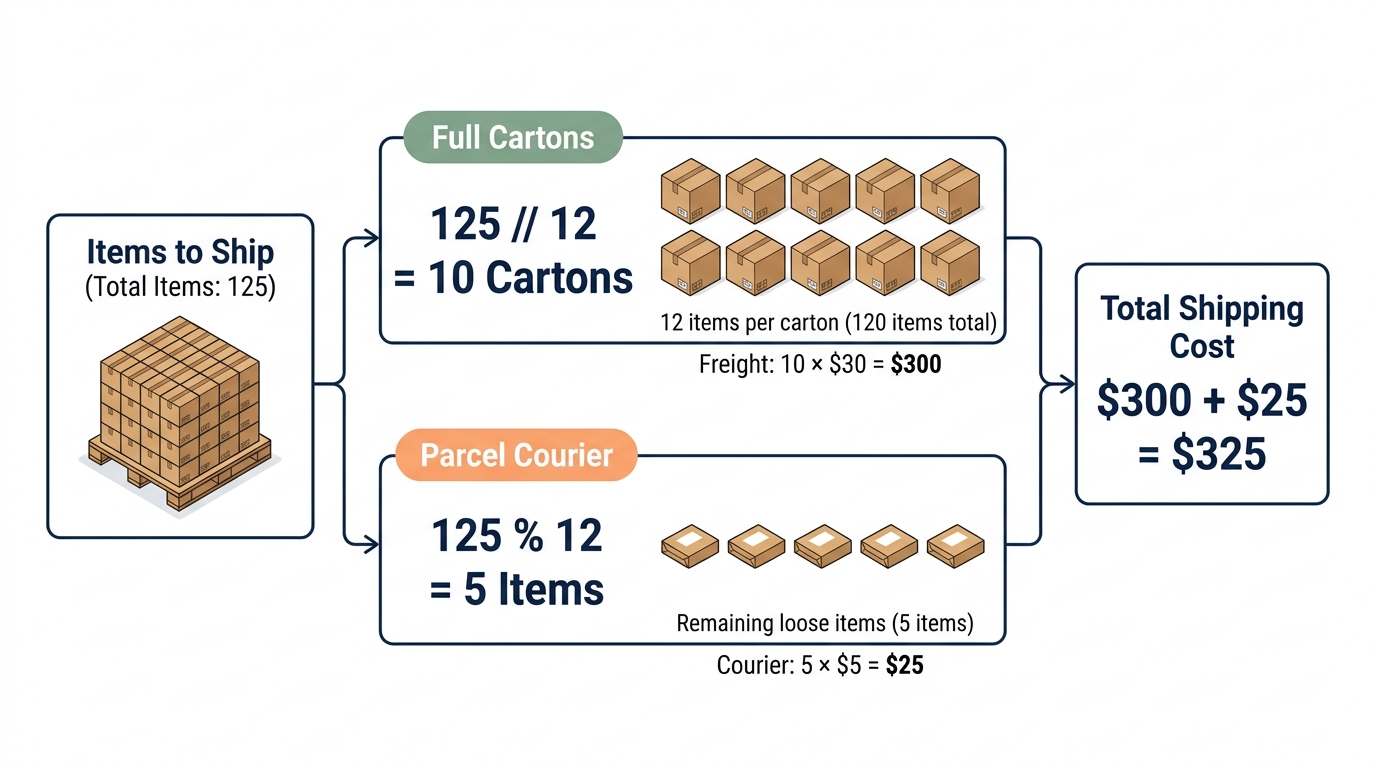
total_items = 125
box_capacity = 12

full_boxes = total_items // box_capacity  # Floor division: calculate the number of full cartons
loose_items = total_items % box_capacity  # Modulo: calculate the number of remaining items

shipping_cost = (full_boxes * 30) + (loose_items * 5)

print("Full boxes:", full_boxes)
print("Loose items:", loose_items)
print("Total shipping cost ($):", shipping_cost)
Output:
Full boxes: 10
Loose items: 5
Total shipping cost ($): 325
Compound Interest Calculation
Example: Use the exponentiation operator (
**) to calculate the future value of an investment with a fixed annual return.
A company deposits $10,000 of surplus cash into a two-year certificate of deposit with an annual interest rate of 5% compounded annually (r = 0.05).
The future value formula is:
where PV is the initial principal, r is the annual interest rate, and n is the investment horizon in years. We calculate the maturity value after two years:
principal = 10000.0  # Initial principal ($)
annual_rate = 0.05   # Annual return rate (5%)
years = 2            # Term (years)

# Compute future value using **
future_value = principal * ((1 + annual_rate) ** years)

print("Initial principal ($):", principal)
print("Future value after 2 years ($):", future_value)
Output:
Initial principal ($): 10000.0
Future value after 2 years ($): 11025.0
1.4 The String Type: Textual Data
Text such as customer names, tracking identifiers, and addresses is stored as strings (str).
1.4.1 Defining and Concatenating Strings
Enclose strings in single quotes ('...') or double quotes ("..."). The opening and closing quotes must match. To join two strings, concatenate them with the + operator.
Example: Store a customer name and product name, then concatenate them into a purchase statement.
customer_name = 'Li Minghui'
product_name = "Oat Milk"
message = customer_name + " purchased " + product_name  # + concatenates strings here
print(message)
Output:
Li Minghui purchased Oat Milk
Extended Example: Read Fields from a Standalone JSON File and Format with an f-string
In production systems and data pipelines, business records are typically stored in standalone files (such as
order.json) or returned by database queries in structured JSON (JavaScript Object Notation) format.Download the sample order data and save it as
order.jsonin your project workspace.Suppose your project workspace contains an order file named
order.json:json{ "order_id": "ORD-20260922-001", "customer_name": "Li Minghui", "product_name": "Oat Milk", "quantity": 2, "total_price": 48.0 }Python provides the standard library
jsonmodule. Opening the file withopen(...)and callingjson.load(file)parses the JSON text directly into a key-value mapping.Rather than concatenating strings with repeated
+operators, modern Python uses formatted string literals (f-strings): prefix the string withfand place variable names directly inside curly braces{}. This syntax produces cleaner, less error-prone templates.
import json

# 1. Open and read order.json from the current workspace
with open("order.json", "r", encoding="utf-8") as file:
    order_data = json.load(file)

# 2. Extract the target fields from the parsed data
customer_name = order_data["customer_name"]
product_name = order_data["product_name"]

# 3. Format and print the message using an f-string
message = f"{customer_name} purchased {product_name}"
print(message)
Output:
Li Minghui purchased Oat Milk
1.4.2 Indexing and Slicing
An index marks the position of a character within a string:
- Forward indexing starts at
0from the left (s[0]is the first character). - Negative indexing counts backward from the right (
s[-1]is the last character).
Slicing extracts a contiguous substring using the half-open interval [start:stop):
s[start:stop] extracts characters starting at index start up to, but not including, index stop.
- Omitting
start(s[:stop]) defaults to the beginning of the string (index0). - Omitting
stop(s[start:]) extracts through to the end of the string.
Example: Extract the first character, the last character, the primary keyword, and the subtitle from a report title.
report_title = "Python Data Analysis Guide"
print(report_title[0])     # Forward index 0: first character
print(report_title[-1])    # Reverse index -1: last character
print(report_title[0:6])   # Slice indices 0 to 5 (excluding 6): "Python"
print(report_title[7:])    # Slice from index 7 to the end: "Data Analysis Guide"
Output:
P
e
Python
Data Analysis Guide
The slice [0:6] extracts six characters from index 0 to 5, excluding index 6. The slice [7:] extracts characters from index 7 to the end, skipping the space at index 6. For any split index k, the two slices s[:k] and s[k:] partition the string without gaps:
1.4.3 String Immutability
Strings in Python are immutable: you cannot modify an existing character in place. Attempting product_code[-1] = "B" raises a TypeError. To change text, construct a new string through slicing, concatenation, or method calls, and bind the result to a variable. The original string remains unchanged in memory.
Example: Replace the suffix
AwithBin a product code while keeping the original string intact.
product_code = "SKU-2024-A"
new_product_code = product_code[:-1] + "B"
print(product_code)
print(new_product_code)

# Uncommenting the next line raises a TypeError: strings do not support item assignment
# product_code[-1] = "B"
Output:
SKU-2024-A
SKU-2024-B
1.4.4 Common String Methods
The syntax string.method(...) calls a built-in method on a string. Because strings are immutable, methods never modify the original string in place—they return a newly created string or evaluated result. Assign the result to a variable when you need to retain it.
Example: Strip surrounding whitespace from a customer name before including it in a notification. The method
strip()removes leading and trailing whitespace, including spaces, tabs, and newline characters.
raw_name = "   Li Minghui   "
customer_name = raw_name.strip()  # Strip whitespace and bind result to customer_name
print(customer_name)
Output:
Li Minghui
Example: Update the fulfillment status in a notification message. The method
replace(old, new)replaces matching substrings with replacement text.
message = "Fulfillment Status: Awaiting Pickup"
updated_message = message.replace("Awaiting Pickup", "Dispatched")

print(updated_message)
Output:
Fulfillment Status: Dispatched
Example: Convert a promo code to uppercase and an email address to lowercase using
upper()andlower().
coupon_code = "spring2026sale"
email = "STUDENT@EXAMPLE.COM"
print(coupon_code.upper())
print(email.lower())
Output:
SPRING2026SALE
student@example.com
1.4.5 Formatted String Literals (f-strings)
Prefixing a string with f creates a formatted string literal (an f-string). Inside curly braces {}, you can interpolate variable values directly and format them using format specifiers. For example, {amount:.2f} formats amount as a floating-point number rounded to two decimal places. Formatting affects only the generated string; it does not alter the underlying numeric variable.
Example: Combine a customer name and an order total into a payment notice, formatting the currency amount to two decimal places.
customer_name = "Lin Zhao"
order_amount = 4520.3789
message = f"Customer: {customer_name}, Order Total: ${order_amount:.2f}"
print(message)
Output:
Customer: Lin Zhao, Order Total: $4520.38
Generating Notifications from Computed Results
Example: Calculate the compound future value of an investment after five years, formatting the output to two decimal places.
This example compounds interest annually into the principal:
where P is the initial investment, r is the annual interest rate, and t is the term in years. We evaluate a $100,000 investment earning 3.5% annually over 5 years:
principal = 100000.0  # Principal: $100,000.00
annual_rate = 0.035   # Annual interest rate: 3.5%
years = 5             # Investment horizon: 5 years

future_value = principal * ((1 + annual_rate) ** years)
print(f"Total balance after 5 years: ${future_value:.2f}")
Output:
Total balance after 5 years: $118768.63
Example: Given
phone_number = "13812345678", mask the middle four digits with****using slicing and an f-string to yield138****5678.
phone_number = "13812345678"
masked_number = f"{phone_number[:3]}****{phone_number[7:]}"  # Using an f-string
# masked_number = phone_number[:3] + "****" + phone_number[7:]  # Using string concatenation
print(masked_number)
Output:
138****5678
1.5 The Boolean Type and Conditional Logic
Every program eventually makes decisions: Does an account balance cover a purchase? Does an order qualify for free shipping? Python represents truth values with the Boolean type (bool), which has exactly two values: True and False. Both must be capitalized.
True and False are reserved keywords in Python. Keywords are predefined identifiers with fixed grammatical roles in the language:
- Keywords Cannot Be Assigned or Rebound: You cannot use keywords as variable names, nor can you assign new values to them (executing
True = 1raisesSyntaxError: cannot assign to True). - Strict Case Sensitivity: Python is case-sensitive. Only
TrueandFalsewith capital first letters represent Boolean literals. Writing lowercasetrueorfalsecauses Python to search for a variable by that name, raising aNameErrorif undefined.
The logical operators and, or, and not are also reserved keywords. Section 1.11 covers how to inspect the full list of keywords in your active Python environment.
1.5.1 Comparison Operators
Comparison operators evaluate numeric or string operands and return a Boolean value:
| Operator | Meaning | Example Expression | Result |
|---|---|---|---|
== |
Equal to (checks whether values are equal) | 50 == 50.0 |
True |
!= |
Not equal to | 100 != 80 |
True |
> |
Greater than | 3500 > 3000 |
True |
< |
Less than | 1.2 < 1.0 |
False |
>= |
Greater than or equal to | 100 >= 100 |
True |
<= |
Less than or equal to | 60 <= 55 |
False |
Example: Compare an account balance against a payment amount using
>=to determine whether funds are sufficient.
account_balance = 420.0
payment = 450.0

has_enough_funds = account_balance >= payment
print(f"Account balance sufficient: {has_enough_funds}")
Output:
Account balance sufficient: False
Example: Verify user-entered promotional code against the valid system code using
==.
input_code = "SPRING20"  # User-entered code (e.g., from a web form)
valid_code = "SPRING20"  # System promotional code (e.g., from a database)

# == tests equality; do not confuse with assignment =
is_code_valid = input_code == valid_code
print(f"Promo code valid: {is_code_valid}")
Output:
Promo code valid: True
Distinguish
=from==: A single equals sign=is an assignment operator that binds a value to a variable (payment = 450.0). A double equals sign==is a comparison operator that tests whether two expressions evaluate to the same value, returningTrueorFalse.
1.5.2 Logical Operators and Short-Circuit Evaluation
To combine multiple conditions, use and, or, and not:
and(Logical AND): Evaluates toTrueonly when both conditions are true.or(Logical OR): Evaluates toTrueif at least one condition is true.not(Logical NOT): Inverts a Boolean value.
Example: Combine
or,and, andnotto evaluate free shipping eligibility based on cart value, membership status, and customer restrictions.
# Free shipping qualification rules:
# Condition: order total >= $99.00 OR user is a VIP member; AND user is NOT on the restricted list
cart_total = 85.0
is_vip = True
is_restricted = False

qualifies_free_shipping = (cart_total >= 99.0 or is_vip) and (not is_restricted)
print(f"Qualifies for free shipping: {qualifies_free_shipping}")
Output:
Qualifies for free shipping: True
Naming Conventions for Boolean Variables: In Python, Boolean variables typically use descriptive prefixes such as
is_orhas_insnake_case:
is_prefix: Denotes a state or attribute, such asis_vip(whether a customer has VIP status) oris_code_valid(whether a code is valid).has_prefix: Denotes possession of a resource or condition, such ashas_enough_funds(whether funds are sufficient).This naming style reads like a direct yes-or-no question, making conditional logic easier to read.
Short-Circuit Evaluation: When evaluating compound logical expressions, Python evaluates operands from left to right and stops as soon as the truth value of the entire expression is determined:
- In
A and B, ifAevaluates toFalse, the overall expression cannot be true; Python does not evaluateB.- In
A or B, ifAevaluates toTrue, the overall expression must be true; Python does not evaluateB.Programmers rely on this behavior to guard against runtime errors, such as division by zero.
Example: Use short-circuit evaluation in an
andexpression to verify that transaction volume is greater than zero before computing average transaction value, preventing a zero-division error.
transaction_count = 0
total_sales = 1000.0
# If transaction_count is 0, the first condition evaluates to False. Short-circuit skips the division.
is_high_average = (transaction_count > 0) and ((total_sales / transaction_count) > 200.0)
print(is_high_average)
Output:
False
1.6 Type Inspection and Type Conversion
Python is strongly typed: operations depend on the exact type of the data. For example, trying to add the string "50" and the integer 10 with + raises a TypeError.
1.6.1 Inspect Data Types: type()
The built-in function type() returns the type of a value or object:
Example: Inspect the type names of an integer, a float, a string, and a Boolean using
type().
print(type(500))
print(type(18.5))
print(type("Shanghai"))
print(type(True))
Output:
<class 'int'>
<class 'float'>
<class 'str'>
<class 'bool'>
1.6.2 Type Conversion
When numbers arrive from files or web forms, they usually enter the program as text strings. You must convert them to numeric types before doing math:
Example: Convert string representations of a unit price and a quantity to
floatandintto compute discounts, and convert an integer order ID to a string for code formatting.
# 1. Convert strings to numbers
raw_price = "199.9"
clean_price = float(raw_price)  # Convert to float
discounted_price = clean_price * 0.9
print(discounted_price)

raw_quantity = "25"
quantity = int(raw_quantity)    # Convert to integer
print(quantity + 5)

# 2. Convert number to string
order_id = 10086
order_code = "ORD-" + str(order_id)
print(order_code)

# 3. Convert float to integer (drops the fractional part toward zero)
print(int(8.99))
Output:
179.91
30
ORD-10086
8
Conversion Errors: If a string does not match the format of the target type, Python raises a
ValueError. For instance,int("abc")fails, andint("12.5")fails becauseint()cannot directly parse a string containing a decimal point (convert withfloat("12.5")instead). Try running these in your terminal to inspect the traceback.
Core Exercises
Exercise 1: Order Notification and Phone Masking
Task: Clean a customer name, mask the middle four digits of a phone number with asterisks, calculate the final payment after a discount, and construct an order confirmation message.
Given: raw_name = " Li Minghui ", phone = "13812345678", raw_total = "388.50", and payment_status = "PAID". The order qualifies for a promotion with a $40 discount.
Strip the extra whitespace from the customer name; slice the phone number to mask the middle four digits (****); convert the raw total to a numeric float and subtract the discount. Print the final formatted message:
Customer: Li Minghui (138****5678), Amount Paid: $348.50, Payment Status: PAID.
Exercise 2: Checking Fund Sufficiency
Task: Calculate the total purchase price, verify whether an account balance covers the purchase, and evaluate whether the order qualifies for free shipping.
The unit price of an item is $28.50, the purchase quantity is 4 units, and the account balance is $120.00. An order ships free if the item total reaches $99.00 or if the buyer is a rewards member (assume the customer is not a rewards member). Print the total purchase price, whether the balance is sufficient, and whether the order qualifies for free shipping.
Expected outputs: 114.0, True, and True. Next, change the account balance to $100.00, predict which outputs will change, and run the script to verify. This exercise tests condition evaluation; do not write branching logic.
Part 2: Advanced Topics
The following sections are optional reading. The core exercises do not require concepts from this part (such as lists or the Decimal module).
1.7 The Null Value: None
None represents the absence of a value, such as an optional delivery note that a customer leaves blank. Its type is NoneType. None is distinct from the numeric zero (0) and an empty string ("").
Example: Record an unprovided delivery note and check whether the value is
None.
delivery_note = None
print(delivery_note is None)
Output:
True
The operator is None tests object identity against the singleton None. While == checks value equality, Python style guidelines recommend using is None or is not None to test for None (PEP 8 Programming Recommendations).
1.8 Floating-Point Representation Error
1.8.1 Observing Representation Error
Example: Compute
0.1 + 0.2and test whether the sum equals0.3.
result = 0.1 + 0.2
print(result)
print(result == 0.3)
Output:
0.30000000000000004
False
This behavior stems from how computers represent fractions in binary (base 2).
In decimal notation, fractions like 1/3 cannot be written in a finite number of digits and repeat forever as 0.3333\dots. Similarly, in binary, simple decimal fractions such as 0.1 (1/10) and 0.2 (1/5) are infinite repeating fractions. Because standard hardware allocates a fixed number of bits (53 bits of precision in IEEE 754 double precision) to store each floating-point number, the computer must cut off the repeating tail. This leaves a tiny rounding error (Python Tutorial: Floating-Point Arithmetic).
Formatting a number to two decimal places (such as f"{amount:.2f}") rounds the displayed text, but the underlying float in memory remains an approximation.
1.8.2 Approximate Comparisons: math.isclose()
The Python standard library includes modules for specialized tasks. Writing import math loads the math module into your program, granting access to its functions via math.function_name(...).
Example: Test whether two floating-point sums are close within a defined numerical tolerance.
import math

val_a = 0.1 + 0.2
val_b = 0.3
print(math.isclose(val_a, val_b))
Output:
True
The function math.isclose(a, b) compares two numbers within relative and absolute tolerance bounds:
This example uses Python's default relative tolerance (10^{-9}). When working with sensor data, experimental measurements, or statistical estimates, choose tolerance parameters suited to your application domain.
1.8.3 Exact Decimal Calculations: Decimal
The decimal standard library module provides the Decimal type for exact fixed-point and floating-point decimal arithmetic. The statement from decimal import Decimal imports the type so you can use Decimal(...) directly.
Example: Construct Decimal objects from strings and calculate the decimal sum of
0.1and0.2.
from decimal import Decimal

price_a = Decimal("0.1")
price_b = Decimal("0.2")
exact_sum = price_a + price_b
print(exact_sum)
print(exact_sum == Decimal("0.3"))
Output:
0.3
True
Notice that we pass string literals ("0.1", "0.2") to Decimal(). If we passed floating-point numbers directly (such as Decimal(0.1)), Python would convert the already-imprecise binary float, locking the roundoff error into the Decimal instance.
Decimal operations follow explicit precision and rounding rules. For example, the fraction one-third cannot be represented as a finite decimal in base 10 either; accounting and billing systems must specify rounding modes and decimal precision explicitly (Python Documentation: decimal).
1.9 Truth Value Testing and Truthiness
Every Python value has an implicit truth value (truthiness) when evaluated in a conditional context. Calling bool(...) reveals how Python interprets that value:
- Falsy values:
None,False,0,0.0, and the empty string""all evaluate toFalse. - Truthy values: Non-zero numbers and non-empty strings all evaluate to
True.
Example: Test whether a search query string is empty, and compare the string
"False"with the Boolean literalFalse.
search_term = "Python"
print(bool(search_term))
print(bool(""))
print(bool("False"))
print(bool(False))
Output:
True
False
True
False
Notice that bool("False") evaluates to True. To Python, "False" is simply a non-empty string of five characters. Python tests whether the string contains characters; it does not parse English words inside quotation marks into Boolean states.
Example: Test whether a customer rating is missing. A rating of
0.0is a valid numeric score; testing truthiness alone would misclassify0.0as missing data.
user_rating = 0.0
print(bool(user_rating))
print(user_rating is None)
Output:
False
False
In Python, and and or return the actual value of one of their operands rather than a strict True or False literal:
x or y: returnsxifxis truthy; otherwise, returnsy.x and y: returnsxifxis falsy; otherwise, returnsy(Python Documentation: Boolean Operations).
Example: Supply a fallback display name when a username is empty.
nickname = ""
display_name = nickname or "Anonymous User"
print(display_name)
Output:
Anonymous User
Try replacing nickname with your own name and running the script again.
A caution on numbers: when a valid score or balance can be zero (0 or 0.0), writing value or default fails silently because 0 is falsy. Python will incorrectly discard your valid zero and substitute the default. When testing whether optional data is missing, always check explicitly with is None.
1.10 Multiline Strings, Escape Characters, and Raw Strings
1.10.1 Multiline Strings
Triple quotes ("""...""" or '''...''') define strings that span multiple lines:
Example: Store and print a shipping address across two lines.
shipping_address = """100 Main Street
Suite 400"""
print(shipping_address)
Output:
100 Main Street
Suite 400
1.10.2 Escape Characters
In strings, a backslash (\) paired with a following character forms an escape sequence: \n represents a newline, \t represents a tab, and \\ represents a literal backslash. To include quotation marks matching the enclosing string delimiters, precede them with a backslash (\' or \").
Example: Format a course title and room assignment across two lines using
\n.
print("Course: Python\nRoom: A203")
Output:
Course: Python
Room: A203
1.10.3 Raw Strings
Windows file paths commonly use backslashes, such as C:\data\new_reports.csv. In a standard string, \n is interpreted as a newline. Prepending r to the opening quote designates a raw string literal, which preserves backslashes literally.
Example: Store and print a Windows file path using a raw string.
report_path = r"C:\data\new_reports.csv"
print(report_path)
Output:
C:\data\new_reports.csv
A raw string literal cannot end with an odd number of backslashes because a trailing backslash escapes the closing quotation mark. To represent a Windows directory ending in a backslash, use a standard string with double backslashes ("C:\\data\\"), or use Python's standard pathlib module (Python Reference: Raw String Literals).
1.11 Keywords and Built-in Identifiers
Reserved keywords such as if, for, and class have dedicated syntactic roles and cannot be used as variable names. You can inspect them using the keyword module.
Example: Check whether
classandpriceare reserved keywords.
import keyword

print(keyword.iskeyword("class"))
print(keyword.iskeyword("price"))
Output:
True
False
Run print(keyword.kwlist) in your terminal to view the complete list of reserved keywords in your installed Python version.
Built-in names like str, sum, len, and max are standard Python functions, not reserved keywords. Python will technically allow you to write str = 500, but doing so shadows the built-in name in your current scope. Calling str(order_id) afterward will raise TypeError: 'int' object is not callable. Never reuse built-in function names as your variable names.
Example: Store an order identifier in
order_idand use the built-instr()function to format an order code.
order_id = 10086
order_code = "ORD-" + str(order_id)
print(order_code)

# Assigning str = 500 before calling str(order_id) raises a TypeError
Output:
ORD-10086
1.12 Splitting and Joining Strings: A First Look at Lists
1.12.1 split() and List Elements
A list (list) stores an ordered sequence of values enclosed in square brackets [] and separated by commas. The string method split() cuts a string by a specified delimiter and returns a list of substrings.
Example: Split a record containing city, district, and postal code, then extract the postal code.
raw_record = "   Beijing, Chaoyang, 100020   "
clean_record = raw_record.strip()
fields = clean_record.split(", ")
print(fields)
print(fields[2])
Output:
['Beijing', 'Chaoyang', '100020']
100020
The expression fields[2] retrieves the third element (index 2) from the list—the complete string "100020". By contrast, indexing a string returns only an individual character. Later chapters cover list operations, mutation, and iteration in full.
This example splits on a comma followed by a space (", "). Try changing the delimiter to a comma alone (",") and observe how the resulting substrings differ.
1.12.2 join(): Concatenating Elements
The syntax delimiter.join(list_of_strings) joins string elements from a list into a single string, placing the delimiter between consecutive items.
Example: Join year, month, and day strings into an ISO date string.
date_elements = ["2026", "09", "05"]
iso_date = "-".join(date_elements)
print(iso_date)
Output:
2026-09-05
All elements in the list must be strings; join() does not convert numeric types to strings automatically.
1.13 Zero-Padding Format Specifiers
In an f-string, the format specifier :05d formats an integer with a minimum width of five digits, padding with leading zeros on the left as needed. It never cuts off digits from numbers wider than five digits.
Example: Format the integer 86 as a five-digit identifier
00086.
invoice_no = 86
print(f"Invoice ID: {invoice_no:05d}")
Output:
Invoice ID: 00086
Advanced Exercises
Exercise 1: Parsing Complete Order Records
Task: Split an order text record, extract customer name, phone number, order total, and payment status, and construct the formatted notification from the core exercises. Requires list indexing and splitting from §1.12.
Raw input: raw_record = " USER:Li Minghui;PHONE:13812345678;TOTAL:388.50;STATUS:PAID ". All four fields are guaranteed present in fixed order. The order qualifies for a $40 discount.
Split the record by semicolons, then split each field by colons to separate field names from values. Extract the phone number and order total, mask the phone number, convert the total to a numeric float, and subtract the discount. Expected output:
Customer: Li Minghui (138****5678), Amount Paid: $348.50, Payment Status: PAID.
Exercise 2: Comparing Two Installment Plans
Task: Calculate installment payments according to given financing terms, evaluating results with both
floatandDecimal. RequiresDecimalfrom §1.8.
An invoice total is $12,000. Plan A divides the balance into 3 installments, charging a 0.75% fee on the original principal per installment. Plan B divides the balance into 6 installments, charging a 0.65% fee on the original principal per installment. Principal is amortized evenly across installments.
Compute the principal per installment, fee per installment, total fees across all installments, and the fee difference between Plan B and Plan A. Verify against this table:
| Item | Plan A | Plan B |
|---|---|---|
| Principal per installment | $4,000 | $2,000 |
| Fee per installment | $90 | $78 |
| Total fees | $270 | $468 |
The total fee difference is $198. The values computed with float and Decimal may appear identical for these specific numbers. Connecting back to the 0.1 + 0.2 example, explain why a single matching calculation does not prove that floating-point arithmetic is exact in all cases.
References
For further details on naming rules and built-in types, consult the official Python documentation on Identifiers and Keywords and Built-in Types.
Chapter Navigation: Previous Chapter: Chapter 0 Environment Setup and Development Tools | Next Chapter: Chapter 2 Functions