Chapter 2: Functions
Table of contents (13)
- Part 1: Core Concepts
- 2.1 Why Functions Are Needed
- 2.2 Defining and Calling Functions
- 2.3 Parameters: Passing Data to Functions
- 2.4 Return Values and Screen Output
- 2.5 Local Variables and Scope
- 2.6 Explicit Type Annotations for Inputs and Outputs
- Core Exercises
- Part 2: Advanced Topics
- 2.7 Greater Calling Flexibility: Keyword and Default Arguments
- 2.8 Returning Multiple Results: Multiple Return Values and Unpacking
- 2.9 Function Documentation: Docstrings
- Advanced Exercises
Navigation: Previous: Chapter 1 - Variables, Basic Data Types, and Operators | Next: Chapter 3 - Built-in Functions and Function Calls
In mathematics, a function describes a deterministic relationship between independent and dependent variables:
where x is the independent variable (input data), f is the rule of correspondence (mapping and calculation rules), and y is the dependent variable (calculation result). When an input contains multiple independent variables—such as the production function Q = f(K, L) in economics—capital input K and labor input L serve as input variables, and total output Q is the calculation result.
In computer science, this structure is abstracted into the Input-Process-Output (IPO) model:
In Python, a function directly implements this model:
- Parameters: Serve as system inputs (independent variables), receiving the data passed to the function at call time;
- Function Body: Performs the system process, encapsulating computation logic and execution steps;
- Return Value: Delivers the system output (dependent variable), handing the final computation result back to the caller.
This chapter has two parts:
- Part 1: Core Concepts covers defining and calling functions, the flow of execution, code blocks and indentation, argument passing, the difference between return values and printed output, local variable scope, and type annotations for inputs and outputs.
- Part 2: Advanced Topics introduces keyword and default arguments, multiple return values and unpacking, and docstring conventions.
Part 1: Core Concepts
2.1 Why Functions Are Needed
In Section 1.2.4 of Chapter 1, we used the variable shipping_fee to manage shared shipping costs in one place. When the shipping fee changed, updating a single variable assignment updated the value everywhere. Variables manage changeable data values.
In real-world programming, however, what we need to reuse is often not just a single value, but entire processing logic and calculation rules. When multiple business transactions must run through the same calculation steps, we define functions to package this recurring logic into a reusable unit.
Example: An online store initially calculates the final payable amount for three orders using
unit_price * quantity + shipping_fee:
shipping_fee = 6.0

# Order 1: Notebook (unit price 50.0 yuan, 2 items)
total_1 = 50.0 * 2 + shipping_fee
print("Order 1 total:", total_1)

# Order 2: Keyboard (unit price 200.0 yuan, 1 item)
total_2 = 200.0 * 1 + shipping_fee
print("Order 2 total:", total_2)

# Order 3: Monitor (unit price 150.0 yuan, 4 items)
total_3 = 150.0 * 4 + shipping_fee
print("Order 3 total:", total_3)
Output:
Order 1 total: 106.0
Order 2 total: 206.0
Order 3 total: 606.0
In this code, the three orders have different inputs (unit prices and quantities), but they all repeat the exact same processing logic: unit_price * quantity + shipping_fee.
Code Redundancy and Maintenance Difficulties from Complex Processing Logic
Suppose promotional rules change so that order settlement now requires a multi-step calculation process:
- Calculate subtotal: \text{subtotal} = \text{unit\_price} \times \text{quantity};
- Apply 20% store discount (80% of original price): \text{discounted} = \text{subtotal} \times 0.8;
- Add 10% value-added tax (VAT): \text{tax} = \text{discounted} \times 0.1;
- Calculate final total: \text{total} = \text{discounted} + \text{tax} + \text{shipping\_fee}.
Without functions to encapsulate this logic, code suffers from duplicate logic and high maintenance overhead. We must replace the original single-line expression with these 4 steps for every order:
# Order 1 billing logic (4-step process)
subtotal_1 = 50.0 * 2
discounted_1 = subtotal_1 * 0.8
tax_1 = discounted_1 * 0.1
total_1 = discounted_1 + tax_1 + shipping_fee
print("Order 1 total:", total_1)

# Order 2 billing logic (exact same 4 steps)
subtotal_2 = 200.0 * 1
discounted_2 = subtotal_2 * 0.8
tax_2 = discounted_2 * 0.1
total_2 = discounted_2 + tax_2 + shipping_fee
print("Order 2 total:", total_2)

# Order 3 also requires repeating the same 4 steps...
Copying and pasting this calculation logic causes two fundamental problems:
- Duplicating identical processing logic (Code redundancy): The processing rules are general. If a system handles 100 orders, we must copy and paste these 4 steps 100 times. The code balloons rapidly and fills with mindless repetition.
- Scattering change points across the codebase (Fragile maintenance): Because the processing logic is scattered across each order's calculation flow, any future change to business rules (such as adjusting the discount rate) forces you to find and update every single copy. Missing or mistyping even one instance leads to inconsistent settlement standards across orders, introducing subtle business bugs.
Solution: Encapsulating Processing Logic in Functions
When processing logic must be reused, the best solution is to encapsulate it into a standalone functional unit: a function:
# Encapsulate the general order billing process
# Input: unit price (unit_price), purchase quantity (quantity)
# Output: final payable amount (return value)
# Mechanism: The same processing flow converts different inputs into their respective expected results
def calculate_order_total(unit_price, quantity):
    shipping_fee = 6.0
    subtotal = unit_price * quantity        # Step 1: Calculate subtotal
    discounted = subtotal * 0.8             # Step 2: Apply 20% discount
    tax = discounted * 0.1                  # Step 3: Add 10% VAT
    return discounted + tax + shipping_fee  # Step 4: Return final payable amount


# Call the function: pass price and quantity for each order, capture the return value in subtotal, and print

# Order 1: Notebook. Pass arguments (unit price 50.0 yuan, 2 items)
subtotal = calculate_order_total(50.0, 2)
print("Order 1 total:", subtotal)

# Order 2: Keyboard. Pass arguments (unit price 200.0 yuan, 1 item); reuse subtotal to capture new order result
# Note: The result from Order 1 is overwritten
subtotal = calculate_order_total(200.0, 1)
print("Order 2 total:", subtotal)

# Order 3: Monitor. Pass arguments (unit price 150.0 yuan, 4 items); reuse subtotal to capture new order result
# Note: The result from Order 2 is overwritten
subtotal = calculate_order_total(150.0, 4)
print("Order 3 total:", subtotal)
Output:
Order 1 total: 94.0
Order 2 total: 182.0
Order 3 total: 534.0
By encapsulating logic inside a function, we package a general processing workflow into a cohesive unit, achieving both process reuse and centralized maintainability:
- Encapsulating shared steps for process reuse:
Based on the Input-Process-Output model introduced at the start of this chapter, defining a function builds a self-contained subsystem:
- First, define the inputs (the parameters
unit_priceandquantityin the parentheses ofdef); - Next, define the output (the result handed back by
return, such as the total payable amount); - The function body defines how to transform inputs step by step into the output (subtotal \to discount \to tax \to final payable amount);
- You define this shared process only once inside the function body. For any number of orders, callers supply the inputs and receive the expected output. Callers never need to inspect the internal calculation details.
- First, define the inputs (the parameters
- Centralizing logic for straightforward maintenance: A function gathers logic that would otherwise be duplicated across orders into a single body, establishing a single source of processing. When business rules change (such as adjusting the discount from 20% off to 15% off, or waiving VAT), we only need to edit code in one place: inside the function definition. Every call site automatically runs the updated calculation, making the program robust and easy to maintain.
2.2 Defining and Calling Functions
2.2.1 Basic Syntax for Defining Functions
In Python, define a function with the keyword def (short for define). The basic syntax is:
def function_name(param1, param2, ...):
    statement_1
    statement_2
    ...
    return result
This structure consists of five syntax elements:
- The
defkeyword: Declares the start of a function definition; - Function name: Follows the Chapter 1 variable naming rules using
snake_case, clearly describing what the function does; - Parentheses and parameter list: Parentheses enclose the variable names that receive inputs, known as parameters. Parentheses
()are required even when the function takes no inputs; - Colon
:: Placed at the end of the header line to begin the indented function body; - Function body and
returnstatement: The indented block contains the statements executed by the function.returnends function execution and delivers the result back to the caller (a function can omitreturnif it produces no result).
2.2.2 Code Blocks and Indentation
In Python, a code block is a group of codes that belong to the same logical structure. Many programming languages (such as C and Java) use curly braces {} to delimit blocks, while Python uses indentation:
- Colon introduces a block: Writing a colon
:at the end of thedefline signals that the next line begins the function's internal code block; - Indentation standard: The Python PEP 8 style guide recommends 4 spaces per indentation level. In VS Code, pressing
Tabinserts 4 standard spaces by default; - Consistent indentation: All statements in the same block must use the exact same number of spaces;
- Exiting a block: When the function logic is complete, restore the previous indentation level on subsequent lines to exit the function body.
Not only function bodies use code blocks, but also conditional branches (if) and loops (for, while) in later chapters follow this same "colon + indentation" rule.
Example: Define an item subtotal function to calculate the subtotal for 4 items priced at 28.5 yuan each.
def calculate_subtotal(unit_price, quantity):
    # Indentation begins the function code block
    subtotal = unit_price * quantity
    return subtotal
    # Function code block ends

# Restore previous indentation level to exit the function code block
amount = calculate_subtotal(28.5, 4)
print(amount)
Output:
114.0
2.2.3 The Flow of Execution
When a computer executes a program containing functions, it operates in two distinct phases: definition and call:
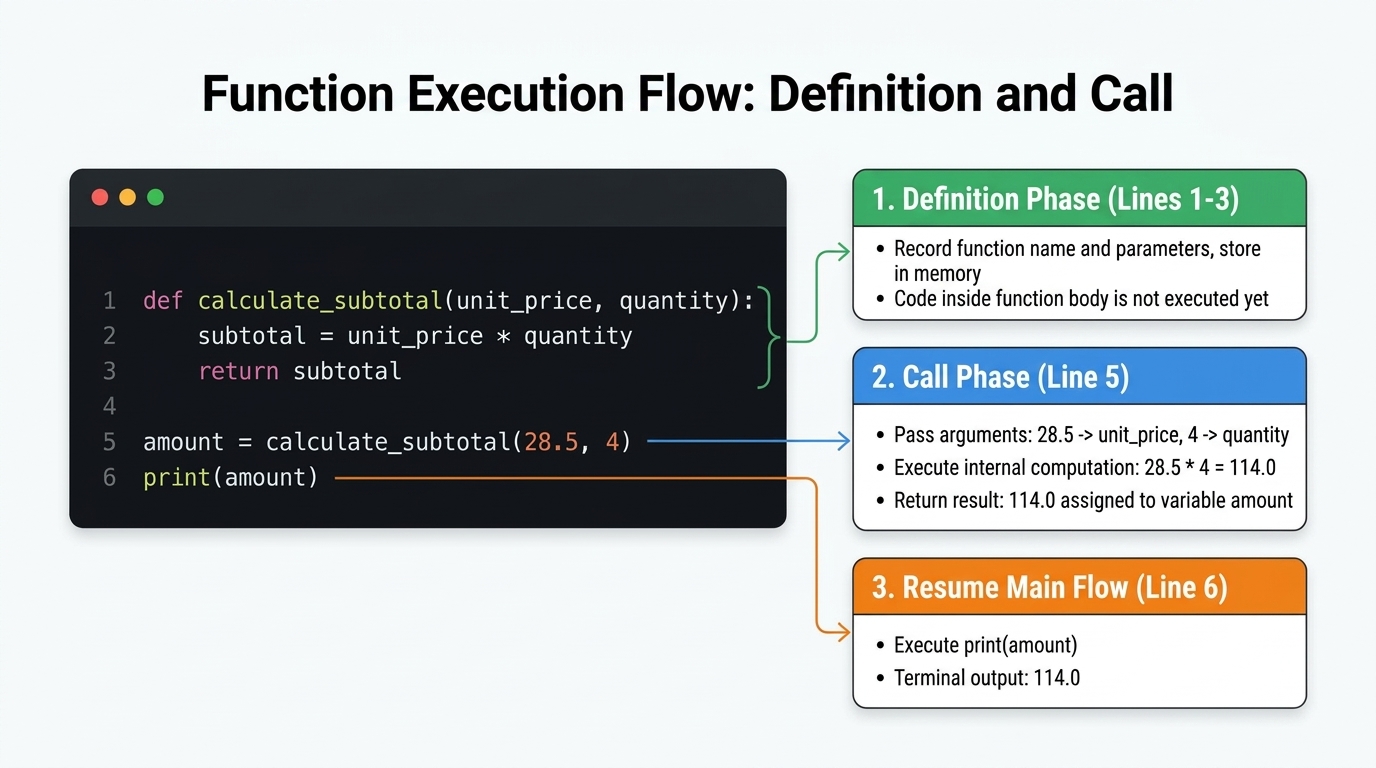
- Definition phase (lines 1–3):
- When the interpreter encounters
def calculate_subtotal(...), it parses and records the function definition (function name, parameter list, and internal logic); - The indented code block does not execute at this time; it is saved in memory as a callable unit (waiting to be invoked).
- When the interpreter encounters
- Call phase (line 5):
- When execution reaches
amount = calculate_subtotal(28.5, 4), parentheses trigger the function call:- Pass arguments: Values
28.5and4are passed to parametersunit_priceandquantity; - Execute computation: The interpreter runs the statements inside the function body;
- Return the result: The
returnstatement passes114.0back to the call site, and then it is assigned toamount.
- Pass arguments: Values
- When execution reaches
- Resume main flow (line 6):
- The interpreter continues to
print(amount), writing the result to the terminal.
- The interpreter continues to
2.2.4 Troubleshooting Indentation Errors
If you omit indentation or use inconsistent spacing in a code block, the Python interpreter raises an error during syntax parsing (IndentationError):
Example: Observe the separation between the indented function block and the outer call statement.
def apply_discount(price, rate):
    discounted_price = price * rate
        return discounted_price # Indentation error causes program failure

final_price = apply_discount(120.0, 0.85)
print(final_price)
Output:
IndentationError: expected an indented block after function definition
Exercise: Fix the indentation above, then delete the 4 spaces before discounted_price = ... and run the script to observe the terminal output. Restore the indentation and run it again. Practicing intentional debugging helps you identify and fix indentation errors quickly.
2.3 Parameters: Passing Data to Functions
Variables declared in parentheses during function definition are called parameters, representing the expected inputs. The concrete values supplied during a function call are called arguments. By passing different arguments at call time, the same function evaluates different values.
2.3.1 A Single Parameter
Example: Convert duration from minutes to seconds for 5 minutes and 12 minutes.
def minutes_to_seconds(minutes):
    return minutes * 60     # Compute and return result

print(minutes_to_seconds(5))    # Call function to get result, then print
print(minutes_to_seconds(12))
Output:
300
720
2.3.2 Multiple Parameters
When a function takes multiple inputs, separate the parameters with commas.
Positional argument passing is Python's fundamental mechanism: the interpreter matches arguments to parameters strictly from left to right, binding the first argument to the first parameter, the second to the second, and so on.
Example: Convert duration given in hours and minutes into total minutes.
def to_total_minutes(hours, minutes):
    return hours * 60 + minutes

travel_minutes = to_total_minutes(1, 30)
print(travel_minutes)
Output:
90
In this call, parameter hours receives 1 and minutes receives 30. Swapping argument positions to to_total_minutes(30, 1) means "30 hours and 1 minute", returning 1801. Positional arguments require strict adherence to the defined order.
Furthermore, the number of arguments must match the number of parameters exactly. Supplying too few arguments raises TypeError: to_total_minutes() missing 1 required positional argument: 'minutes'; passing too many also raises a TypeError.
Exercises:
- Predict the result of
to_total_minutes(2, 15)before running it. Then try callingto_total_minutes(2)to see the missing-argument error message. - Write a function
calculate_course_grade(attendance, pop_quiz, final_exam)that accepts three scores: attendance, pop quizzes, and the final exam (each out of 100). Compute and return the weighted final grade with weights 10%, 30%, and 60% respectively (for example, passing90, 80, 85should return84.0).
Exercise 2 Reference Solution:
def calculate_course_grade(attendance, pop_quiz, final_exam):
    # Grade weight distribution: attendance 10%, quizzes 30%, final exam 60%
    total_grade = attendance * 0.1 + pop_quiz * 0.3 + final_exam * 0.6
    return total_grade

# Test call: attendance 90, quiz 80, final exam 85
final_score = calculate_course_grade(90, 80, 85)
print(final_score)
Output:
84.0
2.3.3 Passing and Returning Different Data Types
Parameters and return values are not restricted to numbers. They can be strings (str), Booleans (bool), or data structures like lists and dictionaries covered in later chapters.
Example: In e-commerce orders and SMS notifications, mask the middle 4 digits of an 11-digit phone number with
****for privacy protection.
def mask_phone_number(phone_number):
    # Extract the first 3 and last 4 digits, joining 4 asterisks between them for privacy masking
    masked = f"{phone_number[:3]}****{phone_number[7:]}"
    return masked

masked_phone = mask_phone_number("13812345678")
print(masked_phone)
Output:
138****5678
2.4 Return Values and Screen Output
2.4.1 The Fundamental Difference Between return and print
Beginners often confuse the return statement with the print() function. They serve distinct purposes in a program:
print()displays output: It formats data into text on the terminal screen for humans to read. Text displayed on screen cannot be used by subsequent code, andprint()itself always returnsNone;returnhands back data: It delivers the calculation result back to the call site, allowing the caller to store and use it in subsequent calculations.
Mental picture: print() is like printing an invoice onto paper; return is like handing a machined part to the next workstation on an assembly line.
Example: Call functions that return versus print a sum, and check which result can continue in downstream calculations.
def add_with_return(a, b):
    return a + b


def add_with_print(a, b):
    print(f'Print inside the function add_with_print: {a + b}')


total_1 = add_with_return(100, 200)
print(f'Return from the function add_with_return: {total_1}')
print(total_1 + 6)  # Directly printed; receives a valid numeric result

total_2 = add_with_print(100, 200)  # total_2 receives the return value of add_with_print, which is None
print(f'Return from the function add_with_print: {total_2}')
print(total_2 + 6)  # Raises TypeError: None cannot be added to an integer
Output:
Return from the function add_with_return: 300
306
Print inside the function add_with_print: 300
Return from the function add_with_print: None
TypeError: unsupported operand type(s) for +: 'NoneType' and 'int'
Output Analysis:
- Line 1 (
Return from the function add_with_return: 300): Callingadd_with_return(100, 200)returns300to the outer variabletotal_1, which the script prints; - Line 2 (
306): Becausetotal_1holds the number300, it continues in subsequent arithmetic (total_1 + 6yields306); - Line 3 (
Print inside the function add_with_print: 300): Runningtotal_2 = add_with_print(100, 200)triggers the call, and the internalprint()writes text directly to the screen; - Line 4 (
Return from the function add_with_print: None): Becauseadd_with_print()contains noreturnstatement, it returnsNoneby default, which is assigned tototal_2; - Line 5 (
TypeError...): Attemptingtotal_2 + 6fails becausetotal_2isNone. Python cannot addNoneto an integer, raising aTypeError.
If execution reaches the end of a function without hitting a return statement, or if it encounters a bare return with no expression, Python returns None by default. For more on None, see Chapter 1 Section 1.7. For official documentation, see Python Defining Functions.
2.4.2 The return Statement Terminates Execution
When return hands back a calculation result, it also immediately terminates function execution. Once the interpreter hits return, it exits back to the caller; statements following return within the same block never run.
Example: Place a print statement after
returnand observe whether it executes.
def calculate_subtotal(unit_price, quantity):
    subtotal = unit_price * quantity
    return subtotal
    print("This line has executed")

amount = calculate_subtotal(28.5, 4)
print(amount)
Output:
114.0
In this example, the function exits as soon as it evaluates return subtotal. The subsequent print("This line has executed") never triggers (such statements are called "unreachable code").
Exercise: Move the print() statement above the return statement, predict the terminal output, and run the script to verify.
2.5 Local Variables and Scope
2.5.1 Names Inside Functions and Local Scope
Input parameters and variables created inside a function are local variables.
Local variables are visible only inside the function body, a boundary known as local scope:
- Lifecycle: Local variables are created when the function is called. When the function returns, its local variables are destroyed from memory and cannot be referenced by subsequent code;
- Access isolation: Code outside the function cannot access its local variables directly. The outer program can only receive values that the function explicitly hands back via
return.
Example: Compute net income (revenue minus cost) and capture the result outside the function.
def calculate_net_income(income, cost):
    net = income - cost
    return net

net_income = calculate_net_income(10000, 3500)
print(net_income)

# Attempting to read local variable net from outside the function:
# print(net)
# Uncommenting the line above raises NameError: name 'net' is not defined
Output:
6500
Here, net is a local variable inside calculate_net_income and cannot be accessed outside. net_income is an outer variable that receives the returned value. Once the function finishes running, net is released from memory, but the computed value 6500 is safely stored in net_income.
2.5.2 Independent Namespaces for Local Variables
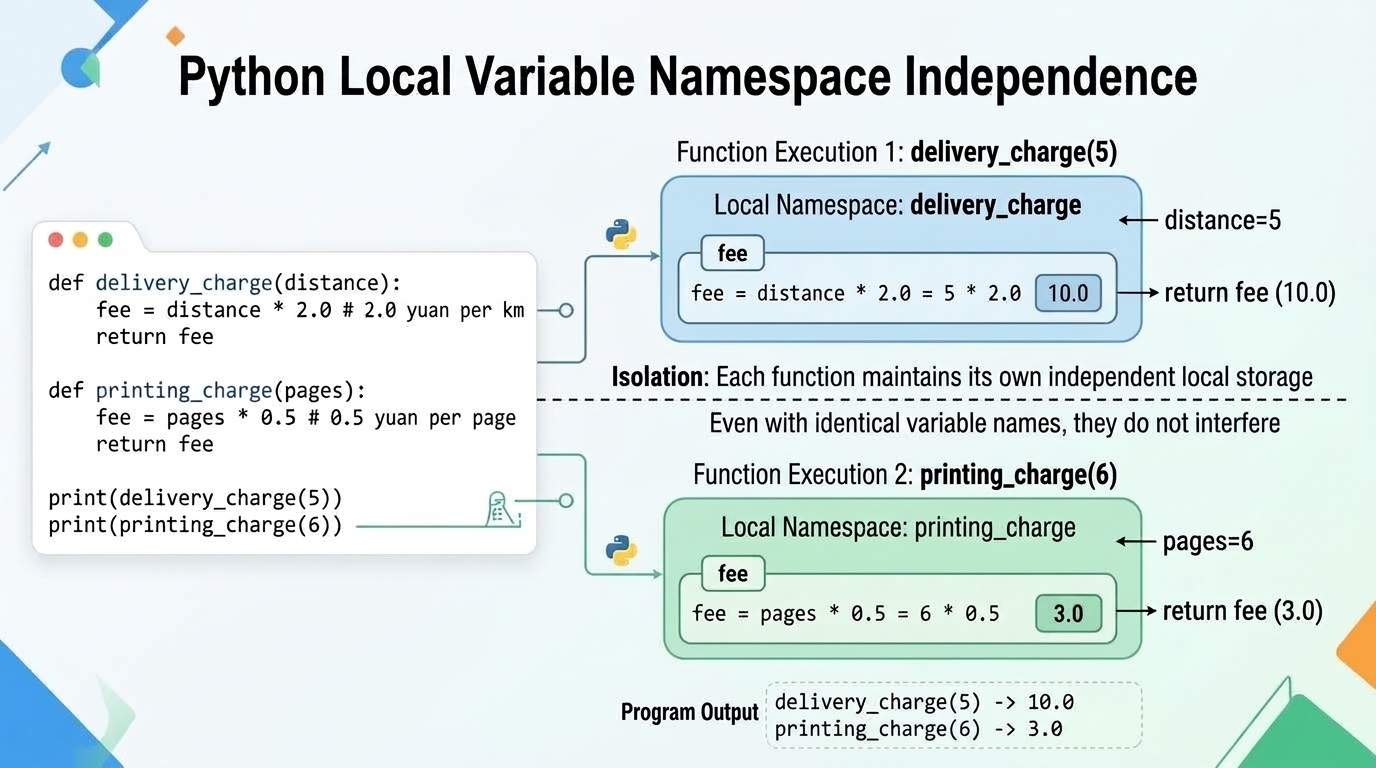
Different functions maintain their own independent local namespaces. Separate functions can use the exact same variable name without collision:
Example: Calculate delivery fees and printing fees, with both functions storing their results in a local variable named
fee.
def delivery_charge(distance):
    fee = distance * 2.0  # 2.0 yuan per kilometer
    return fee


def printing_charge(pages):
    fee = pages * 0.5  # 0.5 yuan per page
    return fee


print(delivery_charge(5))
print(printing_charge(6))
Output:
10.0
3.0
2.6 Explicit Type Annotations for Inputs and Outputs
Python is a dynamically typed language. By default, you do not declare variable types when defining a function. As codebases grow and teams collaborate, however, parameter names alone (such as price or status) make it hard to tell what type of data the function expects.
To address this, Python provides type annotations (also called type hints), allowing you to state expected types for input parameters and return values explicitly:
- Parameter type annotations: Place a colon and the type name after the parameter name, such as
unit_price: floatorquantity: int; - Return type annotation: Place an arrow
->and the return type between the parameter parentheses and the ending colon, such as-> float.
Example: Add explicit type annotations for parameters and return value in an item subtotal function.
def calculate_subtotal(unit_price: float, quantity: int) -> float:
    return unit_price * quantity


amount = calculate_subtotal(28.5, 4)
print(amount)
Output:
114.0
Key Characteristics:
- Not enforced at runtime: The Python interpreter does not check types while running, nor does it crash if passed values of a non-declared type. Type hints serve primarily as code-level documentation;
- Better tooling and code robustness: In editors like VS Code, type hints provide accurate hover documentation and autocompletion. They also let static analysis tools catch type mismatch errors before code runs.
Course Requirement (Mandatory for this course): Explicit type annotations are standard engineering practice in modern Python. In all subsequent code examples, homework assignments, quizzes, and projects throughout this course, every function must include explicit type annotations for its parameters and return value to cultivate disciplined engineering habits.
Core Exercises
Exercise 1: Takeout Bill Calculation Function
Task: Write a function
calculate_takeout_bill(food_total, coupon_discount, delivery_fee)that calculates and returns the final payable amount based on food total, coupon discount, and delivery fee.
Business Rules:
- Formula:
food_total - coupon_discount + delivery_fee; - All inputs are non-negative, and
coupon_discountdoes not exceedfood_total.
After writing the code, call print() to display the results and verify them against the table below:
| Call | Expected Return | Note |
|---|---|---|
calculate_takeout_bill(80, 10, 6) |
76 |
Uses 10 yuan coupon and 6 yuan delivery fee |
calculate_takeout_bill(80, 0, 6) |
86 |
No coupon |
calculate_takeout_bill(80, 10, 0) |
70 |
Free delivery |
Exercise 2: Tiered Freight Calculation Function
Task: Write a function
calculate_freight(weight)that calculates and returns shipping fees based on parcel weight.
Billing Rules:
- Billed weight
weightis an integer greater than 1 (in kilograms); - Base fee for the first 1 kg is 12 yuan;
- Each additional kilogram beyond 1 kg costs 5 yuan (additional weight is
weight - 1); - Formula:
12 + (weight - 1) * 5.
After writing the code, check your function against these test calls:
| Call | Expected Return | Calculation |
|---|---|---|
calculate_freight(2) |
17 |
12 yuan base + 1 kg × 5 yuan = 17 yuan |
calculate_freight(4) |
27 |
12 yuan base + 3 kg × 5 yuan = 27 yuan |
Note: Branching logic for weights under 1 kg (or flat base fee charges) will be covered in the conditional statements (
if/else) chapter. For now, assume the billed weight is always an integer greater than 1.
Exercise 3: User Login Verification Function
Task: Write a function
login(username, password)that verifies whether a user's credentials are correct and returns a Boolean (TrueorFalse).
Business Rules:
- The system's preset valid username is
"admin"and the preset password is"python2026"; - The function returns
Trueif and only ifusernamematches"admin"exactly andpasswordmatches"python2026"exactly; - If either the username or password (or both) fails to match, the function returns
False.
After writing the code, check your function against these test calls:
| Call | Expected Return | Business Meaning |
|---|---|---|
login("admin", "python2026") |
True |
Username and password match; login granted |
login("admin", "wrong_pwd") |
False |
Username matches but password is wrong; login denied |
login("guest", "python2026") |
False |
Account does not exist; login denied |
Note: This exercise uses comparison (
==) and logical (and) operators to evaluate a Boolean expression. Production authentication systems are significantly more complex, involving one-way cryptographic password hashing, database lookups, rate limiting against brute-force attacks, and session or token management.
Reference Solutions
Exercise 1: Takeout Bill Calculation Function
def calculate_takeout_bill(
    food_total: float, coupon_discount: float, delivery_fee: float
) -> float:
    # Total payable = food subtotal - coupon discount + delivery fee
    total_bill = food_total - coupon_discount + delivery_fee
    return total_bill

# Test calls
print(calculate_takeout_bill(80, 10, 6))  # Output: 76
print(calculate_takeout_bill(80, 0, 6))   # Output: 86
print(calculate_takeout_bill(80, 10, 0))  # Output: 70
Exercise 2: Tiered Freight Calculation Function
def calculate_freight(weight: int) -> int:
    # Billing rules: 12 yuan for the first 1 kg; 5 yuan per additional kg
    # Additional weight is weight - 1
    freight = 12 + (weight - 1) * 5
    return freight

# Test calls
print(calculate_freight(2))  # Output: 17
print(calculate_freight(4))  # Output: 27
Exercise 3: User Login Verification Function
def login(username: str, password: str) -> bool:
    # Verification rule: preset account is "admin", preset password is "python2026"
    # Use == to compare strings and 'and' to combine both conditions
    # Evaluates to True only when both credentials match; otherwise False
    is_authenticated = (username == "admin") and (password == "python2026")
    return is_authenticated

# Test calls
print(login("admin", "python2026"))  # Output: True
print(login("admin", "wrong_pwd"))   # Output: False
print(login("guest", "python2026"))  # Output: False
Part 2: Advanced Topics
The following sections are optional reading for students seeking deeper knowledge or cleaner code. Solving the core exercises does not depend on this material.
2.7 Greater Calling Flexibility: Keyword and Default Arguments
2.7.1 Passing Arguments by Name (Keyword Arguments)
Besides passing arguments by position (positional arguments), you can specify values explicitly using parameter_name=value. This style is called keyword arguments.
With keyword arguments, argument order does not matter; the interpreter matches values to parameters by name:
Example: Convert 1 hour and 30 minutes into total minutes, comparing positional and keyword calls.
def to_total_minutes(hours: int, minutes: int) -> int:
    return hours * 60 + minutes

# 1. Positional call (strictly hours first, minutes second)
print(to_total_minutes(1, 30))

# 2. Keyword call (explicit parameter names; order can be swapped)
print(to_total_minutes(minutes=30, hours=1))
Output:
90
90
When a function takes many parameters, keyword arguments clarify the meaning of each argument and prevent bugs caused by passing values in the wrong order.
2.7.2 Setting Default Values for Parameters (Default Arguments)
When defining a function, you can assign default values to common parameters. These are called default arguments.
When calling the function:
- If you omit that argument, the function uses the default value;
- If you supply an argument, it overrides the default value.
Syntax Rule: In a function definition, parameters with default values must follow all parameters without default values. Violating this rule (such as writing
def func(a: int = 1, b: int) -> int:) raisesSyntaxError: non-default argument follows default argument.Design Rationale: If default parameters could come first, a single-argument call like
func(5)would be ambiguous: should5overridea, or bind to required parameterb? Requiring non-default parameters first eliminates this ambiguity.
Example: Calculate order totals with a default 6.0 yuan shipping fee. In a free-shipping promotion, pass
0.0to override it.
def checkout(subtotal: float, shipping_fee: float = 6.0) -> float:
    return subtotal + shipping_fee

# shipping_fee omitted; uses default value 6.0
print(checkout(100.0))

# Passing shipping_fee=0.0 overrides the default
print(checkout(100.0, shipping_fee=0.0))
Output:
106.0
100.0
Example: Rewrite a movie ticket fare function with a default discount rate of
1.0(full price).
def calculate_ticket_fare_with_default(
    ticket_count: int, discount_rate: float = 1.0
) -> float:
    return ticket_count * 45 * discount_rate

# Standard purchase calculated at full price
print(calculate_ticket_fare_with_default(9))

# Group purchase passing a 20% discount rate (0.8)
print(calculate_ticket_fare_with_default(10, discount_rate=0.8))
Output:
405.0
360.0
2.8 Returning Multiple Results: Multiple Return Values and Unpacking
Separating multiple expressions with commas after return allows a function to return multiple results at once.
Under the hood, Python packs these values into a single tuple object. The function still returns a single object.
The return annotation tuple[int, int] describes a tuple containing two integers.
Callers can receive multiple return values in two ways:
- Single variable: One variable stores the entire packed tuple;
- Tuple unpacking: Place multiple comma-separated variables on the left-hand side of the assignment. The elements of the tuple unpack into the variables in order.
Example: Convert total minutes into whole hours and remaining minutes, comparing both ways of capturing the result.
def split_hour_minute(total_minutes: int) -> tuple[int, int]:
    hours = total_minutes // 60
    minutes = total_minutes % 60
    return hours, minutes

# Approach 1: Store the entire tuple in a single variable
duration_tuple = split_hour_minute(95)
print(duration_tuple)

# Approach 2: Unpack into multiple variables
h, m = split_hour_minute(95)
print(f"{h} hours {m} minutes")
Output:
(1, 35)
1 hours 35 minutes
When unpacking, the number of variables on the left must match the number of elements in the tuple exactly; otherwise, Python raises a ValueError. Tuples are covered in detail in later chapters.
2.9 Function Documentation: Docstrings
A multi-line string on the first line of a function body is a docstring (documentation string), typically written using triple quotes """.
Docstrings differ from regular comments:
- Regular comments (
#) are ignored by the interpreter at runtime; - Docstrings are preserved in the function object's
__doc__attribute. You can view them with the built-inhelp()function, and editors like VS Code display them when you hover over the function name.
Example: Write a docstring for the subtotal calculation function and inspect it using
help().
def calculate_subtotal(unit_price: float, quantity: int) -> float:
    """
    Calculate and return the subtotal for an item purchase.

    Parameters:
        unit_price (float): Price per unit (yuan)
        quantity (int): Number of units purchased

    Returns:
        float: Subtotal amount (yuan)
    """
    return unit_price * quantity

# Call the function to calculate the amount
print(calculate_subtotal(28.5, 4))

# Inspect the function's documentation
help(calculate_subtotal)
Output:
114.0
Help on function calculate_subtotal in module __main__:

calculate_subtotal(unit_price: float, quantity: int) -> float
    Calculate and return the subtotal for an item purchase.

    Parameters:
        unit_price (float): Price per unit (yuan)
        quantity (int): Number of units purchased

    Returns:
        float: Subtotal amount (yuan)
Writing docstrings for core functions aids readability, maintenance, and team collaboration.
Advanced Exercises
Exercise 1: Term Deposit Return (Multiple Return Values)
Task: Write a function
calculate_deposit_return(principal, annual_rate, years)that calculates simple interest and total maturity amount, returning both values simultaneously. Apply the multiple return values and unpacking concepts from §2.8.
Calculation Rules:
- Interest formula:
principal * annual_rate * years; - Total maturity amount formula:
principal + interest; - Return:
(interest, total).
After writing the code, unpack the return value into two variables outside the function and verify your results against the table below:
| Call | Expected Tuple | Unpacked Display Output |
|---|---|---|
calculate_deposit_return(10000, 0.02, 1) |
(200.0, 10200.0) |
Interest: 200.0 yuan, Total: 10200.0 yuan |
calculate_deposit_return(10000, 0.02, 3) |
(600.0, 10600.0) |
Interest: 600.0 yuan, Total: 10600.0 yuan |
Exercise 2: Writing a Standard Docstring for the Freight Function
Task: Add a standard docstring to the
calculate_freight(weight)function. Apply the docstring conventions from §2.9.
The triple-quoted docstring must include:
- A brief summary of what the function does;
- Description, unit, and constraint for parameter
weight(an integer withweight > 1); - Description and currency unit for the return value.
After writing the docstring, call help(calculate_freight) in your script to inspect the formatted documentation and ensure it is clean and readable.
Navigation: Previous: Chapter 1 - Variables, Basic Data Types, and Operators | Next: Chapter 3 - Built-in Functions and Function Calls