Fundamentals of Computer Programming: In-Class Quiz (Paper A) — Questions and Reference Solutions
Table of contents (13)
- [Q1] Question 1
- Problem Statement
- Reference Solution for [Q1.1]
- Reference Solution for [Q1.2]
- [Q2] Question 2
- Problem Statement
- Reference Solution 1 for [Q2.1] (Two-Stage Pipeline: 2 Functions)
- Reference Solution 1 for [Q2.2]
- Reference Solution 2 for [Q2.1] (1 Helper Function + 3 Business Functions)
- Reference Solution 2 for [Q2.2]
- [Q3] Question 3
- Problem Statement
- Reference Solution for [Q3.1]
Language / 语言: English | 中文版
Southwestern University of Finance and Economics | Instructor: Luping Zhang | Date: October 21, 2026 | Paper Type: Paper A (SWUFE-20261021-QUIZ1-A)
Instructions:
- Clearly enter your name and student ID and select your session in the information table on the first page.
- When designing programs, choose appropriate variables, control flow, and functions for the scenario (identify and design independent system units). Follow the naming and data type annotation conventions taught in class. More than one solution is acceptable; marks are awarded for the soundness and appropriateness of the design.
- Write each answer in the corresponding area of the answer sheet. Keep code indentation clear and consistent with Python syntax.
- You may answer in Chinese or English.
[Q1] Question 1
Problem Statement
Read the following Python code:
base_price = 100.0
discount = 20.0
final_price = base_price - discount

if final_price >= 60.0:
    final_price = final_price - 10.0

print(final_price)
Using the code above and what you have learned, answer the following questions:
- [Q1.1] Explain each step in Python's execution of this code and the associated memory model.
- [Q1.2] Explain the concept, structure, and key characteristics of code blocks, and give examples of common code blocks.
Reference Solution for [Q1.1]
1. Overview of the Python Memory Model
In our course model, Python manages variables and data in memory using two components: a variable table, which records the variable names defined in the program, and data storage units, which store the actual data values (such as 100.0, 20.0, 80.0, and 70.0).
A variable in the variable table and its value in a data storage unit are bound together through a memory address. When Python executes an assignment statement (variable = expression), it first evaluates the expression on the right-hand side, stores the resulting value in a data storage unit, and binds that value to the variable on the left-hand side. When an existing variable is reassigned, Python stores the new value in a separate data storage unit and rebinds the new value to the variable.
2. Step-by-Step Execution
-
Line 1 (
base_price = 100.0, Initial Assignment):- Python evaluates the right-hand side
100.0, stores100.0in a data storage unit, and binds the value100.0to the variablebase_price.
- Python evaluates the right-hand side
-
Line 2 (
discount = 20.0, Initial Assignment):- Python evaluates the right-hand side
20.0, stores20.0in a data storage unit, and binds the value20.0to the variablediscount.
- Python evaluates the right-hand side
-
Line 3 (
final_price = base_price - discount, Expression Evaluation and Binding):- Python first evaluates the right-hand side
base_price - discountby reading the values bound tobase_price(100.0) anddiscount(20.0) and computing100.0 - 20.0 = 80.0. - It then stores
80.0in a data storage unit and binds the value80.0to the variablefinal_price.
- Python first evaluates the right-hand side
-
Line 5 (
if final_price >= 60.0:, Condition Evaluation):- Python reads the current value bound to
final_price(80.0) and evaluates the comparison80.0 >= 60.0. Because the condition isTrue, execution enters the indented body of theifblock on Line 6.
- Python reads the current value bound to
-
Line 6 (
final_price = final_price - 10.0, Reassignment):- Python first evaluates the right-hand side
final_price - 10.0using the current value bound tofinal_price(80.0), which gives80.0 - 10.0 = 70.0. - It then stores
70.0in a new data storage unit and rebinds the new value70.0tofinal_price(replacing its previous binding to80.0).
- Python first evaluates the right-hand side
-
Line 8 (
print(final_price), Exiting the Block and Screen Output):- Because indentation returns to the leftmost column, execution exits the
ifcode block and resumes the main flow. Python reads the value currently bound tofinal_price(70.0) and prints70.0to the terminal. - Terminal Output:text
70.0
- Because indentation returns to the leftmost column, execution exits the
3. Memory Model Diagram
+-------------------------------------------------------------------+
|                     MEMORY MODEL ILLUSTRATION                     |
|      (Variables and values are bound via memory addresses)        |
+-------------------------------+-----------------------------------+
|         VARIABLE TABLE        |        DATA STORAGE UNITS         |
+-------------------------------+-----------------------------------+
|                               |                                   |
|   base_price   ---------------------->  [ 100.0 ]                 |
|                               |                                   |
|   discount     ---------------------->  [  20.0 ]                 |
|                               |                                   |
|   final_price  -------x-------------->  [  80.0 ]  (Line 3)       |
|                   |           |                                   |
|                   +------------------>  [  70.0 ]  (Line 6)       |
|                  (Rebound)    |                                   |
+-------------------------------+-----------------------------------+
Reference Solution for [Q1.2]
1. Concept of a Code Block
In Python, a code block is a self-contained logical structure composed of a header line and an indented body; it organizes and governs a group of statements as a single execution unit.
2. Structure of a Code Block
A code block has a fixed two-part structure (Header + Body):
keyword_header_statement:          # Part 1: Header (ends with a colon ':')
    body_statement_1               # Part 2: Body (indented by 4 spaces)
    body_statement_2               # Part 2: Body (aligned at 4 spaces)
    ...

subsequent_statement               # Outside the code block (indentation restored)
- Header Line: The header starts with a keyword (such as
if,elif,else,def,for, orwhile), states the control condition or definition rule, and ends with a colon (:). - Body: The body immediately follows the header and consists of one or more indented statements (4 spaces per indentation level). Returning to the header's indentation level on a subsequent line ends the code block.
3. Key Characteristics
- Fixed and Indivisible Structure: A code block has a fixed syntactic form (
header + indented body) and acts as a single structural whole: its parts must appear together or not at all, and neither part can stand alone. - Unified Execution as a Whole: A code block forms a single execution unit; its statements either execute together in sequence or are skipped together as a whole.
- Indentation-Defined Boundaries: Python uses indentation to group statements. All statements at the same logical level in the body must share the same indentation, and restoring the header's indentation level exits the block.
- Hierarchical Nesting: Because a code block is a self-contained unit, an entire inner code block (header + body) can be placed inside the body of an outer code block using deeper indentation.
4. Examples of Code Blocks
- Conditional Branch Code Block (
if/elif/else):pythonif final_price >= 60.0: # Header final_price = final_price - 10.0 # Body - Function Definition Code Block (
def):pythondef calculate_subtotal(unit_price: float, quantity: int) -> float: # Header return unit_price * quantity # Body - Loop Code Block (
for/while):pythonfor day in range(1, 4): # Header print(f"Day {day}") # Body
[Q2] Question 2
Problem Statement
A cross-border logistics company offers air, land, and sea freight services. For this question, all three transport modes use the same shipping charge calculation rules:
- The volumetric weight (kg) is the shipment's volume (\text{cm}^3) divided by 6000;
- The chargeable weight is the greater of the actual weight and the volumetric weight;
- The shipping charge is the chargeable weight multiplied by the rate for the selected transport mode.
Table 1 lists the shipping rates. Table 2 gives the details of three shipments.
Table 1: Shipping Rates
| Mode | Rate (CNY/kg) |
|---|---|
| Air | 8.5 |
| Land | 3.0 |
| Sea | 1.5 |
Table 2: Shipment Details
| Mode | Volume (\text{cm}^3) | Actual weight (kg) |
|---|---|---|
| Air | 120000 | 15 |
| Land | 3000 | 2.5 |
| Sea | 500000 | 120 |
- [Q2.1] For the scenario above, divide the shipping charge calculation system into appropriate functions and implement them in Python. Call your functions to calculate and output the shipping charge for each of the three shipments in Table 2.
- [Q2.2] Draw a system structure diagram for your program using the "system" model introduced in the lecture notes.
Reference Solution 1 for [Q2.1] (Two-Stage Pipeline: 2 Functions)
1. Functional Division
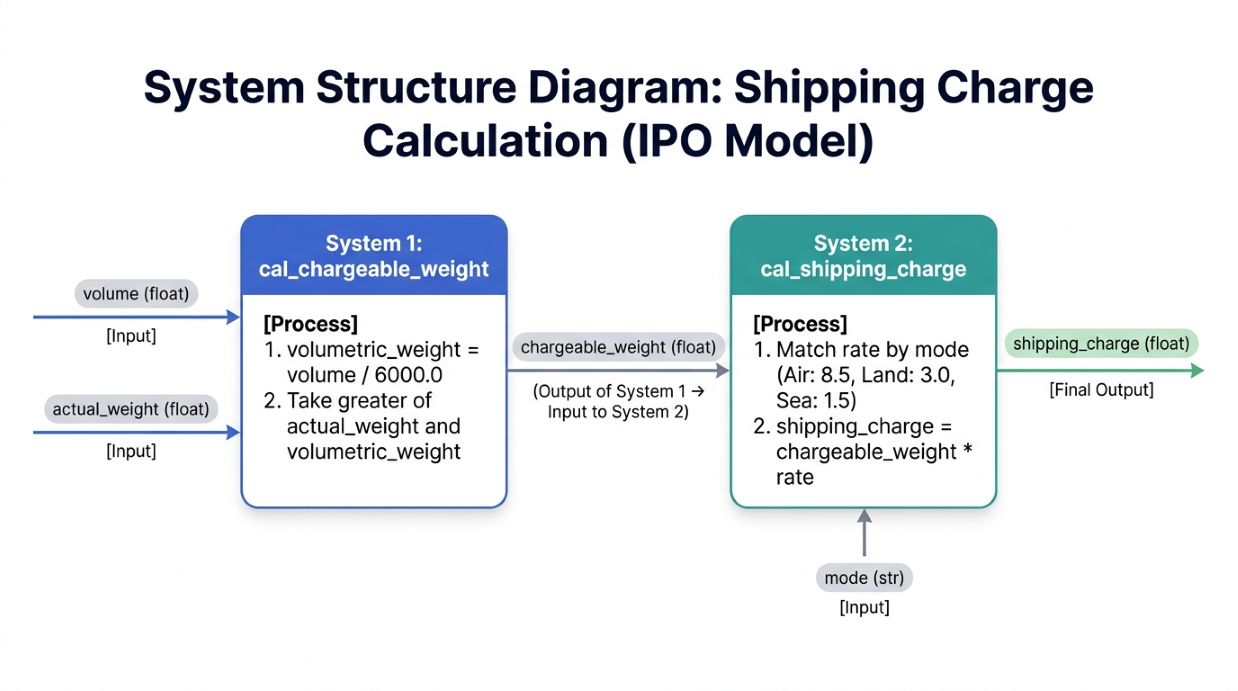
The shipping charge calculation can be divided into two functions (systems), where the output of the first function is an input to the second:
cal_chargeable_weight(volume: float, actual_weight: float) -> float: Takes the shipment volume and actual weight, computes the volumetric weight (volume / 6000.0), and returns the greater of the actual weight and the volumetric weight (chargeable_weight).cal_shipping_charge(chargeable_weight: float, mode: str) -> float: Takeschargeable_weight(the output ofcal_chargeable_weight) and the transportmode, selects the corresponding unit shipping rate, and returns the shipping charge (chargeable_weight * rate).
2. Python Code
# Function 1: Calculate chargeable weight from volume and actual weight
def cal_chargeable_weight(volume: float, actual_weight: float) -> float:
    volumetric_weight = volume / 6000.0
    if volumetric_weight >= actual_weight:
        chargeable_weight = volumetric_weight
    else:
        chargeable_weight = actual_weight
    return chargeable_weight


# Function 2: Calculate shipping charge from chargeable weight and transport mode
def cal_shipping_charge(chargeable_weight: float, mode: str) -> float:
    if mode == "Air":
        rate = 8.5
    elif mode == "Land":
        rate = 3.0
    elif mode == "Sea":
        rate = 1.5
    else:
        print("Mode is incorrect!")
        return -1.0 # An exception indicator
    shipping_charge = chargeable_weight * rate
    return shipping_charge


# Calculate and output shipping charges for the three shipments in Table 2
weight_air = cal_chargeable_weight(120000.0, 15.0)
charge_air = cal_shipping_charge(weight_air, "Air")
print(f"Air shipment charge: {charge_air:.2f} CNY")

weight_land = cal_chargeable_weight(3000.0, 2.5)
charge_land = cal_shipping_charge(weight_land, "Land")
print(f"Land shipment charge: {charge_land:.2f} CNY")

weight_sea = cal_chargeable_weight(500000.0, 120.0)
charge_sea = cal_shipping_charge(weight_sea, "Sea")
print(f"Sea shipment charge: {charge_sea:.2f} CNY")
Reference Solution 1 for [Q2.2]
Each function is an Input-Process-Output (IPO) system, and the output of System 1 (chargeable_weight) passes directly to System 2 as an input:
Reference Solution 2 for [Q2.1] (1 Helper Function + 3 Business Functions)
1. Functional Division
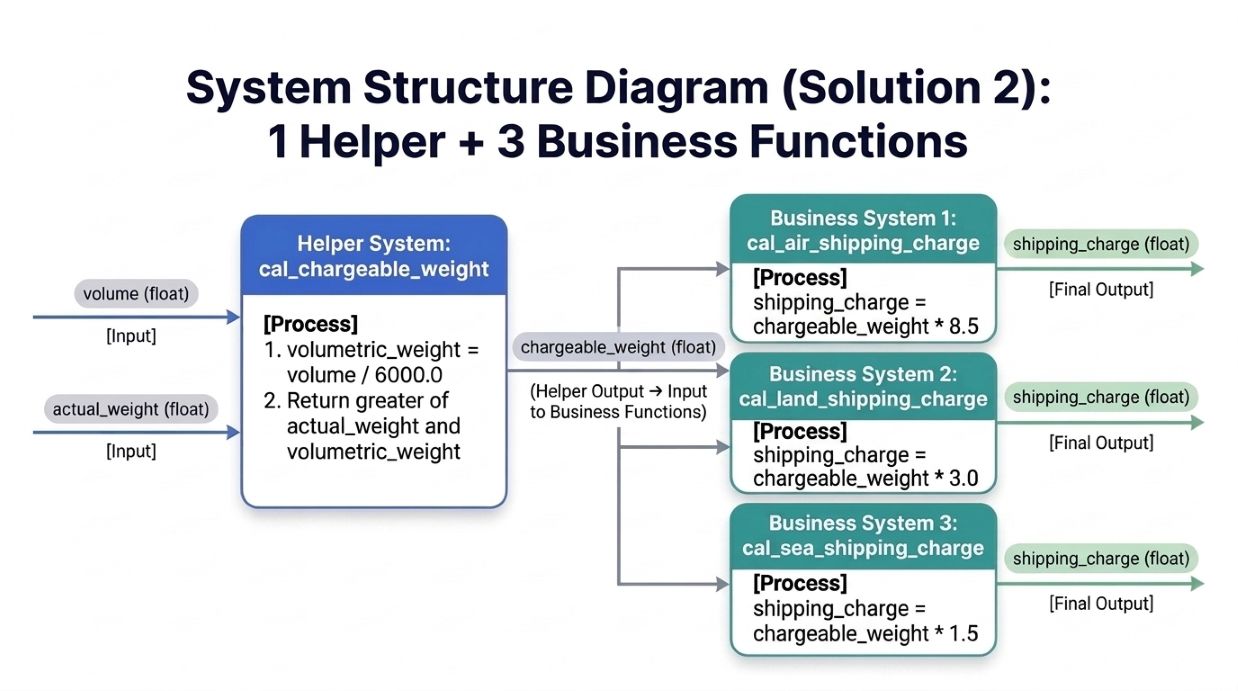
The calculation can also be divided into one helper function and three business functions:
- Helper Function (
cal_chargeable_weight): Takesvolumeandactual_weight, computes the volumetric weight (volume / 6000.0), and returns the greater of the actual weight and the volumetric weight (chargeable_weight). - Business Functions (
cal_air_shipping_charge,cal_land_shipping_charge, andcal_sea_shipping_charge): Each function takesvolumeandactual_weight, callscal_chargeable_weight(volume, actual_weight), and multiplies the result by the rate for that transport mode (8.5,3.0, or1.5, respectively).
2. Python Code
# Helper function: Calculate chargeable weight from volume and actual weight
def cal_chargeable_weight(volume: float, actual_weight: float) -> float:
    volumetric_weight = volume / 6000.0
    if volumetric_weight >= actual_weight:
        chargeable_weight = volumetric_weight
    else:
        chargeable_weight = actual_weight
    return chargeable_weight


# Business function 1: Calculate Air shipping charge
def cal_air_shipping_charge(volume: float, actual_weight: float) -> float:
    chargeable_weight = cal_chargeable_weight(volume, actual_weight)
    return chargeable_weight * 8.5


# Business function 2: Calculate Land shipping charge
def cal_land_shipping_charge(volume: float, actual_weight: float) -> float:
    chargeable_weight = cal_chargeable_weight(volume, actual_weight)
    return chargeable_weight * 3.0


# Business function 3: Calculate Sea shipping charge
def cal_sea_shipping_charge(volume: float, actual_weight: float) -> float:
    chargeable_weight = cal_chargeable_weight(volume, actual_weight)
    return chargeable_weight * 1.5


# Calculate and output shipping charges for the three shipments in Table 2
charge_air = cal_air_shipping_charge(120000.0, 15.0)
print(f"Air shipment charge: {charge_air:.2f} CNY")

charge_land = cal_land_shipping_charge(3000.0, 2.5)
print(f"Land shipment charge: {charge_land:.2f} CNY")

charge_sea = cal_sea_shipping_charge(500000.0, 120.0)
print(f"Sea shipment charge: {charge_sea:.2f} CNY")
Reference Solution 2 for [Q2.2]
The helper system (cal_chargeable_weight) takes volume and actual_weight and outputs chargeable_weight, which feeds into each of the three business systems (cal_air_shipping_charge, cal_land_shipping_charge, and cal_sea_shipping_charge) to compute shipping_charge:
[Q3] Question 3
Problem Statement
A retail chain monitors trial sales of a newly launched product over several consecutive days. For each day, output the day number, expected sales quantity for that day, and restocking alert status, in chronological order.
The daily alert rules are as follows:
- If expected sales are 150 units or more, the status is
"Red - Urgent restocking"; - If expected sales are at least 100 but fewer than 150 units, the status is
"Yellow - Routine restocking"; - If expected sales are fewer than 100 units, the status is
"Green - Sufficient stock".
A new product is monitored for 3 days. Expected sales on the first day are 80 units, and expected sales increase by 40 units each day thereafter. After producing the monitoring output for all days, output the message "Trial sales monitoring complete" once.
- [Q3.1] For the scenario above, first provide a structured description of the steps, and then write the corresponding Python code.
Reference Solution for [Q3.1]
1. Structured Description of Steps
# Define a helper function to return the alert status for a given expected sales quantity:
#     If expected sales are at least 150 units:
#         Return "Red - Urgent restocking"
#     Else if expected sales are at least 100 units:
#         Return "Yellow - Routine restocking"
#     Else:
#         Return "Green - Sufficient stock"
#
# Set total monitoring days to 3,
# first-day expected sales to 80 units,
# and daily sales increase to 40 units
#
# For each day from Day 1 to Day 3:
#     Calculate expected sales for the current day
#     Call the helper function to get the alert status for the current day's expected sales
#     Output the current day number, expected sales quantity, and alert status
#
# Output "Trial sales monitoring complete" once after all days are processed
2. Python Code
# Helper function: Return the restocking alert status for a given expected sales quantity
def get_alert_status(expected_sales: int) -> str:
    if expected_sales >= 150:
        return "Red - Urgent restocking"
    elif expected_sales >= 100:
        return "Yellow - Routine restocking"
    else:
        return "Green - Sufficient stock"


# Initialize parameters
total_days = 3
initial_sales = 80
daily_increase = 40

# Loop through each day from Day 1 to Day 3
for day in range(1, total_days + 1):
    # Calculate expected sales for the current day
    expected_sales = initial_sales + (day - 1) * daily_increase

    # Call the helper function to get the restocking alert status
    alert_status = get_alert_status(expected_sales)

    # Output day number, expected sales, and alert status
    print(f"Day {day}: Expected sales = {expected_sales} units, Alert status = {alert_status}")

# Output completion message once after the loop ends
print("Trial sales monitoring complete")