Chapter 4: if Statements and Branching Structures
Table of contents (19)
- Part 1: Core Concepts
- 4.1 Execute Only When a Condition Holds: The if Statement
- 4.2 Branch A or Branch B? The if/else Structure
- 4.3 Handling Multiple Cases: The if/elif/else Multi-Branch Structure
- 4.4 Evaluating Multiple Conditions: Logical Operators and, or, and not
- 4.5 Independent if Statements vs. if/elif Chains
- 4.6 Nested if Statements: Multi-Tiered Decisions
- 4.7 Combining Branching with Functions
- Core Exercises
- Part 2: Advanced Topics
- 4.8 Conditional Expressions: Single-Line Value Selection
- 4.9 Early Exit with return: Guard Clauses
- Advanced Exercises
- Supplementary Notes (Tips)
- Tip 1: Conditional Expressions and Truth Value Testing
- Tip 2: Return Value Mechanics of and/or vs. Truth Value
- Tip 3: Condition Order and Interval Relationships in Multi-Branch Statements
- Tip 4: Operator Precedence vs. Runtime Evaluation Order
- Tip 5: Discrete Grade Descriptions vs. Continuous Intervals in Code
Navigation: Previous: Chapter 3 - Built-in Functions and Function Calls
Language: English | 中文版
In the first three chapters, every program ran along a single, top-to-bottom path: the interpreter read and executed each line of code in sequence. This sequential structure works well when every step is fixed in advance.
Real-world business rules, however, depend on conditions and choices: an e-commerce order ships for free if the total reaches 99 yuan, but incurs a standard shipping fee otherwise; a payment succeeds when an account has enough funds, but fails when funds run short; an exam score passes at 60 points or above, but fails otherwise. The core idea across all these scenarios is simple: check the current state at runtime, then decide which execution path to take.
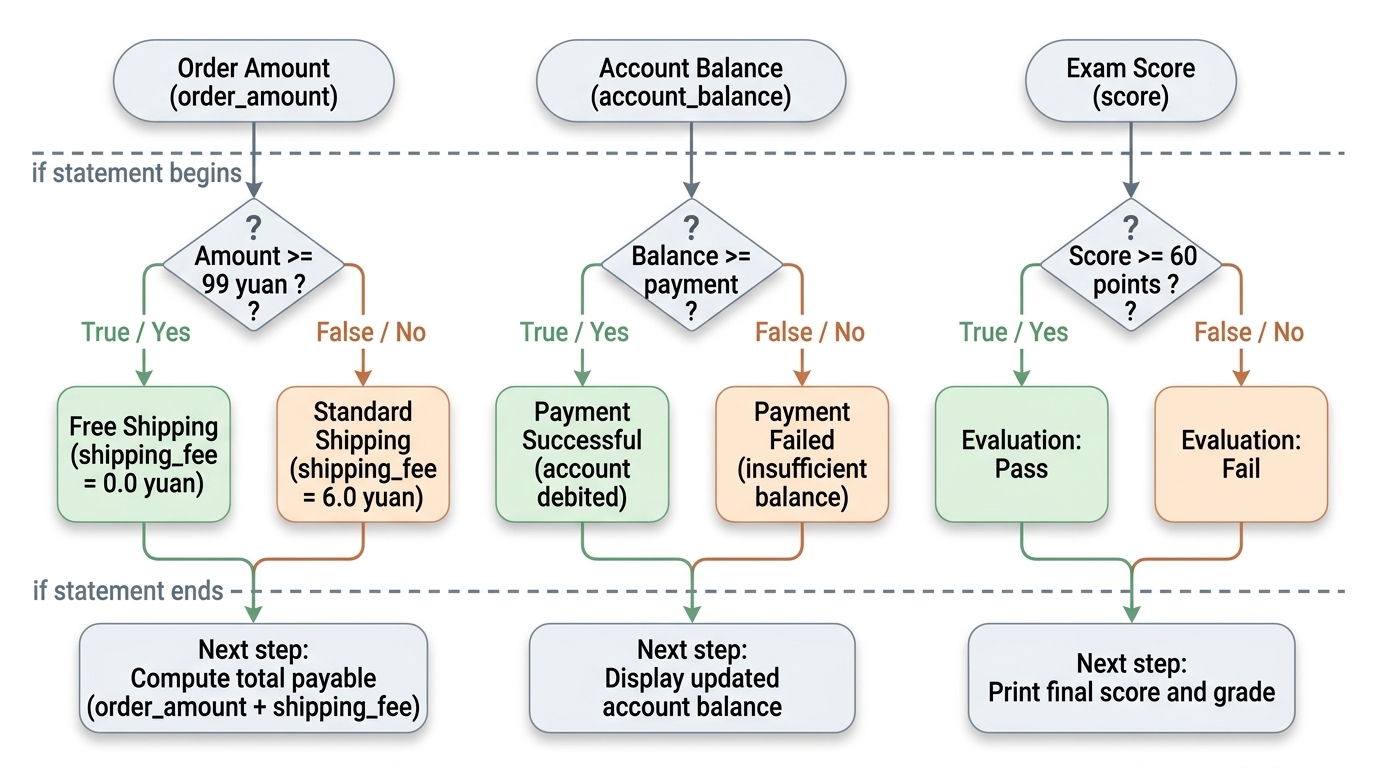
In Section 1.5 of Chapter 1, we examined comparison and logical operators, which evaluate to True or False 〔Tip 2〕. This chapter introduces conditional branching: it uses the if statement to let programs make decisions at runtime.
This chapter contains two parts:
- Part 1: Core Concepts covers single-branch (
if), two-way (if/else), and multi-way (if/elif/else) syntax and execution rules; combining conditions with logical operators (and,or,not) and short-circuit evaluation; nested branching; and using conditional logic inside custom functions. - Part 2: Advanced Topics introduces concise conditional expressions (ternary operations) and guard clauses that use early
returnstatements to flatten nested logic.
Part 1: Core Concepts
4.1 Execute Only When a Condition Holds: The if Statement
4.1.1 Deciding Whether to Execute a Code Block
Consider free shipping rules in e-commerce: orders of 99 yuan or more ship for free, while orders below that threshold incur a 6 yuan standard shipping fee.
Using comparison operators, we can test whether an order amount reaches the free shipping threshold and store the resulting boolean in a variable:
order_amount = 120.0
# Compare order amount with threshold; assign True or False to is_free_shipping
is_free_shipping = order_amount >= 99.0
print(is_free_shipping)
Output:
True
The expression order_amount >= 99.0 evaluates to True, which shows that the order qualifies for free shipping.
In real applications, programs do more than inspect boolean flags: they must choose different execution paths based on the outcome. When the condition holds, the program sets shipping to 0 yuan; otherwise, it keeps the standard fee. Python uses the if statement to control whether a specific block of code runs.
Example: Set a default base shipping fee, and reset the fee to zero if the order qualifies for free shipping.
# main flow starts
order_amount = 120.0  # Order amount
shipping_fee = 6.0    # Default base shipping fee (standard charge below threshold)

# If order_amount exceeds 99.0:
#     Reset shipping fee to 0.0
if order_amount >= 99.0:
    shipping_fee = 0.0

# Exit the if block and continue main flow: total = order amount + shipping fee
total = order_amount + shipping_fee
print(f"Shipping fee: {shipping_fee:.2f} yuan")  # :.2f formats the float to two decimal places
print(f"Total payable: {total:.2f} yuan")
Output:
Shipping fee: 0.00 yuan
Total payable: 120.00 yuan
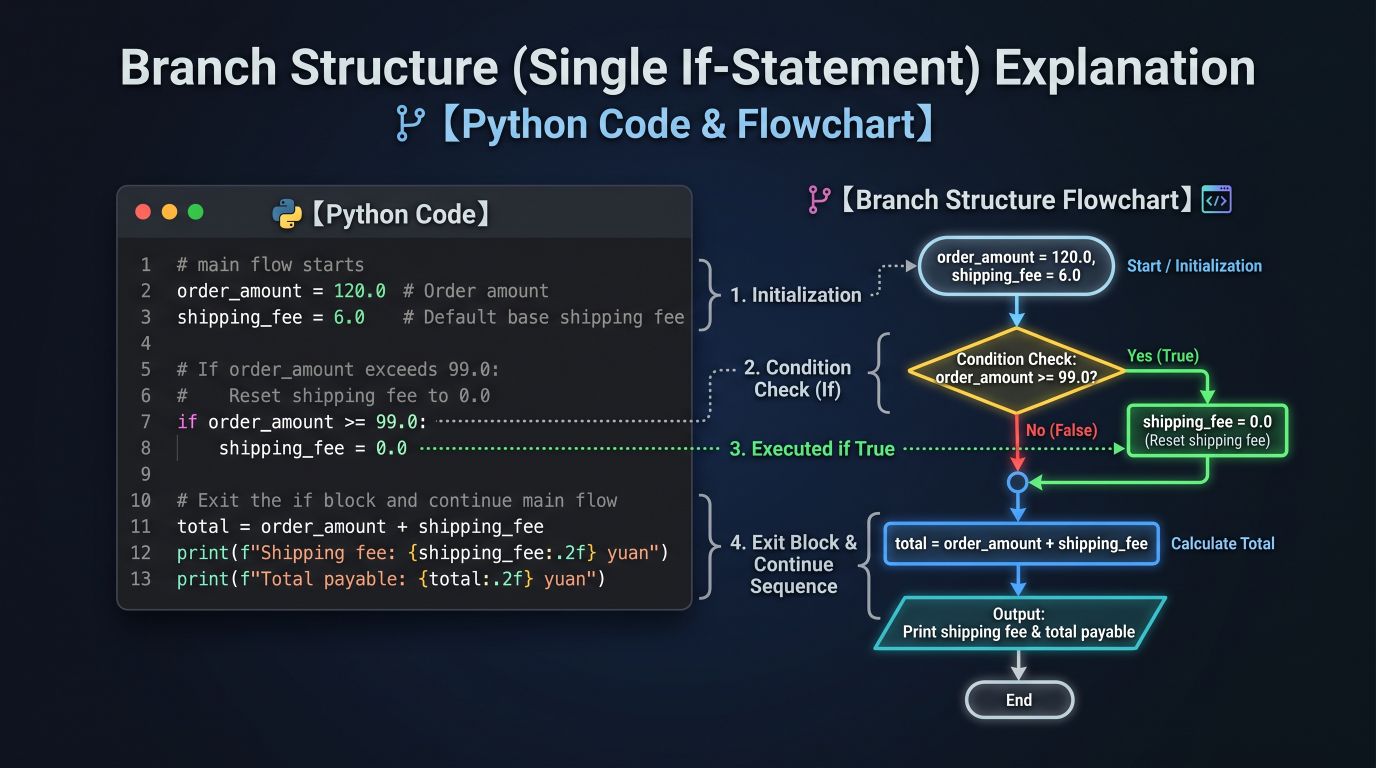
As shown in the diagram above, this program runs in four steps:
- Initialize variables: Set
order_amountto120.0andshipping_feeto6.0. - Evaluate the condition: At the
ifstatement, the interpreter evaluatesorder_amount >= 99.0, which yieldsTrue. - Execute the
ifbranch: Because the condition isTrue, execution enters the indented block underifand runsshipping_fee = 0.0, which updatesshipping_feeto0.0. - Resume main flow: Leaving the
ifblock, execution continues sequentially withtotal = order_amount + shipping_fee. Heretotal = 120.0 + 0.0 = 120.0, and the program prints the fee and total.
Tip (Format specifier
:.2f): Inside an f-string,:.2fcontrols the display format of floating-point numbers. The colon:begins the format specification,.2specifies two digits after the decimal point, andfspecifies a float. Financial amounts typically align to the cent (fen); using:.2fformats0.0as0.00and120.0as120.00. Formatting modifies only the printed string; it leaves the variable's numeric value and type untouched.
If we change order_amount to 85.0, the expression 85.0 >= 99.0 evaluates to False. The interpreter skips every statement inside the if block, so shipping_fee retains its initial value of 6.0. Execution continues after the block, which computes 85.0 + 6.0 = 91.0.
| Order Amount | Condition order_amount >= 99.0 |
Enters if Block? |
Final Shipping Fee | Final Total |
|---|---|---|---|---|
| 85.0 yuan | False |
No (skip) | 6.0 yuan | 91.0 yuan |
| 99.0 yuan | True |
Yes (run) | 0.0 yuan | 99.0 yuan |
| 120.0 yuan | True |
Yes (run) | 0.0 yuan | 120.0 yuan |
In-Class Exercise: Change order_amount to 98.0, 99.0, and 100.0 in turn. Calculate the shipping fee and total payable by hand first, then run the code to verify your answers. Notice that "reaches 99 yuan" includes exactly 99 yuan, so we use >= rather than >.
4.1.2 Colons, Indentation, and Code Blocks
The standard syntax of an if statement is:
if condition_expression:
    statement_1_when_true
    statement_2_when_true
    ...

subsequent_statement_after_branch
This structure has four parts:
- Keyword
if: Marks the start of a conditional branch (if block). - Condition: Follows
ifand evaluates to a boolean value. It can be a comparison expression, a logical expression, or a boolean variable 〔Tip 1〕. - Colon
:: Ends the condition line and introduces the indented block below it. - Indented code block: The statements belonging to this branch, indented consistently (PEP 8 recommends 4 spaces).
When indentation returns to the level of the if keyword, the program leaves the branch and returns to the main flow.
In our shipping example, the only statement inside the if block is shipping_fee = 0.0. Therefore, the condition controls only whether shipping_fee is updated. The statements that calculate total and print the output share the outer indentation level with if. They do not belong to the branch, so they run whether the condition is true or false.
A structure that executes a block of statements when a condition holds and skips it otherwise is called a single-branch structure.
Note: When checking whether two variables or values are equal, use the equality operator
==in the condition (such asstatus == "PAID"). Do not confuse it with the single equals sign=, which assigns a value to a variable.
4.1.3 Multiple Statements Within a Branch
A single code block can contain multiple statements. As long as they share the same indentation level, the interpreter executes or skips them together as a unit.
Example: Deduct 20 yuan when an order reaches 200 yuan, and print a discount notice to the terminal.
order_amount = 230.0
payment = order_amount  # Set default payable to original price

# If order_amount >= 200.0:
#     Deduct 20.0 yuan
#     Print discount notice
if order_amount >= 200.0:
    payment = order_amount - 20.0
    print("Discount applied: 20 yuan off orders of 200 yuan or more")

# Exit if block and display final payable amount
print(f"Payable amount: {payment:.2f} yuan")
Output:
Discount applied: 20 yuan off orders of 200 yuan or more
Payable amount: 210.00 yuan
Here order_amount >= 200.0 evaluates to True. Execution enters the if block and runs both statements in sequence: it deducts 20 yuan and prints the notice. Because both lines share the same indentation, they belong to the same block.
If we change order_amount to 180.0, the condition evaluates to False. The interpreter skips both statements in the block. The terminal prints no discount notice, and payment remains at its initial value of 180.0.
In-Class Exercise: Change order_amount to 180.0. Predict the terminal output before running the program, then execute the code to verify your prediction.
4.2 Branch A or Branch B? The if/else Structure
4.2.1 Two-Way Branching
Many decisions are not simply "run or skip," but an explicit choice between two alternatives:
- When an account balance is sufficient, deduct the payment and notify success.
- When an account balance is insufficient, prevent the deduction and notify failure.
For these mutually exclusive choices, Python provides the if/else two-way branching structure, which directs execution down exactly one of two paths.
Example: Deduct funds on sufficient balance, or print a failure notice otherwise.
account_balance = 120.0  # Balance before payment
payment = 114.0          # Payment amount for this transaction

# If account balance >= payment amount:
#     Deduct payment amount
#     Notify payment success
# Else:
#     Notify insufficient balance
if account_balance >= payment:
    account_balance = account_balance - payment
    print("Payment successful")
else:
    print("Insufficient balance, payment incomplete")

# Exit if/else structure and display updated balance
print(f"Current balance: {account_balance:.2f} yuan")
Output:
Payment successful
Current balance: 6.00 yuan
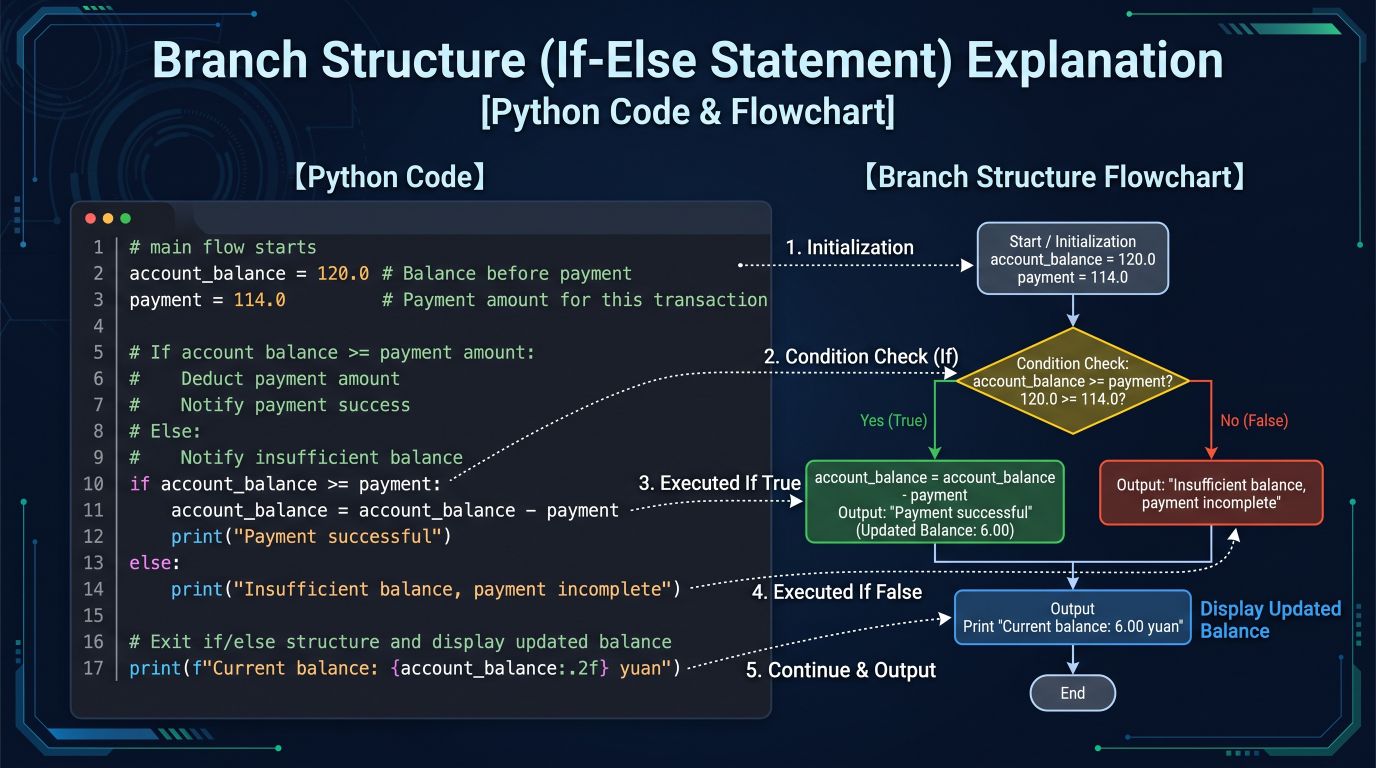
As shown in the diagram above, execution begins by evaluating account_balance >= payment:
- When
True: Execution enters the indented block underif, deducts the payment, and prints "Payment successful". Once this block finishes, the interpreter skips the entireelseblock. - When
False: The interpreter skips theifblock and runs theelseblock directly, printing "Insufficient balance, payment incomplete". This branch does not modifyaccount_balance, so the variable stays unchanged.
Two-way branching enforces mutual exclusion: on any single run, the interpreter executes exactly one branch. It never runs both branches, and it never skips both branches. After completing the chosen branch, execution rejoins the common flow below the structure.
| Initial Balance | Payment Amount | Condition Evaluation | Executed Branch | Balance After Transaction |
|---|---|---|---|---|
| 120.0 yuan | 114.0 yuan | True |
if branch (success) |
6.0 yuan |
| 100.0 yuan | 114.0 yuan | False |
else branch (failure) |
100.0 yuan |
| 114.0 yuan | 114.0 yuan | True |
if branch (success) |
0.0 yuan |
4.2.2 Indentation Alignment and Rules for else
The standard syntax for two-way branching is:
if condition_expression:
    statement_when_true
    ...
else:
    statement_when_false
    ...

subsequent_statement_after_branch
Two rules govern else:
- Indentation alignment:
elsemust align at the same indentation level as its matchingif(the leftmost column of the structure) to pair them together. - No condition on
else: Write a colon:directly afterelse. Never attach a condition expression toelse. The keywordelseacts as the fallback whenever theifcondition isFalse.
4.2.3 Two Common Patterns: Default Value vs. Explicit Dual Branches
In Section 4.1.1, we computed shipping fees using a default value updated by a single if statement:
shipping_fee = 6.0  # Default base shipping fee

# If order_amount >= 99.0:
#     Update shipping fee to 0.0
if order_amount >= 99.0:
    shipping_fee = 0.0
We can solve the same problem using an explicit if/else structure:
order_amount = 85.0

# If order_amount >= 99.0:
#     Free shipping (0.0 yuan)
# Else:
#     Standard shipping (6.0 yuan)
if order_amount >= 99.0:
    shipping_fee = 0.0
else:
    shipping_fee = 6.0

print(f"Shipping fee: {shipping_fee:.2f} yuan")
Output:
Shipping fee: 6.00 yuan
Comparing these two patterns:
- Default value pattern (single branch): Works best when most cases use a default value and only occasional exceptions change it. It uses fewer lines of code.
- Explicit dual branches (
if/else): Assigns values explicitly in both branches. This symmetric structure makes variable assignments clear on every path without requiring readers to check whether a default was set earlier. In complex business logic, explicit branching is often clearer and less prone to errors.
In-Class Exercise: In the payment example, change account_balance to 100.0 and 114.0. Predict both printed lines before executing the code, then run it to verify.
4.3 Handling Multiple Cases: The if/elif/else Multi-Branch Structure
4.3.1 Classifying Grades and the elif Keyword
When business rules divide into three or more mutually exclusive intervals, if/else alone is insufficient. Consider university course grading:
| Score Interval 〔Tip 5〕 | Grade |
|---|---|
| 90 and above | Excellent |
| 80 to 89 | Good |
| 60 to 79 | Pass |
| Below 60 | Fail |
A given score belongs to exactly one of these four grades. Python uses the if/elif/else multi-branch structure to express this choice among multiple alternatives.
elif is short for else if ("otherwise, if..."). Its core rule is: evaluate this condition only if all preceding conditions were false.
Example: Input a numerical score on a 100-point scale and display the corresponding grade.
score = 85

# If score >= 90:
#     Grade is "Excellent"
# Else if score >= 80:
#     Grade is "Good"
# Else if score >= 60:
#     Grade is "Pass"
# Else:
#     Grade is "Fail"
if score >= 90:
    grade = "Excellent"
elif score >= 80:
    grade = "Good"
elif score >= 60:
    grade = "Pass"
else:
    grade = "Fail"

print(f"Score: {score}, Grade: {grade}")
Output:
Score: 85, Grade: Good
4.3.2 Top-to-Bottom Evaluation: Exit on First Match
For input score = 85, the interpreter executes these steps:
| Step | Condition Expression | Evaluation | Action |
|---|---|---|---|
| 1 | score >= 90 |
False |
Condition not met; skip branch and evaluate next condition |
| 2 | score >= 80 |
True |
Condition met; execute grade = "Good"; immediately exit the entire branch structure |
| 3 | score >= 60 |
Not evaluated | Skipped (evaluation halts) |
| 4 | else |
Not executed | Skipped |
The execution rule for multi-branch structures is strict: evaluate from top to bottom, and exit on the first match:
- The interpreter begins at the first
ifand evaluates conditions sequentially downward. - When a condition evaluates to
True, the interpreter runs the indented block under that condition. - Once that block finishes, the entire branching structure terminates. The interpreter skips all remaining
elifandelseblocks.
Beginners often write elif score >= 80 and score < 90:. While logically correct, the score < 90 check is redundant. Execution reaches elif score >= 80 only after the previous check score >= 90 failed (which already ruled out scores of 90 or higher). Writing score >= 80 directly keeps the code clean without repeating constraints.
4.3.3 Why Condition Order Matters
When working with continuous numerical intervals, the order in which you write conditions determines whether your program logic is correct.
The rule "from strictest to loosest" applies because the ranges of these conditions nest inside one another. In our one-sided lower-bound checks (score >= 90, score >= 80, score >= 60):
- Subset relations on the real line: The solution set of a stricter condition is a proper subset of a looser condition:[90, 100] \subset [80, 100] \subset [60, 100]
- High-score coverage: High scores satisfy all lower thresholds simultaneously. For example, a score of 95 satisfies \ge 90, \ge 80, and \ge 60.
Reversing the order and placing the looser condition first creates a shadowing bug where looser conditions intercept values before stricter checks can run:
# Incorrect: Order reversed (from loosest to strictest)
# Placing the loose condition (>= 60) first intercepts high scores early:
if score >= 60:
    grade = "Pass"
elif score >= 80:
    grade = "Good"
elif score >= 90:
    grade = "Excellent"
Because if/elif/else terminates on the first match, when score = 95, the first condition score >= 60 matches immediately. The program assigns grade = "Pass" and exits the structure, so the stricter branches below never run.
Ordering Principles:
When condition ranges nest inside one another, arrange branches from strictest to loosest 〔Tip 3〕:
- When checking with
>=: Larger numbers impose stricter conditions with smaller solution sets. Arrange thresholds in descending order (check the strictest threshold 90 first, then 80, and finally the broadest threshold 60). - When checking with
<=: Smaller numbers impose stricter conditions with smaller solution sets. Arrange thresholds in ascending order (check the strictest, smallest threshold first, then broaden to larger thresholds).
In-Class Exercise: Test score with values 59, 60, 79, 80, 89, and 90. Calculate the expected grade by hand first, then run the code to verify boundary behavior.
4.4 Evaluating Multiple Conditions: Logical Operators and, or, and not
In everyday decisions, we often evaluate several conditions together: "If it does not rain tomorrow and the temperature exceeds 20 degrees, we will hike"; or "Visitors with a student ID or a senior card receive half-price admission."
In Python, when a single comparison operator (>, <, ==) cannot express compound logic, we combine conditions using logical operators: and, or, and not.
4.4.1 The and Operator: Both Conditions Must Hold
The and operator evaluates to True only when both operands are True. If either side is False, the expression evaluates to False 〔Tip 2〕.
Example: A store offers a 20 yuan discount only when a customer is a VIP member and the order total reaches 100 yuan.
order_amount = 120.0
is_vip = True

# If order amount >= 100 and customer is VIP:
#     Set discount to 20.0
# Else:
#     Set discount to 0.0
if order_amount >= 100.0 and is_vip:
    discount = 20.0
else:
    discount = 0.0

# Payable amount = order amount - discount
payment = order_amount - discount
print(f"Discount: {discount:.2f} yuan")
print(f"Payable amount: {payment:.2f} yuan")
Output:
Discount: 20.00 yuan
Payable amount: 100.00 yuan
Tip
The variable
is_vipis already a boolean (TrueorFalse). Writingif order_amount >= 100.0 and is_vip:is clear and idiomatic. Do not writeis_vip == True.
4.4.2 The or Operator: At Least One Condition Must Hold
The or operator evaluates to True whenever at least one operand is True. It evaluates to False only when both operands are False 〔Tip 2〕.
Example: An order qualifies for free shipping if the order total reaches 99 yuan or the customer is a VIP member.
order_amount = 85.0
is_vip = True

# If order amount >= 99 or customer is VIP:
#     Shipping fee is 0.0
# Else:
#     Shipping fee is 6.0
if order_amount >= 99.0 or is_vip:
    shipping_fee = 0.0
else:
    shipping_fee = 6.0

print(f"Shipping fee: {shipping_fee:.2f} yuan")
Output:
Shipping fee: 0.00 yuan
Here order_amount >= 99.0 evaluates to False (only 85 yuan spent), but because is_vip is True, the entire or expression evaluates to True, so the order qualifies for free shipping.
A truth table highlights the difference between and and or:
| Condition A | Condition B | A and B (True only if both are true) |
A or B (True if at least one is true) |
|---|---|---|---|
False |
False |
False |
False |
True |
False |
False |
True |
False |
True |
False |
True |
True |
True |
True |
True |
4.4.3 Negation and Operator Precedence: not and Parentheses
The logical negation operator not inverts a boolean value:
not TruebecomesFalsenot FalsebecomesTrue
When an expression mixes multiple operators, Python evaluates them in strict precedence order:
That is, Python computes arithmetic operations first, evaluates comparisons next, applies not, computes and, and evaluates or last 〔Tip 4〕.
Parentheses () carry the highest precedence. When writing compound conditions, use parentheses () to group subexpressions explicitly 〔Tip 4〕. This guarantees the intended evaluation order and keeps the expression readable.
Example: Free shipping applies on orders of 99 yuan or to VIP members, except for deliveries to remote areas.
order_amount = 85.0
is_vip = True
is_remote_area = False  # False means not a remote area

# If (order amount >= 99 or customer is VIP) and not a remote area:
#     Shipping fee is 0.0
# Else:
#     Shipping fee is 6.0
if (order_amount >= 99.0 or is_vip) and not is_remote_area:
    shipping_fee = 0.0
else:
    shipping_fee = 6.0

print(f"Shipping fee: {shipping_fee:.2f} yuan")
Output:
Shipping fee: 0.00 yuan
4.4.4 Common Pitfall: Omitting the Comparison Target
When checking whether a variable matches one of several values, natural language phrasing can lead to this trap:
# Incorrect: Do not write conditions this way!
if coupon == "SAVE10" or "VIP10":
    ...
Beginners often expect this to mean "if coupon is SAVE10 or VIP10." In reality, this creates a major bug:
- Python parses the expression into two distinct parts:
coupon == "SAVE10"on the left, and the string"VIP10"on the right. - If
coupondoes not match, the left side evaluates toFalse. The interpreter then evaluatesFalse or "VIP10". - In Python, any non-empty string is considered truthy in boolean tests.
- Because
False or "VIP10"returns"VIP10"(which is truthy), the condition passes no matter what valuecouponholds 〔Tip 2〕.
Correct approach: Write a complete comparison expression on each side of or, naming the variable explicitly:
coupon_code = "VIP10"

# If coupon code is "SAVE10" or coupon code is "VIP10":
#     Notify valid coupon
# Else:
#     Notify invalid coupon
if coupon_code == "SAVE10" or coupon_code == "VIP10":
    print("Coupon valid")
else:
    print("Invalid coupon")
Output:
Coupon valid
When checking whether a number falls within an interval, Python supports chained comparisons, which match standard mathematical notation:
# Form 1: Explicit conjunction with and
if score >= 60 and score < 80:
    ...

# Form 2: Python chained comparison (matches mathematical notation, recommended)
if 60 <= score < 80:
    ...
Both forms are equivalent.
4.4.5 Short-Circuit Evaluation
When Python evaluates compound conditions with and or or, such as:
A and B and C and D
# Where A, B, C, D are comparison expressions or boolean values
Python evaluates subexpressions from left to right. Once the preceding operands determine the overall result, the interpreter stops evaluation immediately. This mechanism is called short-circuit evaluation.
Short-circuit rules follow two principles:
- Short-circuiting with
and: Becauseandrequires every operand to be true, if the left operand isFalse, the entire expression cannot be true. Python stops immediately and skips the right operand. - Short-circuiting with
or: Becauseorrequires only one true operand, if the left operand isTrue, the entire expression is already true. Python stops immediately and skips the right operand.
| Expression | Left Operand | Evaluates Right Operand? | Reason |
|---|---|---|---|
A and B |
False |
No (short-circuited) | and requires both to be true; a false left operand makes the entire expression false |
A and B |
True |
Yes (continues) | The left operand is true, so the overall outcome depends on the right operand |
A or B |
True |
No (short-circuited) | or requires only one true operand; a true left operand makes the entire expression true |
A or B |
False |
Yes (continues) | The left operand is false, but a true right operand can still make the expression true |
Short-circuit evaluation saves computation and makes defensive programming possible. Its primary use is guarding a risky operation by placing a safety check on the left.
Example: Compute the average score. If
course_countis 0, dividing by zero raises a runtime error and stops execution. We use the short-circuit behavior ofandto guard against division by zero.
total_score = 150.0
course_count = 0

# Guard using short-circuit evaluation:
# When course_count is 0, the left operand evaluates to False.
# The division on the right never runs, avoiding a ZeroDivisionError.
if course_count > 0 and (total_score / course_count) >= 60.0:
    print("Passed assessment")
else:
    print("No valid scores or assessment not passed")
Output:
No valid scores or assessment not passed
In this example, because course_count = 0:
- Python evaluates
course_count > 0, which yieldsFalse. - This triggers the short-circuit behavior of
and. The right-hand division(total_score / course_count) >= 60.0is skipped entirely. - The program avoids a division-by-zero error and executes the
elsebranch safely.
WarningOperand order matters
Short-circuit evaluation proceeds strictly from left to right. Reversing the operands:
if (total_score / course_count) >= 60.0 and course_count > 0:
forces Python to evaluate the division first. Whencourse_countis 0, Python immediately raisesZeroDivisionError: float division by zeroand crashes. Always place protective guard checks on the left, and place expressions that depend on those checks on the right.
4.5 Independent if Statements vs. if/elif Chains
Beginners often confuse independent if statements with an if/elif/else chain. The two structures express very different business logic.
4.5.1 Independent Business Rules: Consecutive if Statements
Suppose a store runs a promotion:
- Orders of 100 yuan or more receive a coupon.
- Orders of 200 yuan or more also receive a custom tote bag.
- Customers can earn both rewards at the same time (the two rules operate independently).
A customer spending 250 yuan qualifies for both gifts. We model this using multiple independent if statements:
order_amount = 250.0

# Rule 1: If order amount >= 100, award a coupon
if order_amount >= 100.0:
    print("Award coupon (reward for 100 yuan orders)")

# Rule 2: If order amount >= 200, award a custom tote bag (independent check)
if order_amount >= 200.0:
    print("Award custom tote bag (reward for 200 yuan orders)")
Output:
Award coupon (reward for 100 yuan orders)
Award custom tote bag (reward for 200 yuan orders)
Each independent if statement represents a standalone checkpoint. Whether the first condition is true or false, the interpreter always evaluates the second if in sequence.
4.5.2 Mutually Exclusive Choices: The if/elif Chain
Now suppose the store updates its policy: "Orders of 200 yuan or more receive only a tote bag; orders between 100 and 199 yuan receive only a coupon"—the two rewards are mutually exclusive.
If we use two independent if statements, a customer spending 250 yuan receives both gifts, which violates the policy. An if/elif chain enforces the rule correctly:
order_amount = 250.0

# If order amount >= 200:
#     Award a custom tote bag
# Else if order amount >= 100:
#     Award a coupon
if order_amount >= 200.0:
    print("Award custom tote bag")
elif order_amount >= 100.0:  # Evaluated only when order is under 200 yuan
    print("Award coupon")
Output:
Award custom tote bag
| Business Rule Characteristic | Recommended Control Structure | Core Behavior | Practical Examples |
|---|---|---|---|
| Independent rules (can accumulate) | Multiple independent if statements |
Evaluates each condition separately; can trigger multiple outcomes | Stacking promotional gifts, multi-field form validation |
| Mutually exclusive choices (select one) | A single if/elif/else chain |
Exits immediately upon the first match; executes at most one branch | Letter grade assignment, tiered shipping rates, exclusive discounts |
4.6 Nested if Statements: Multi-Tiered Decisions
4.6.1 Checking Prerequisites Before Detailed Checks
Many decisions follow a hierarchy where a second check makes sense only after a prerequisite check passes.
Consider displaying product prices in an online store:
- Check whether the user is logged in.
- If logged in, check membership status: VIP members see the discounted price of 80 yuan, while regular users see the standard price of 100 yuan.
- If not logged in, skip the membership check entirely and prompt the user to log in first.
Placing an if statement inside the indented block of an outer if or else creates nested conditionals.
Example: Evaluate login status and membership tier using nested branching.
is_logged_in = True  # Whether user is logged in
is_vip = False       # Whether user is VIP member

# If user is logged in:
#     If user is VIP:
#         Price is 80.0
#     Else:
#         Price is 100.0
#     Print product price
# Else:
#     Prompt to log in first
if is_logged_in:

    # ----------- Inner nested if block starts -----------
    # Prerequisite: is_logged_in is True
    if is_vip:
        price = 80.0
    else:
        price = 100.0
    # ----------- Inner nested if block ends -------------

    # Continue outer if block
    print(f"Product price: {price:.2f} yuan")
else:   # is_logged_in is False
    print("Please log in to view price")
Output:
Product price: 100.00 yuan
4.6.2 Indentation Determines Which if an else Pairs With
In Python, indentation alone determines which if an else belongs to:
- An
else:with no indentation aligns with the outerif is_logged_in:, to handle the unauthenticated case. - An
else:indented by 4 spaces aligns with the innerif is_vip:, to handle the authenticated non-VIP case.
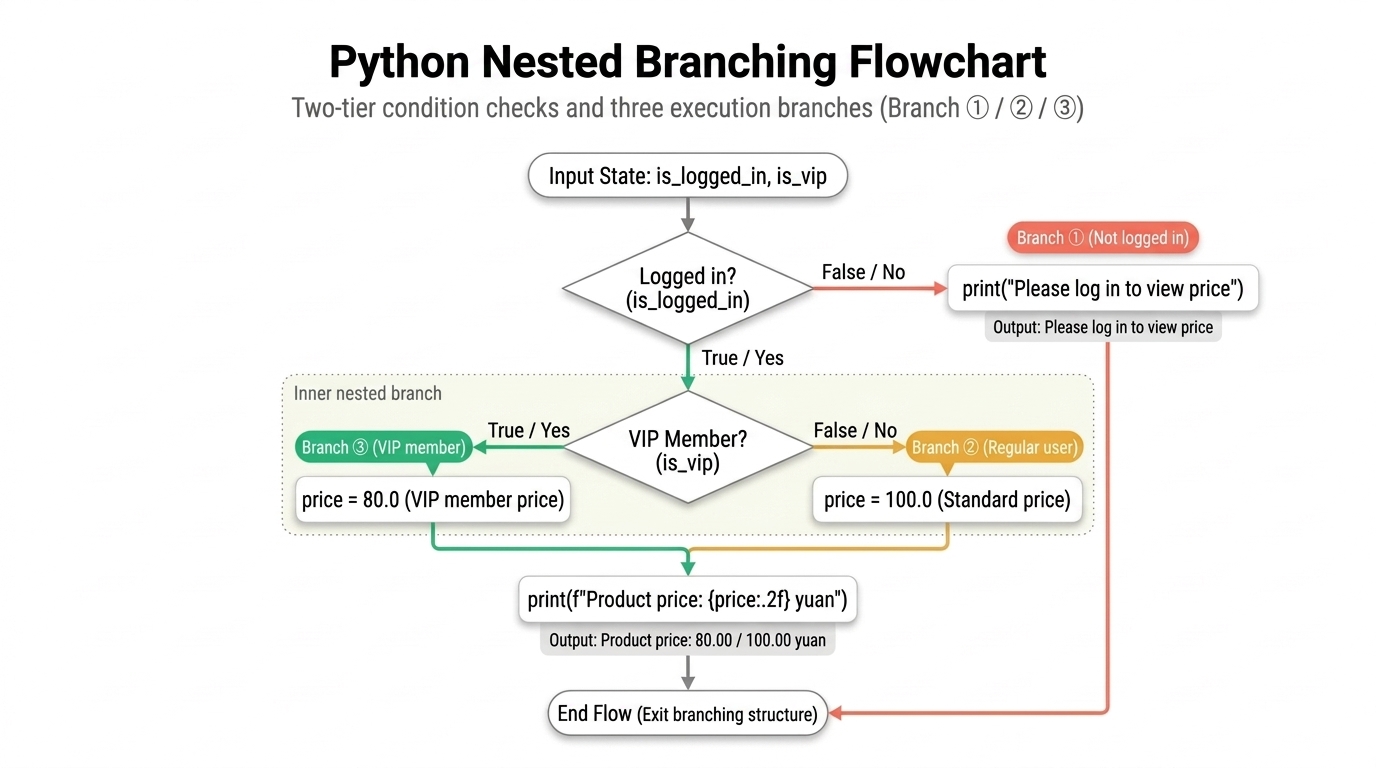
As shown in the flowchart, execution traces three paths:
- Branch ① (Not logged in): When the outer check
is_logged_inisFalse, execution jumps directly to the outerelseand runsprint("Please log in to view price"). The interpreter skips the inner block completely and never evaluatesis_vip. - Branch ② (Logged in, regular user): The outer check evaluates to
True, so execution enters the inner block. The inner checkis_vipevaluates toFalse, so the program takes the innerelsebranch, sets the standard price (100.0yuan), and continues to the shared print statement. - Branch ③ (Logged in, VIP member): Both the outer and inner checks evaluate to
True. The program takes the innerifbranch, sets the discounted price (80.0yuan), and continues to the shared print statement.
Coding style: Python allows deeply nested
ifstatements, but nesting three or more levels deep pushes code far to the right (often called "arrow code") and hurts readability. Section 4.9 shows how to flatten nested logic using guard clauses and early returns.
4.7 Combining Branching with Functions
4.7.1 Selecting Calculation Branches from Inputs
In Chapter 2, we established the Input-Process-Output (IPO) model for functions. Introducing if statements into a function body lets the function select different calculation paths based on its arguments.
Recall the shipping calculation from the exercises in Chapter 2 (billable weight is a positive integer in kilograms):
- 1 kg or less (base weight): Up to 1 kg, charge a flat base fee of 12 yuan.
- Over 1 kg (additional weight): Add 5 yuan for each additional kilogram beyond the first: 12 + (\text{weight} - 1) \times 5.
Example: Write a shipping calculation function that handles base and additional weight tiers.
def calculate_freight(weight: int) -> int:
    """Calculate freight based on package weight.

    Parameters:
        weight (int): Billable weight (positive integer, in kg)
    Returns:
        int: Calculated freight amount (yuan)
    """
    # 1 kg or less (base weight; packages under 1 kg are charged as 1 kg):
    if weight <= 1:
        freight = 12
    else:
        # Over 1 kg (additional weight): 5 yuan for each additional kg
        freight = 12 + (weight - 1) * 5

    # Exit branch and return final freight
    return freight


# Test calls
print(calculate_freight(1))  # 1 kg -> Base freight: 12 yuan
print(calculate_freight(2))  # 2 kg -> 12 + 1*5 = 17 yuan
print(calculate_freight(4))  # 4 kg -> 12 + 3*5 = 27 yuan
Output:
12
17
27
4.7.2 Unified Output: Single Exit Point
This function proceeds through three distinct stages:
- Receive input: The parameter
weighttakes the argument passed by the caller. - Branch calculation: An
if/elsecheck testsweight <= 1and computesfreightin the matching branch. - Return result:
return freightsits outside the branching structure, aligned withif. Whichever branch runs,freightholds the final value, which this last line returns to the caller.
Writing a function with a single return statement after its conditional logic is called the single exit point pattern.
In-Class Exercise: Call calculate_freight(3) and calculate_freight(5). Calculate the expected return values by hand, then run the script to verify (expected outputs are 22 and 32).
Core Exercises
In practice, programmers first analyze business requirements, then choose clear function names, parameters, type annotations, and return types. Implement each function according to its specification and test it using the provided cases.
Exercise 1: Food Delivery Order Total
A food delivery platform applies these delivery fee rules:
- The standard delivery fee is 5.0 yuan.
- Delivery is free (0.0 yuan) if the food total reaches 30.0 yuan or more, or if the customer is a VIP member.
- The final payable amount is the sum of the food total and delivery fee.
Test Cases (for self-verification):
| Test Case | Food Total (yuan) | VIP Member (is_vip) |
Expected Return | Description |
|---|---|---|---|---|
| Case 1 | 25.0 |
False |
30.0 |
Under 30 yuan and non-VIP: adds 5.0 yuan delivery fee |
| Case 2 | 30.0 |
False |
30.0 |
Exactly 30 yuan: free delivery |
| Case 3 | 25.0 |
True |
25.0 |
Under 30 yuan but VIP member: free delivery |
Exercise 2: Tiered Printing Fees
A self-service print shop charges tiered rates: larger print jobs receive lower per-page prices:
| Page Count (Positive Integer) | Unit Price per Page | Interval Description |
|---|---|---|
| Under 20 pages | 0.5 yuan / page | 1 \le \text{pages} < 20 |
| 20 to 49 pages | 0.4 yuan / page | 20 \le \text{pages} \le 49 |
| 50 pages or more | 0.3 yuan / page | \text{pages} \ge 50 |
Total cost equals the page count multiplied by the corresponding per-page price.
Test Cases (for self-verification):
| Test Case | Page Count | Expected Return | Description |
|---|---|---|---|
| Case 1 | 19 |
9.5 |
Upper bound of Tier 1: 19 \times 0.5 = 9.5 yuan |
| Case 2 | 20 |
8.0 |
Lower bound of Tier 2: 20 \times 0.4 = 8.0 yuan |
| Case 3 | 49 |
19.6 |
Upper bound of Tier 2: 49 \times 0.4 = 19.6 yuan |
| Case 4 | 50 |
15.0 |
Lower bound of Tier 3: 50 \times 0.3 = 15.0 yuan |
Exercise 3: Layered Payment Verification
When processing payment requests, an online billing system performs sequential checks on order status and account balance:
- Check order status: If the order is cancelled, return
"Order cancelled". - Check account balance: If the order is active, verify whether the balance covers the payable amount:
- If the balance is greater than or equal to the payable amount, return
"Payment approved". - If the balance is less than the payable amount, return
"Insufficient balance".
- If the balance is greater than or equal to the payable amount, return
Requirements:
- Choose function and parameter names with type annotations, and return a string (
str). - Use a two-level nested structure (nested
if/else), with the balance check placed inside the outerelseblock. - Follow the single exit point pattern by storing the status message in a variable and returning it at the end of the function.
Test Cases (for self-verification):
| Test Case | Order Cancelled (is_cancelled) |
Account Balance (yuan) | Payable (yuan) | Expected Return | Description |
|---|---|---|---|---|---|
| Case 1 | True |
120.0 |
114.0 |
"Order cancelled" |
Order cancelled; balance check bypassed |
| Case 2 | False |
120.0 |
114.0 |
"Payment approved" |
Order active and balance sufficient |
| Case 3 | False |
100.0 |
114.0 |
"Insufficient balance" |
Order active but balance insufficient |
| Case 4 | False |
114.0 |
114.0 |
"Payment approved" |
Boundary case: balance exactly equals payable |
Reference Solutions and Implementation Notes
Exercise 1: Food Delivery Order Total
def calculate_takeout_total(food_total: float, is_vip: bool) -> float:
    """Calculate the final total for a food delivery order.

    Parameters:
        food_total (float): Total price of food items (yuan)
        is_vip (bool): Whether the customer is a VIP member
    Returns:
        float: Final total payable including delivery fee (yuan)
    """
    # Free delivery if food total reaches 30 yuan or customer is VIP
    if food_total >= 30.0 or is_vip:
        delivery_fee = 0.0
    else:
        delivery_fee = 5.0

    # Single exit point: final total = food total + delivery fee
    return food_total + delivery_fee


# Test calls
print(calculate_takeout_total(25.0, False))  # Output: 30.0
print(calculate_takeout_total(30.0, False))  # Output: 30.0
print(calculate_takeout_total(25.0, True))   # Output: 25.0
Implementation Notes:
- Interface design: Use verb-noun phrases for function names (such as
calculate_takeout_total) to state their purpose directly. Boolean parameters conventionally start withis_(such asis_vip). Because currency amounts involve decimals, annotate bothfood_totaland the return value asfloat. - Combining conditions: Qualifying for free delivery requires satisfying either condition, so combine them with
or(food_total >= 30.0 or is_vip). - Single exit point: Assign
delivery_feeinside the branches, then computefood_total + delivery_feeonce outside. This separates condition checking from arithmetic calculation and avoids repeating the addition across multiple branches.
Exercise 2: Tiered Printing Fees
def calculate_printing_fee(pages: int) -> float:
    """Calculate the total printing charge using tiered pricing.

    Parameters:
        pages (int): Total number of printed pages (positive integer)
    Returns:
        float: Total charges payable (yuan)
    """
    # Match unit prices from strictest to loosest (highest to lowest)
    if pages >= 50:
        unit_price = 0.3
    elif pages >= 20:
        unit_price = 0.4
    else:
        unit_price = 0.5

    # Compute and return the total fee
    return pages * unit_price


# Test calls
print(calculate_printing_fee(19))  # Output: 9.5
print(calculate_printing_fee(20))  # Output: 8.0
print(calculate_printing_fee(49))  # Output: 19.6
print(calculate_printing_fee(50))  # Output: 15.0
Implementation Notes:
- Interface design: Page counts are whole numbers, so annotate
pagesasint. Because unit prices have decimal parts (0.3,0.4,0.5), the total is a floating-point number; annotate the return type asfloat. - Branch ordering: When using
>=comparisons, larger thresholds represent stricter conditions. Evaluate the strictest checkpages >= 50first, thenpages >= 20, and useelsefor pages under 20. - Avoiding redundancy: Reaching
elif pages >= 20guarantees thatpages >= 50failed, sopages < 50already holds. Writepages >= 20directly; do not writepages < 50 and pages >= 20.
Exercise 3: Layered Payment Verification
def get_payment_message(
    is_cancelled: bool, account_balance: float, payment: float
) -> str:
    """Check order status and account balance, and return a status message.

    Parameters:
        is_cancelled (bool): Whether the order has been cancelled
        account_balance (float): Current available balance (yuan)
        payment (float): Amount payable for this order (yuan)
    Returns:
        str: Payment status message
    """
    # Outer level: check whether the order has been cancelled
    if is_cancelled:
        message = "Order cancelled"
    else:
        # Inner level: if active, check whether balance is sufficient
        if account_balance >= payment:
            message = "Payment approved"
        else:
            message = "Insufficient balance"

    return message


# Test calls
print(get_payment_message(True, 120.0, 114.0))   # Output: Order cancelled
print(get_payment_message(False, 120.0, 114.0))  # Output: Payment approved
print(get_payment_message(False, 100.0, 114.0))  # Output: Insufficient balance
print(get_payment_message(False, 114.0, 114.0))  # Output: Payment approved
Implementation Notes:
- Hierarchical checks: If an order is already cancelled, checking the account balance is unnecessary. Rule out cancelled orders at the outer level first, and check the balance inside the outer
elseblock (for active orders). - Indentation and hierarchy: Indenting the inner
if/elseblock 4 spaces underelseensures that balance checks run only when the order is active. - Single exit point: Store the status message in the variable
messagein each branch and return it once at the end of the function.
Part 2: Advanced Topics
4.8 Conditional Expressions: Single-Line Value Selection
In the earlier examples, if/else structures required multiple lines. When business logic simply selects one of two values based on a condition, multi-line blocks can feel unnecessarily long.
Python offers a compact syntax: the conditional expression, commonly called the ternary operator in other programming languages.
4.8.1 Syntax and Evaluation
The basic syntax of a conditional expression is:
target_variable = value_if_true if condition else value_if_false
Evaluation proceeds as follows:
- Evaluate the
conditionin the middle first. - If
conditionevaluates toTrue, takevalue_if_trueon the left. - If
conditionevaluates toFalse, takevalue_if_falseon the right.
Recall the shipping calculation from Section 4.1.1:
if order_amount >= 99.0:
    shipping_fee = 0.0
else:
    shipping_fee = 6.0
Using a conditional expression, we write this on a single line:
order_amount = 120.0

# Free shipping (0.0) if order amount reaches 99.0, otherwise 6.0
shipping_fee = 0.0 if order_amount >= 99.0 else 6.0
print(f"Shipping fee: {shipping_fee:.2f} yuan")
Output:
Shipping fee: 0.00 yuan
4.8.2 Practical Guidelines
Conditional expressions shorten code, but readability remains the primary goal:
- Recommended use: Simple two-way assignments, or inline arguments inside function calls like
print("Pass" if score >= 60 else "Fail"). - Discouraged use: Multi-step calculations, print statements, or modifying multiple variables inside branches. Never chain conditional expressions together (such as
a if c1 else b if c2 else c), which makes code difficult to read. When decision logic grows complex, multi-lineif/elif/elseblocks are clearer.
4.9 Early Exit with return: Guard Clauses
Section 4.7 introduced the single exit point pattern (a single return at the end of a function). In practice, however, if a function must validate multiple preconditions or navigate deeply nested branches, enforcing a single exit point often drives indentation deeper and deeper.
In Python, executing a return statement terminates the function immediately and sends the result back to the caller; statements below it never run. We can take advantage of this behavior by returning early whenever preconditions fail or special cases arise. This technique is called a guard clause or early return.
4.9.1 Nested Structures vs. Early Returns
Using get_payment_message from Exercise 3, compare these two programming styles:
Style 1: Traditional nested structure (single exit point)
def get_payment_message(
    is_cancelled: bool, account_balance: float, payment: float
) -> str:
    # Outer check: verify whether order is cancelled
    if is_cancelled:
        message = "Order cancelled"
    else:
        # Inner check: if active, verify balance
        if account_balance >= payment:
            message = "Payment approved"
        else:
            message = "Insufficient balance"
    return message
Style 2: Early exit with return (guard clauses)
def get_payment_message(
    is_cancelled: bool, account_balance: float, payment: float
) -> str:
    # Guard clause 1: exit early if order is cancelled
    if is_cancelled:
        return "Order cancelled"

    # Guard clause 2: exit early if balance is sufficient
    if account_balance >= payment:
        return "Payment approved"

    # Default fallback: insufficient balance
    return "Insufficient balance"


# Test calls
print(get_payment_message(True, 120.0, 114.0))   # Triggers return 1: Order cancelled
print(get_payment_message(False, 120.0, 114.0))  # Triggers return 2: Payment approved
print(get_payment_message(False, 100.0, 114.0))  # Triggers return 3: Insufficient balance
Output:
Order cancelled
Payment approved
Insufficient balance
4.9.2 Execution Flow and Benefits of Guard Clauses
Guard clauses follow a linear evaluation path:
- Step-by-step filtering:
- When
is_cancelledisTrue, execution enters the firstifand hitsreturn "Order cancelled". The function terminates immediately; subsequent code never runs. - Execution reaches the second
ifonly when the first check fails (sois_cancelledis guaranteed to beFalse). We do not need anelseblock to indent the rest of the code. - If the second condition also fails, execution reaches the final default statement
return "Insufficient balance".
- When
- Structural advantages:
- Flattens indentation: All checks sit at the outermost indentation level, so readers can scan the function from top to bottom.
- Separates error handling from core logic: Handling invalid inputs upfront keeps the core logic clear and prominent.
Advanced Exercises
Exercise 1: Admission Ticket Pricing (Conditional Expressions)
A scenic area prices tickets as follows: standard admission is 80.0 yuan; visitors presenting a student ID receive a 50% discount (40.0 yuan).
Requirements:
- Design function and parameter names with type annotations and a return type.
- Return the price using a single-line conditional expression (
value1 if condition else value2), without multi-lineif/elsestatements. - Write a standard docstring.
Test Cases (for self-verification):
| Test Case | Has Student ID (is_student) |
Expected Return | Description |
|---|---|---|---|
| Case 1 | True |
40.0 |
Student status: half-price discount |
| Case 2 | False |
80.0 |
Non-student status: full-price ticket |
Exercise 2: Coupon Eligibility (Refactoring Nested Branches with Guard Clauses)
An e-commerce platform issues coupons under these rules:
- Users must be logged in. Unauthenticated users cannot claim coupons.
- Logged-in users qualify if they satisfy either of these conditions:
- The user is a VIP member.
- The order total reaches 100.0 yuan or more.
- Logged-in users who are neither VIP members nor meet the 100.0 yuan threshold cannot claim coupons.
Requirements:
- Design function and parameter names with type annotations, and return a boolean (
bool). - Implement the logic using two different approaches:
- Approach 1 (Traditional nested branches): Check login status at the outer level, and check VIP status or order threshold at the inner level. Store the result in a variable and return it once at the end (single exit point).
- Approach 2 (Guard clauses): Use early
returnstatements. Rule out unauthenticated users first, check qualifying conditions next, and return a default result at the end.
- Write test code to verify that both implementations return identical results across all test cases.
Test Cases (for self-verification):
| Test Case | Logged In (is_logged_in) |
VIP Member (is_vip) |
Order Total (yuan) | Expected Return | Description |
|---|---|---|---|---|---|
| Case 1 | False |
True |
120.0 |
False |
Not logged in: cannot claim coupon |
| Case 2 | True |
False |
80.0 |
False |
Logged in, but non-VIP and order under 100 yuan |
| Case 3 | True |
True |
80.0 |
True |
Logged in and VIP member: qualifies |
| Case 4 | True |
False |
120.0 |
True |
Logged in and order reaches 100 yuan: qualifies |
| Case 5 | True |
False |
100.0 |
True |
Boundary case: order is exactly 100 yuan |
Reference Solutions and Implementation Notes
Exercise 1: Admission Ticket Pricing (Conditional Expressions)
def get_ticket_price(is_student: bool) -> float:
    """Calculate admission ticket price using a single-line conditional expression.

    Parameters:
        is_student (bool): Whether the visitor holds a valid student ID
    Returns:
        float: Ticket price payable (yuan)
    """
    return 40.0 if is_student else 80.0


# Test calls
print(get_ticket_price(True))   # Output: 40.0
print(get_ticket_price(False))  # Output: 80.0
Implementation Notes:
- Interface design: Use a verb-noun phrase (such as
get_ticket_price) to describe retrieving the ticket price. The parameteris_studentis boolean, and the return value is annotated asfloat. - Conditional expression evaluation: In
40.0 if is_student else 80.0, Python evaluatesis_studentfirst. If true, it yields40.0; if false, it yields80.0. Returning a conditional expression directly is more concise than a multi-lineif/elseblock for simple two-way value selection.
Exercise 2: Coupon Eligibility (Refactoring Nested Branches with Guard Clauses)
# Approach 1: Traditional nested branches (single exit point)
def can_claim_coupon(
    is_logged_in: bool, is_vip: bool, order_amount: float
) -> bool:
    """Determine coupon eligibility (traditional nested branching).

    Parameters:
        is_logged_in (bool): Whether the user is logged in
        is_vip (bool): Whether the user is a VIP member
        order_amount (float): Order amount (yuan)
    Returns:
        bool: Whether the user can claim the coupon
    """
    if is_logged_in:
        if is_vip or order_amount >= 100.0:
            eligible = True
        else:
            eligible = False
    else:
        eligible = False

    return eligible


# Approach 2: Guard clauses (early exit)
def can_claim_coupon_guard(
    is_logged_in: bool, is_vip: bool, order_amount: float
) -> bool:
    """Determine coupon eligibility (guard clause structure).

    Parameters:
        is_logged_in (bool): Whether the user is logged in
        is_vip (bool): Whether the user is a VIP member
        order_amount (float): Order amount (yuan)
    Returns:
        bool: Whether the user can claim the coupon
    """
    # Guard clause 1: return False immediately if not logged in
    if not is_logged_in:
        return False

    # Guard clause 2: return True if qualifying conditions are met
    if is_vip or order_amount >= 100.0:
        return True

    # Default fallback: logged in but not qualified
    return False


# Test calls: verify consistency between both implementations
test_cases = [
    (False, True, 120.0),   # Case 1: Not logged in
    (True, False, 80.0),    # Case 2: Logged in, non-VIP, under 100 yuan
    (True, True, 80.0),     # Case 3: Logged in, VIP member
    (True, False, 120.0),   # Case 4: Logged in, meets 100 yuan threshold
    (True, False, 100.0),   # Case 5: Boundary case, exactly 100 yuan
]

for logged_in, vip, amount in test_cases:
    res_nested = can_claim_coupon(logged_in, vip, amount)
    res_guard = can_claim_coupon_guard(logged_in, vip, amount)
    print(
        f"Input: ({logged_in}, {vip}, {amount}) "
        f"-> Nested: {res_nested}, Guard: {res_guard}"
    )
Output:
Input: (False, True, 120.0) -> Nested: False, Guard: False
Input: (True, False, 80.0) -> Nested: False, Guard: False
Input: (True, True, 80.0) -> Nested: True, Guard: True
Input: (True, False, 120.0) -> Nested: True, Guard: True
Input: (True, False, 100.0) -> Nested: True, Guard: True
Implementation Notes:
- Naming and return types: Functions that check permissions or eligibility conventionally begin with
can_,is_, orhas_(such ascan_claim_coupon) and return boolean values (TrueorFalse). This makes conditional calls read naturally:if can_claim_coupon(...):. - Nested branches vs. single exit point: Approach 1 checks login status at the outer level and eligibility criteria at the inner level. Storing the result in a local variable
eligibleprovides a single exit point with clear hierarchical nesting, but increases indentation depth. - Guard clause reasoning: Approach 2 filters out non-qualifying cases upfront:
- Eliminate unauthenticated users early:
if not is_logged_in: return Falseintercepts unauthenticated users immediately. - Simplify downstream conditions: Reaching the next line guarantees that the user is logged in, which eliminates the need for an outer
elsewrapper. The code directly checksis_vip or order_amount >= 100.0. - Default fallback: If neither guard triggers, the user is logged in but does not qualify, so the function returns
False. By exiting early, guard clauses remove deeply nested indentation and create a clean, top-to-bottom flow.
- Eliminate unauthenticated users early:
Navigation: Previous: Chapter 3 - Built-in Functions and Function Calls
Supplementary Notes (Tips)
The numerical markers throughout the chapter refer to these supplementary notes. The main text simplifies select low-level mechanics and boundary conditions to maintain clarity; this section provides exact definitions and execution details for advanced study.
Tip 1: Conditional Expressions and Truth Value Testing
Python's
ifstatement determines execution paths using truth value testing: it evaluates the truth value of the condition object directly, so objects of any type can serve as conditions.Under Python's object model, every object has an inherent truth value. Standard rules include:
- Falsy:
None,False, numeric zeros (0,0.0), and empty sequences or collections (empty string"", empty list[]).- Truthy: Almost all other objects, including non-zero numbers and non-empty strings.
Therefore,
if "VIP10":is valid Python syntax. Because the non-empty string"VIP10"is truthy, the condition evaluates to true and execution enters the branch. In production code, prefer explicit comparison expressions (such asorder_amount > 0) or clearly named boolean variables to state business intent directly.Reference: Python Documentation: Truth Value Testing.
Tip 2: Return Value Mechanics of and/or vs. Truth Value
In many programming languages, logical operators return strictly boolean values. Python's
andandoroperators follow short-circuit evaluation by returning the operand that determined the result directly, without converting it to a boolean (onlynotalways returnsTrueorFalse):
x and y: Ifxis falsy, the expression cannot be true, so Python returnsximmediately. Ifxis truthy, the outcome depends ony, so Python evaluates and returnsy. For example,0 and 2returns0, while1 and 2returns the integer2.x or y: Ifxis truthy, the expression is already true, so Python returnsximmediately. Ifxis falsy, the outcome depends ony, so Python evaluates and returnsy. For example,"apple" or "banana"returns"apple", whileFalse or "VIP10"returns the string"VIP10".The truth tables in the main text assume boolean operands for introductory clarity. In Section 4.4.4, in the buggy expression
coupon == "SAVE10" or "VIP10", whencouponis not"SAVE10", the left-hand comparison evaluates toFalse. Theoroperator then returns the right-hand operand"VIP10". Theifstatement tests the truth value of this string, and because any non-empty string is truthy, the condition unexpectedly passes.When writing logical conditions, distinguish the concrete object returned by the logical expression from how that object evaluates in a truth value test.
Reference: Python Documentation: Boolean Operations.
Tip 3: Condition Order and Interval Relationships in Multi-Branch Statements
The
if/elif/elsestructure evaluates conditions sequentially from top to bottom at runtime and terminates on the first match: as soon as a condition evaluates toTrue, the interpreter runs that branch and exits the structure, skipping all remaining branches.The "strictest to loosest" rule applies whenever condition ranges nest inside one another. In our one-sided lower-bound checks (
score >= 90,score >= 80,score >= 60):
- On the real number line, [90, 100] \subset [80, 100] \subset [60, 100].
- Placing the looser condition
score >= 60first intercepts high scores (such as 95) at the passing branch, so the stricter branch for excellent scores never runs. Therefore, thresholds must follow strict descending order (from strictest to loosest).In contrast, if conditions use pairwise disjoint intervals (such as
score >= 90,80 <= score < 90,60 <= score < 80), any specific score belongs to at most one interval. Because these sets do not overlap, reordering theelifbranches produces identical results.One-sided conditions omit upper bounds and produce cleaner code, but depend strictly on branch order. Disjoint intervals do not depend on ordering, but require more verbose expressions.
Reference: Python Documentation: The
ifStatement.
Tip 4: Operator Precedence vs. Runtime Evaluation Order
When analyzing compound expressions, distinguish operator precedence from evaluation order:
- Precedence: Governs syntax parsing. It determines how operators and operands bind together to form the abstract syntax tree.
- Evaluation Order: Governs runtime execution. It determines the sequence in which Python calculates subexpressions, subject to short-circuit rules.
Precedence dictates grouping in the syntax tree; runtime execution follows evaluation order and short-circuit rules. Even if a subexpression contains higher-precedence operations, if the left operand of a logical operator determines the overall truth value, the interpreter skips the right-hand subexpression entirely.
Consider the expression
True or (1 / 0 > 0):
- Parsing phase: Parentheses and operator precedence bind
(1 / 0 > 0)as the complete right operand ofor.- Runtime execution phase: Python evaluates operands from left to right. As soon as the left operand evaluates to
True, the short-circuit rule forordetermines the overall outcome, so Python skips the right-hand expression entirely.- Result: The expression evaluates to
True. Because the division never runs, the program executes safely without raisingZeroDivisionError.In summary, parentheses specify syntactic grouping; runtime execution follows short-circuit evaluation.
Reference: Python Documentation: Evaluation Order and Operator Precedence.
Tip 5: Discrete Grade Descriptions vs. Continuous Intervals in Code
In Section 4.3.1, phrases such as "80 to 89" and "60 to 79" reflect everyday grading conventions where scores are integers.
In software, however, score variables often accept floating-point values (such as
89.5). Treating informal descriptions as closed integer intervals [80, 89] and [90, 100] leaves a gap on the interval (89, 90). The multi-branch code in the text partitions the continuous real line into contiguous half-open intervals:
- Excellent: [90, 100] (code:
score >= 90)- Good: [80, 90) (code:
80 <= score < 90)- Pass: [60, 80) (code:
60 <= score < 80)- Fail: [0, 60) (code:
score < 60)For example, a score of
89.5falls into [80, 90), correctly receiving "Good". When translating natural-language business rules into code branches, watch for gaps caused by discrete descriptions, and define interval boundaries explicitly in code.